The Weather Channel - Radar review
 Analysis by Appsdrops
Weather apps are most useful when they help you make a decision before conditions change, not just tell you what the sky looks like right now. The Weather Channel focuses on preparing for severe weather with notifications, future radar, and live alerts. I’d treat it as a practical companion for checking what may be ahead and deciding whether plans need a second look, rather than as a promise that every forecast will match what happens outside.
Getting oriented when the weather is changing
My first impression is that the app’s appeal is its mix of advance-looking information and timely warnings. A quick forecast check can answer an everyday question, but severe weather calls for a different kind of attention: conditions can shift, and a single glance may not tell the whole story. Future radar and live alerts give the app a clear role in that moment, helping users follow developing weather and stay alert to changes.
That focus is useful, but it also shapes how I’d use the app. I wouldn’t open it once in the morning and assume the day is settled. If weather could affect a commute, an outdoor plan, or time away from home, I’d check again closer to the decision. Forecasts are tools for planning, not guarantees, and the value of alerts depends on having a working connection and paying attention when an update arrives.
New users can sometimes get stuck before they even reach that routine. They may expect an alert to appear immediately, look for a particular screen without knowing where to start, or assume that a notification alone tells the complete story. My advice is to begin with the basic habit: open the app, review the current outlook, and then use its radar and alerts as additional context. That keeps the experience straightforward and avoids treating any one element as the entire forecast.
Why an alert may not answer every question
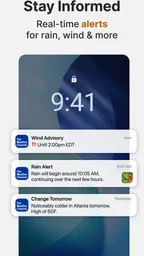
A live alert is a prompt to pay attention, not a substitute for your own judgment. If a warning appears, I’d read the message carefully, consider how it relates to my location and plans, and check the app again if circumstances are changing. A notification can arrive at a moment when you cannot stop to investigate, so it helps to know that you can return to the app when it is safe and convenient.
Future radar can also be easy to misread if you expect it to function like a minute-by-minute guarantee. I find it more useful as a planning aid: it can help me think about the direction of changing weather and whether I should keep checking before heading out. The broader lesson applies to any forecast app: use the visual information alongside alerts and common sense, and leave room for conditions to differ from expectations.
Simple setup checks before relying on notifications
If notifications aren’t appearing, I’d start with the basics instead of assuming the app has stopped working. Check that notifications for the app are allowed in the phone’s settings, then make sure the device is not silencing them through a focus or do-not-disturb setting. These are general phone checks, not a guarantee that every device behaves the same way, but they are sensible first steps when an expected alert is missing.
Next, open the app and confirm that it loads normally. If it seems stuck or its information looks old, check whether the phone has a usable internet connection and try again. A weak or interrupted connection can affect apps that need fresh information, while a temporary service or device issue can also interrupt an otherwise ordinary session. I’d avoid changing several settings at once; one check at a time makes it easier to see what helped.
It’s also worth making sure the app is current when troubleshooting persistent problems. The Weather Channel’s current version is 16.26.0, and it requires Android 9 or later on Android devices. If the app cannot be installed or updated, checking the device’s operating-system compatibility is a more useful first move than repeatedly retrying the same download. On iOS, the relevant compatibility details can be checked in the app store before installing.
The app is free to download, with optional in-app purchases ranging from $0.99 to $29.99 per item. I’d keep that in mind if I encountered a purchase prompt: downloading the app and choosing an optional purchase are different decisions. The app is rated for Everyone, which makes it broadly accessible, although individual users should still make choices about notifications and purchases that fit their own needs.
A steadier routine for checking forecasts
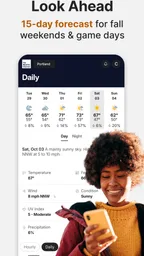
Once setup looks right, a small routine can make the app easier to use. I’d check the outlook when planning the day, use future radar when timing matters, and pay attention to live alerts if severe weather is a concern. If the forecast changes, I’d revisit the relevant information rather than relying on a screenshot or memory from an earlier check. That’s a practical way to use weather tools without turning every update into a reason to worry.
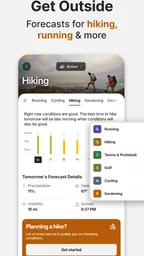
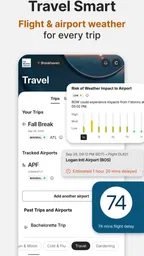
For a planned trip or outdoor activity, I’d check at the point when the forecast can still influence my choices. If conditions are uncertain, a second look later can be more useful than trying to settle everything with one early glance. The app’s main benefit is not that it removes uncertainty; it gives me a place to follow weather information and reconsider plans as circumstances develop.
When an alert seems confusing, I’d pause and read the full message rather than reacting to a notification preview alone. Then I’d compare it with the current forecast and radar view. This simple workflow can help separate a brief notice from the wider picture. It also avoids an easy frustration: assuming that one screen, one icon, or one notification must explain every detail of a changing weather situation.
Recovering when something seems out of date
If information does not refresh, I’d first check the connection and reopen the app. If that does not help, closing and restarting it is a low-effort next step. I’d then check whether the phone itself is having trouble accessing other online services. When several apps are affected, the problem is more likely to involve the device or connection than one weather app alone.
If only this app is behaving oddly, checking for an available update and restarting the phone may be reasonable next steps. I’d be cautious about deleting and reinstalling it unless simpler checks fail, especially if I’m not sure how the app handles saved preferences. Before making a larger change, I’d confirm that I can access the app store and that the device meets the system requirements.
It can also help to distinguish a display problem from a forecast disagreement. If the app opens and updates but the weather outside differs from what I expected, that does not automatically mean the software is broken. Weather conditions can vary, and forecasts can change. I’d refresh the information, look at the available context, and make practical decisions based on what is happening around me as well as what the app shows.
When the phone or circumstances are the real obstacle
Not every missed alert is an app failure. A phone with notifications disabled, a muted sound profile, limited connectivity, or a setting that restricts background activity may not behave as expected. Those are general possibilities across mobile apps, and the exact controls differ between devices. I’d check the phone’s own notification settings before concluding that the weather service has failed.
Location can also make a forecast feel less relevant if the app is showing a place other than the one the user has in mind. Before making a decision, I’d confirm that the displayed location matches the plan I’m considering. If I’m travelling or checking conditions for someone elsewhere, I’d be especially careful not to confuse the forecast for one place with another. This is a basic but important check, and it can prevent a lot of needless troubleshooting.
There are situations where the safest response is not to keep tapping around in an app. If severe weather is underway, focus on immediate safety and follow appropriate local instructions. A weather app can support awareness, but it should not distract from what is happening in person or replace official emergency guidance. I see this as a sensible boundary for any digital forecast tool, including one built around live alerts.
Who may find it useful
The Weather Channel is a reasonable option for people who want a familiar place to follow weather and receive severe-weather notifications. Its scale is notable: it has over 100 million installs, an average rating of 4.6, and around 3.6 million ratings. Those figures suggest broad reach and substantial user feedback, though popularity alone cannot tell me whether the app will suit every person or device.
I’d recommend it most to users who will actually check the information and adjust plans when needed. Someone who only wants an occasional glance may prefer a simpler routine, while a person who often plans around changing conditions may appreciate having radar and alerts together. The app’s free download makes it easy to try, but optional purchases are worth noticing before choosing to buy anything.
It is also a useful fit for people who want a weather app that emphasizes preparation rather than just a static snapshot. The key is setting expectations: alerts can draw attention to changing conditions, radar can add context, and forecasts can inform choices, but none of those tools makes the weather perfectly predictable. Used with that understanding, the app can become part of a sensible planning habit instead of another source of confusion.
My practical verdict
Overall, The Weather Channel is a capable weather app for checking forecasts and keeping an eye on severe conditions. I like the clear practical purpose behind its notifications, future radar, and live alerts. Its strongest use case is helping me stay informed when the weather could affect a decision, while its main limitation is the one shared by weather tools generally: information needs to be interpreted in context and may change as conditions develop.
If something goes wrong, I’d troubleshoot in a calm order: check the phone’s notification settings, confirm the connection, verify the location, reopen the app, and look for an update. If the phone is offline or its settings suppress alerts, changing the app itself may not solve the issue. That distinction can save time and make the experience less frustrating.
The app is free, rated for Everyone, and has a strong presence among weather apps, with 550,000 reviews alongside its substantial rating count. I’d give it a try if I wanted weather information with an emphasis on severe-weather awareness, while keeping a habit of checking updates before important plans. For me, that is the practical verdict: a useful everyday tool when paired with sensible expectations, thoughtful setup, and attention to conditions beyond the screen.
What we like
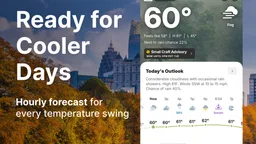
- Hourly forecasts help with planning throughout the day.
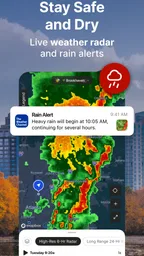
- Radar maps make it easier to track approaching precipitation.
- Severe weather alerts can provide timely local warnings.
- The interface offers several forecast views in one place.
- Widgets provide quick access to current conditions.
What could be better
- Some features require a paid subscription.
- Frequent ads may interrupt browsing.
- Detailed maps can use significant mobile data.
- Location access is needed for accurate local forecasts.
- Forecast accuracy can vary by location and conditions.




