


Yahoo Weather: Forecast & Maps review
 Analysis by Appsdrops
Checking the weather is one of those small routines that can make the rest of the day feel easier. I want a forecast that is quick to understand, but I also appreciate having more than a single temperature when the sky looks unsettled. Yahoo Weather brings local conditions together with hourly radar and severe-storm tracking, giving it a practical focus for everyday planning rather than turning a simple forecast into a complicated chore.
A familiar forecast with useful context
Yahoo Weather is a free weather app from Yahoo, and its central appeal is straightforward: look up the weather where you are and get a clearer sense of what may happen next. Its short store description is simply “Yahoo Weather,” while its fuller summary points to hourly radar, severe storm tracking, and local temperature updates. Those details set expectations for an app aimed at people who want both an at-a-glance forecast and a little more context when conditions change.
In my view, a weather app earns its place on a phone when it helps answer ordinary questions without demanding much attention. Is it warm enough to head out comfortably? Should I check the forecast again before making plans? Is a storm worth keeping an eye on? Yahoo Weather’s combination of local temperatures and radar is well suited to that sort of quick check. The storm tracker also gives the app a more purposeful role when unsettled weather matters, rather than limiting it to a basic temperature display.
The app sits in the weather category and is available at no cost. It has an Everyone content rating, so its intended audience is broad. Its reach is substantial: it has passed ten million installs, with an average rating of 4.2 from around 1.4 million ratings. Those figures suggest that Yahoo Weather is a familiar choice for many people, though personal fit still comes down to whether its presentation and forecast tools match your routine.
What the main tools are for
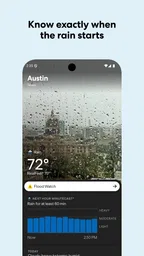
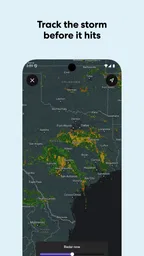
Hourly radar is a useful idea because weather can change within the span of an afternoon. A general forecast may tell me what conditions are expected, while a radar view can help me follow how precipitation is moving. That extra perspective is particularly handy before a walk, commute, or outdoor appointment. It does not remove the uncertainty that comes with forecasting, but it gives users another way to assess the situation instead of relying on a single summary.
The severe-storm tracker serves a different purpose. For everyday use, I may only want a quick local temperature check; when storms are a concern, I want to pay closer attention to changing conditions. Keeping storm tracking alongside ordinary local updates makes the app relevant in both situations. I find that distinction helpful: a good weather app should work for the routine days without feeling pointless when the weather becomes more serious.
Local temperature updates round out the core experience. Temperature is often the first thing people look for, but it is more useful when it is tied to a location and considered alongside the forecast. Yahoo Weather’s focus on local conditions makes it an approachable option for checking the weather where daily plans actually happen. The emphasis is on practical awareness, not on asking users to become weather experts.
How it fits into a daily routine
For a quick morning check, I would start with the local conditions and temperature, then look at the hourly outlook if I had plans later in the day. That simple sequence is the kind of routine Yahoo Weather appears designed to support. Rather than treating every forecast visit as a deep research session, it offers a path from a quick glance to a more detailed look at radar or storm activity when needed.
That flexibility matters because people use weather apps differently. Some open one several times a day; others check only before a trip or outdoor activity. A local forecast is useful to both groups, while radar and storm tracking add value for users who want to follow changing conditions more closely. I like that the app’s core appeal can be understood without a learning curve: check the local weather, then explore the more specific tools if the day calls for it.
For searchers comparing a weather forecast app with a radar-focused alternative, Yahoo Weather’s combination is worth considering. It brings local temperature updates and hourly radar into the same weather experience, with severe-storm tracking as another point of emphasis. That mix makes it more versatile than a temperature-only tool in principle, while keeping the everyday purpose easy to grasp.
A product with a long history
Yahoo Weather was released on October 5, 2010, and its current version is 3.2.6. That timeline gives the app a long presence in a category where users often want dependable, familiar tools. The version number is a concrete marker of its current release, but it should not be treated as a complete account of everything that has changed over the years. A version label alone cannot tell me which screens have been redesigned or how individual forecasting elements have evolved.
What can be said plainly is that the app’s current positioning still centers on local temperature updates, hourly radar, and severe-storm tracking. Those are the features that define its appeal today. The combination also shows how a weather app can serve both quick checks and more attentive monitoring without changing its basic purpose. For existing users, that familiar focus is likely more important than any assumption about a sweeping redesign.
Yahoo Weather requires Android 10 or later. That is useful to know when checking whether an older device is compatible, especially if you are considering installing it on a phone that has not been updated recently. Before downloading, I would check the app store entry on the device itself for the current compatibility information and make sure the operating system meets the stated minimum.
What the release details mean for existing users
If you already use Yahoo Weather, the current version provides a clear reference point when you check whether your app is up to date. The release date and version number establish the product’s history at a high level, but they do not establish specific feature additions or removals. I would avoid assuming that a particular screen or tool has changed simply because the version has advanced. For practical purposes, the strongest indication of what the app is intended to offer remains its emphasis on radar, storm tracking, and local conditions.
That approach is useful for new users too. Instead of choosing an app based on guesses about past updates, you can judge Yahoo Weather by the tools it currently highlights and by how well those tools fit your needs. If your main interest is checking local temperatures, the app’s basic purpose is easy to evaluate. If you care more about following rain or severe storms, the radar and tracker become the parts to explore first.
Yahoo Weather has accumulated around 108,000 written reviews in addition to its large rating count. That volume reflects an established audience and offers prospective users plenty of perspectives to browse in the app store. I would still read those comments with some care: people may be using different devices, checking forecasts in different locations, or judging different aspects of the experience. A review is most useful when it describes a need similar to your own.
Where expectations should stay realistic
Weather forecasts are estimates, and local conditions can shift. Radar and storm tracking can add useful context, but they do not make the weather perfectly predictable. I see that as a reason to use the app as a planning aid rather than a guarantee. For ordinary decisions, a quick forecast may be enough; when severe weather is a concern, it makes sense to pay attention to changing information and follow relevant local guidance as well.
Another point to keep in mind is that a feature name does not explain every detail of its implementation. “Hourly radar” tells me the app places emphasis on an hourly view and radar, but it does not by itself describe every display option or how every map behaves. Likewise, the mention of severe-storm tracking communicates the tool’s purpose without promising a particular notification setup or a specific level of detail. I prefer to assess the app through what it explicitly offers, rather than assume extra functions.
The app’s broad popularity is encouraging, but it cannot guarantee that every person will like its layout or find its forecasts suitable for every location. The best test is whether the local information is easy for you to interpret and whether the radar tools help with the decisions you actually make. That is a more useful measure than popularity alone, especially when choosing a weather app to keep on your home screen.
What I would watch next
For anyone considering an install, I would focus first on the present-day basics: local temperature updates, the hourly radar experience, and the way severe-storm tracking fits into your routine. Those are the app’s clearest strengths and the most relevant points to assess. I would also check how the current release feels on your own device, since comfort and readability are personal matters that cannot be settled by a rating average.
For returning users, future updates are worth judging by clear, practical changes rather than by a version number alone. Improvements that make forecasts easier to read or radar easier to follow would matter most to me, but those are expectations, not claims about what a future release will contain. The right approach is to look at the actual update notes when a new version becomes available and decide whether its changes improve the way you use the app.
That distinction between current features and future hopes is important. Yahoo Weather already has a recognizable mix of everyday forecasts and weather-monitoring tools. What comes next should be evaluated when it arrives, not assumed in advance. In the meantime, the app’s core purpose remains clear enough for someone choosing a weather service today.
My overall take
Yahoo Weather is a solid option for people who want local temperature updates with more context available when conditions are unsettled. I like the balance between a straightforward daily check and the ability to turn to hourly radar or severe-storm tracking when a quick glance is not enough. The app’s long history and large audience make it a familiar name, while its current feature focus gives new users a simple way to decide whether it fits.
Yahoo Weather is not just about looking up a number and closing the app; its radar and storm-tracking emphasis give weather checks a more practical dimension. I would recommend giving it a try if you want a free local weather app that combines everyday temperature information with tools for following changing conditions. Keep expectations grounded, treat forecasts as guidance, and judge the experience by how useful it is for your own plans. For that kind of everyday weather awareness, Yahoo Weather makes a straightforward case for itself.
What we like
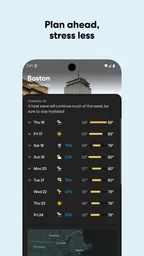
- Clear hourly and 10-day forecasts make planning easier.
- Interactive radar maps help track approaching rain and storms.
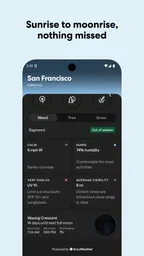
- Detailed sunrise and sunset times are easy to check.
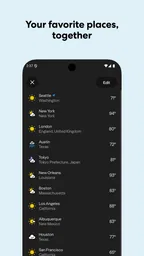
- Saved locations make it simple to compare weather in multiple cities.
- Weather photos give forecasts a polished and engaging feel.
What could be better
- Some detailed forecast features may require an internet connection.
- Ads can interrupt the browsing experience.
- Forecast accuracy may vary by location and weather conditions.
- Location access is needed for automatic local forecasts.
- The interface can feel busy when exploring map layers and details.





