
AccuWeather: Weather Radar review
 Analysis by Appsdrops
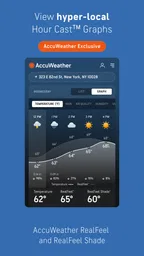
I would treat AccuWeather as a useful forecasting companion, not as an unquestionable authority. Weather decisions are small until they are not: a sudden shower can change a commute, and a storm warning can affect plans for the whole day. What I value most in a weather app is whether it helps me make a sensible choice without pretending a forecast is a guarantee. AccuWeather gives you a familiar mix of local forecasts, radar views, and weather reporting, but the best results still come from checking the detail that matters to your situation.
Useful forecasts, with sensible expectations
AccuWeather is a free weather app from AccuWeather, aimed at people who want more than a temperature on a phone screen. Its focus is practical: check local conditions, look at a storm’s movement, and get a broader picture of changing weather. I find that combination most valuable when I have to decide whether to leave now, take a different route, or bring gear for conditions that may change later.
The app has an average rating of 3.6 from around 2.6 million ratings, and it has been installed over 100 million times. Those figures suggest a widely used product, but they are not a substitute for judging whether its forecasts work well for your location. Weather accuracy can vary by region and by situation, especially when a storm develops quickly or local conditions differ over a short distance.
I would use the forecast as a planning aid rather than a promise. A predicted rain window can help me decide whether to walk to a nearby errand, but I would still check again before setting out if the sky is changing. That habit matters more than chasing a single precise-looking number: forecasts are estimates, and a local shower can miss one neighborhood while hitting another.
Where radar earns its place
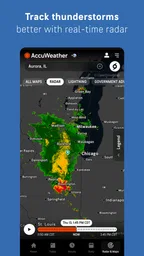
Radar is particularly useful when the question is not simply “Will it rain today?” but “Is rain moving toward me, and should I wait before leaving?” A forecast gives a summary; a map can make the timing feel more concrete. In practice, I would open the radar when rain is already nearby, then compare its movement with the timing of my plans rather than assuming the map can tell me exactly what will happen at my front door.
That distinction is important for outdoor plans. If I am walking a dog or heading to a bus stop, a radar check shortly before leaving can be more useful than looking at the morning forecast once and forgetting it. For a longer drive, I would also check conditions along the route where possible, because a reassuring local view does not necessarily describe weather farther away.
AccuWeather is less compelling if all you want is a quick glance at the current temperature. A built-in phone weather panel may be faster for that simple task. The extra value here is the ability to move from a quick forecast to a closer look at radar and weather coverage when conditions deserve attention.
Trust starts with what you can actually judge
Weather apps deal with information that can feel personal, particularly when location is involved. My practical standard is to look at the choices the app presents and decide what I am comfortable enabling, rather than assume that a polished interface tells me everything about how information is handled. I would review the app’s permission prompts and the controls available on my device before deciding how much location access is appropriate.
I can’t responsibly claim that a particular permission is required, optional, or used in a specific way without seeing the exact prompt and current settings on the device. Those details can also differ across operating systems and app versions. The useful approach is straightforward: read each request when it appears, consider whether it is necessary for the way you want to use the app, and revisit your choice if your needs change.
If you prefer not to grant location access, you can still make an informed decision by checking what location options the app visibly offers and whether you can enter or select a place yourself. I would not assume that a manual-location option is available in every screen or configuration. Before relying on it, test the app’s current controls and confirm that the forecast shown is for the place you intend.
Small choices that can prevent a bad read
One easy mistake with any weather map is treating a broad colored area as a precise forecast for your street. I use radar to understand direction and general timing, then leave room for uncertainty. If the consequences of being caught outside are minor, that may be enough. If I am planning a long outdoor activity or travelling in difficult conditions, I would use more than one check and keep a backup plan.
Another helpful habit is to distinguish between the place you are standing and the place you are going. A forecast that looks calm at home may not represent a destination across town or a route through changing terrain. Before leaving, I would make sure the selected location matches the decision at hand. This is a simple check, but it prevents a local forecast from giving a false sense of reassurance about a different area.
Weather news can add context when a system is affecting a wider region, while radar helps with the immediate “what is approaching?” question. I would use those views for different purposes: reporting to understand the bigger event, map information to judge local timing, and a forecast to plan around expected conditions. No one view should carry the whole decision.
Data-sensitive moments and user control
Location is the most obvious sensitive moment in a weather app, because a local forecast is more convenient when the app knows which place matters. I recommend deciding deliberately whether that convenience is worth the access you are asked to allow. If you only check weather occasionally, selecting a location yourself—if the app offers that choice—may be a better fit than granting broader access. If you rely on frequent local checks, the convenience may matter more to you.
I also look for clear, usable controls rather than relying on assumptions about an account or privacy setting. Before creating an account, if the app presents that option, consider whether you need the account-related functions at all. Before accepting any optional prompt, read what it says and choose based on your own comfort. I won’t suggest that a particular account feature, data deletion option, or tracking switch exists unless it is visibly available in the version you are using.
On Android, AccuWeather lists a minimum operating-system requirement of version 8.0. The app is rated for Everyone, which may make it suitable for a broad household audience, though parents should still review the on-screen experience and any purchase prompts with younger users. The app is free to install, with in-app purchases listed from $0.99 to $79.99 per item. I would check the purchase screen carefully before confirming anything, especially on a shared device.
How it fits beside other weather options
Compared with the simple forecast panel included with many phones, AccuWeather is the choice I would consider when I want to open a dedicated app and inspect radar or weather coverage more closely. A built-in option may win for speed and minimal fuss. A specialist radar tool may suit someone whose main concern is tracking storms in detail. AccuWeather sits between those approaches: broader than a glanceable widget, while still aimed at everyday forecasting rather than serving as a substitute for official emergency instructions.
That middle ground will not satisfy everyone. If your priority is a very clean screen with only current conditions, the additional information may feel like clutter. If you need highly specialized tools for professional forecasting, a general consumer weather app may not provide the depth you want. And if you live somewhere the forecasts do not match your experience, a popular app’s reach is no reason to keep trusting it without comparison.
Everyday use, and when I would skip it
Imagine I have a short walk to work and rain is possible in the afternoon. I would check the day’s forecast while planning, then glance at radar before leaving if clouds have gathered. If the map suggests rain is approaching, I can take a jacket or delay a nonessential errand. If the forecast and the sky disagree, I would give the immediate conditions more weight and check again rather than treating an earlier prediction as settled.
For travel, I would look beyond the current location and verify the forecast for the destination as well. For a picnic, I would use the app to identify a likely window, but keep an indoor alternative. For a storm that could threaten safety, I would not rely on a consumer app alone; I would follow local official alerts and instructions. These are not shortcomings unique to AccuWeather, but they are boundaries every weather app user should keep in mind.
I would skip it if I want no extra app, dislike making choices about location access, or only need a temperature tile that updates at a glance. I would also look elsewhere if the app’s presentation feels too busy for how I check weather. On the other hand, people who regularly plan around changing rain, want radar alongside a local forecast, and are comfortable reviewing permission and purchase prompts may find the added detail worthwhile.
My cautious verdict
AccuWeather: Weather Radar is a practical option for everyday planning when I want a forecast and a map in the same place. Its strongest use is helping me ask better questions about timing and location—not delivering certainty. I like the ability to move from a general outlook to a closer look at approaching weather, but I would keep expectations grounded and check the relevant place before acting.
My recommendation is conditional: try it if radar and local forecasting are part of your routine, then review the choices it presents for location, notifications, accounts, and purchases on your device. Keep only the access and prompts you are comfortable with, and compare its forecasts with what you observe locally. If a simple built-in forecast already answers your needs, there may be little reason to add another app. For everyone else, it can be a helpful planning tool—as long as the final call stays yours.
What we like
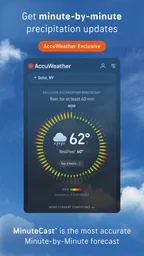
- MinuteCast provides precipitation forecasts for the next few hours.
- Radar maps help track storms as they move across an area.
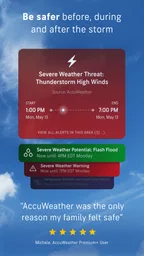
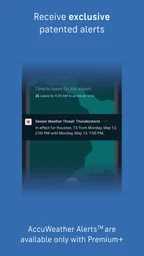
- Custom alerts can warn about severe weather conditions.
- The interface offers useful weather details beyond basic temperatures.
- Saved locations make it easy to check forecasts for multiple places.
What could be better
- Some features require a paid subscription.
- Advertising can interrupt the browsing experience.
- Forecast accuracy may vary by location and weather conditions.
- The app may request location access for local forecasts.
- Frequent alerts can become distracting if not carefully configured.





