


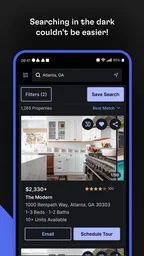
Rent. Apartments & Homes review
 Analysis by Appsdrops
I judge a rental app not only by how many homes it puts in front of me, but by how manageable the search feels when I’m tired, short on time, or trying to compare options with someone else. Rent. Apartments & Homes is a House & Home app from Rent Group, Inc, built around finding rental places. It is free to use, rated for Everyone, and has a 4.7 average from around 146,000 ratings. That scale makes it worth considering, but what matters most is whether its search process fits the way you actually need to look for a home.
Making a rental search easier to follow
The basic appeal is straightforward: rather than starting with scattered listings and trying to make sense of them one by one, I can use a rental-focused app as a place to organize the hunt. That is especially useful when I have a clear area in mind but haven’t settled on the exact kind of home I want. The app’s purpose is to help me discover rental homes, not to replace the judgment I need to make about a particular property.
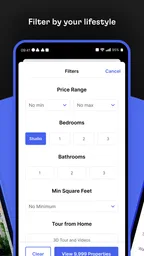
I’d approach a search by deciding what is truly essential before browsing: a manageable commute, a certain number of bedrooms, or a home that works for a particular household. Then I’d treat other preferences as flexible. This small step makes it easier to compare listings without letting attractive photos distract me from practical needs. A rental search can produce a lot of tempting possibilities; a short list of priorities keeps the app useful rather than overwhelming.
Rent has been available since Aug 25, 2010, and its current version is 12.6.0. It has over 5 million installs, which suggests that many people have used it as part of their housing search. Those figures don’t guarantee that every listing will suit a particular renter, but they do indicate that this is an established option rather than a niche tool.
Readable decisions matter more than a polished first impression
For me, readability in a housing app is about more than whether text is legible. The important details should be easy to find and compare: what kind of home is shown, where it is, and whether it deserves a closer look. I recommend slowing down at each promising listing and checking its details instead of making a decision from the first image or short description. Photos help me picture a place, but they cannot tell me how a room feels at different times of day or whether the layout works for my routine.
A practical trick is to keep a simple note outside the browsing session with the few things I need to confirm for every serious candidate. For example, I might record the location, the feature that made me save it, and the question I need answered before arranging a viewing. That approach is useful with Rent because apartment hunting often involves several similar-looking options. It also makes it easier to discuss choices with a partner, roommate, or family member without relying on memory.
The app is most helpful when I use it as a discovery and comparison aid, then verify important details directly with the listing contact. A listing is a starting point, not a guarantee that the home will meet every requirement. If a detail affects safety, access, or daily comfort, I would ask for clarification rather than assume that a photo or brief description tells the whole story.
Using the app with different abilities and routines
People interact with rental apps in different ways. Some browse visually, some prefer to read carefully, and others need to limit time spent on a screen or avoid rapid, repeated movements. I can’t assume that one interface will feel equally comfortable for everyone, so I’d test the search in a low-pressure moment before relying on it during a busy move. Notice whether the text is comfortable to read, whether the steps are easy to follow, and whether you can pause without losing track of the homes that matter.
For motor comfort, it helps to avoid treating browsing as a race. I’d search in short sessions, keep a note of the current area and priorities, and stop when the results start blending together. If repeated scrolling or tapping becomes tiring, a focused search with fewer must-haves may be easier than constantly changing several preferences. This is not a special feature claim; it is a way to make a listing search less demanding with the tools available on your device.
For sensory comfort, I’d be deliberate about when and where I browse. Looking at homes on a crowded commute or in a noisy room can make it harder to notice meaningful differences between listings. A quieter session gives me more room to read carefully and consider whether a property suits my needs. If images are difficult to interpret, I’d rely on written details and follow up with specific questions rather than trying to infer the layout from photographs alone.
The app is rated Everyone, so it is presented for a broad audience. That rating is not the same as a promise that every renter will find the experience accessible or every listing appropriate for their circumstances. A person who needs a particular physical feature, such as step-free entry or a bathroom arrangement that supports independent use, should confirm it directly before investing time in a visit.
When and where a rental search works best
Rent can be useful in several real-life situations: planning a move across town, helping a family member look for a place, or exploring an unfamiliar neighborhood before deciding where to focus. Its rental-specific purpose makes it a more direct starting point than a general classified marketplace when my main task is finding a place to rent. General listing sites can still be useful for broader local information or other kinds of housing, but they may require more filtering to keep the search centered on rentals.
Imagine I’m finishing work and need to shortlist places before a weekend of viewings. I’d open the app with a clear boundary for the area, look for homes that meet my non-negotiables, and record the questions that remain. Instead of sending an inquiry about every appealing listing, I’d first compare the practical fit: travel time, household needs, and whether the home seems worth visiting. This turns casual browsing into a manageable plan and reduces the chance of arranging a viewing based on one attractive photo.
It can also help when the people sharing a home have different priorities. One person may care most about location, while another needs a particular layout or a quieter setting. I’d agree on shared essentials before browsing together, then mark which preferences belong to each person. That makes disagreements more concrete: the question becomes whether a listing meets the household’s needs, not simply whose favorite image wins.
Rental availability can change, and an app search is only useful if I keep my expectations flexible. I would check promising options promptly and confirm that the listing is still relevant before making plans. If my move has a firm deadline, I wouldn’t depend on a single app alone; I’d combine it with other reputable local sources and direct conversations so that a narrow search does not leave me with too few choices.
Where the experience can still fall short
The main limitation of any listing app is the gap between browsing and knowing what a home is really like. Photos and descriptions can help me decide what to investigate, but they can’t replace checking the property, asking questions, and understanding the terms before committing. Rent can make discovery more convenient; it cannot make a listing complete or remove the need for careful judgment.
There is also a trade-off between a broad search and a usable one. If I keep every preference open, the number of possibilities can make the task harder to manage. If I narrow the search too aggressively, I may miss a place that would have worked with one compromise. I’d start with essentials, review the results, and then loosen one preference at a time if the shortlist is too small. This is a more considered workflow than repeatedly changing everything without knowing what improved the results.
Rent may not be the best fit for someone who needs a highly specialized way to search, such as a process centered on detailed accessibility requirements that must be confirmed before viewing. In that situation, I’d use the app only as one source of leads and contact property representatives directly with a prepared checklist. Someone who wants broader housing research beyond rentals may also prefer a general property platform, while a person who already has a trusted local agent may find direct assistance more efficient than browsing independently.
Anyone comparing homes should also be cautious about treating a listing’s presentation as proof. I’d ask about details that affect everyday life, such as the route from the entrance to the rooms I need, the usability of shared facilities, and whether the advertised arrangement matches what I would see in person. These questions are especially important when access needs are not obvious from a photograph.
Who I’d recommend it to
I’d recommend Rent to renters who want a focused place to begin exploring homes and who are comfortable doing their own follow-up. It is a sensible choice for someone moving within a familiar area, a first-time renter who needs a way to organize candidates, or a household that wants to compare options before arranging visits. The app is free, so trying it alongside another search method does not require choosing one approach for the entire move.
I’d be more cautious about recommending it as the only tool for a renter with strict accessibility requirements, a complicated relocation deadline, or little time to verify listing details. In those cases, direct contact and local guidance can matter more than a convenient browsing experience. Likewise, if you dislike comparing homes on a phone or prefer a person to narrow the choices for you, a rental app may feel like extra work rather than help.
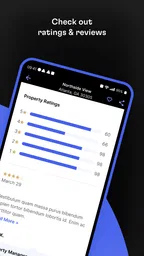
With 8.7 thousand reviews, Rent has attracted a substantial body of feedback, but individual experiences can vary with location and the homes available at the time of a search. I would treat the 4.7 average as a reassuring sign of broad user satisfaction, not as a promise that every search will be smooth or every result will be right for me.
A useful starting point, with a need for careful follow-through
My overall view is that Rent is a practical rental-search companion when I want to browse homes and build a shortlist at my own pace. Its greatest value is not that it can make a housing decision for me, but that it gives me a focused place to begin and a structure for deciding what deserves more attention. The best results come when I search with priorities, keep notes, and verify important details before visiting.
For inclusive use, I’d call it a reasonable starting point rather than a complete answer for every renter. Different people need different levels of readability, control, and information before they can make a confident choice. Rent can support the early search, but a renter should still check whether the app’s browsing experience works comfortably for them and whether a specific home meets their needs in practice.
If you want a free app centered on rental homes and are willing to ask follow-up questions, I think it is worth trying. If you need detailed accessibility confirmation or hands-on help, pair it with direct conversations and other local resources. That balance is what makes Rent. Apartments & Homes most useful: use it to discover possibilities, then make the decision with your own checks and priorities.
What we like
- Search for rentals by location and price range.
- Save promising homes to compare later.
- Contact property managers directly through listings.
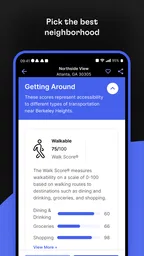
- Map results make it easier to check neighborhood locations.
- Rental listings cover apartments and houses.
What could be better
- Listing availability may change before you make contact.
- Some listings may have incomplete property details.
- Rental prices and fees can vary from the displayed amount.
- Search results depend on the quality of submitted listings.
- You may need to share personal details when contacting landlords.





