
Weather & Radar Forecast review
 Analysis by Appsdrops
In a shared household, a weather app is useful when it helps everyone make the same practical decision: whether to take the bus, carry a coat, or bring outdoor plans forward. Weather & Radar Forecast is built around that kind of quick check, with radar imagery at its centre. I find it most helpful when the question is not simply “What will the temperature be?” but “Is rain moving toward us, and when might it matter?”
One household, several ways to check the sky
The app comes from WetterOnline and sits firmly in the weather category. Its main appeal is a compact view of conditions that can be useful to different people sharing a phone or tablet: one person can look before leaving for work, another can check before walking the dog, and someone else can use the outlook to decide whether an outdoor chore can wait.
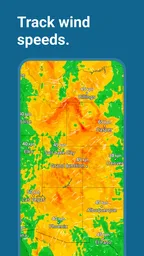
Radar is the part I would open first when timing matters. A general forecast can say that rain is possible, but a moving radar view helps put the possibility in context: a shower may be approaching, passing nearby, or already clearing. That distinction is useful for short errands and school runs, though radar should guide a decision rather than be treated as a promise about exactly what will happen at one address.
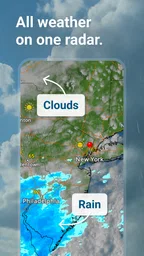
The app’s central idea is easy to understand without needing everyone in a household to learn a complicated set of charts. Its overview brings rain, sunshine, and thunderstorms into one radar experience, while the wider forecast helps with plans beyond the next few minutes. That combination makes it a sensible shared reference, particularly when different people care about different parts of the day.
Agree on the plan, not just the forecast
A realistic morning routine shows where the app can help. I might check the radar before leaving, notice that showers appear to be moving through the area, and tell someone else to take a jacket or allow extra time. Later, that person can look at the same kind of view rather than relying on a vague message such as “it might rain.” The useful benefit is not that the app coordinates the household automatically; it gives people a common picture to discuss.
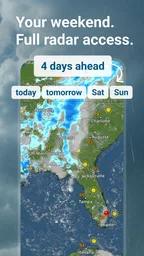
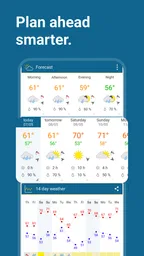
For family plans, I would use the forecast in two passes. First, check the broader outlook when choosing a time for a walk or trip. Then return to radar closer to departure if the weather looks unsettled. This avoids treating a forecast several days ahead as if it could settle every detail, while still making the app useful for planning. The four-day radar focus is especially relevant to people who want a short-range visual overview rather than a long-range seasonal planning tool.
There is a trade-off in making radar central. It is excellent for judging the movement and shape of weather, but it does not replace every kind of forecast information. If the household decision depends on a precise local detail or a specialized warning, I would compare the app’s view with the relevant official local guidance. A colorful map can make weather feel more exact than it is, so I treat it as a practical aid, not certainty.
Shared device habits and account boundaries
On a device that several people use, the simplest arrangement is often to keep the app as a shared reference rather than assume each person’s preferences will be separated. Before relying on any app as a household hub, I would check what appears on screen, whether the location shown is the one everyone expects, and whether the device itself is signed into a shared or personal account. Those are useful habits for any shared phone, and they matter here because a forecast is only helpful when the displayed place is right.
I would also avoid making one person responsible for every weather decision. A teenager checking conditions before cycling, for example, can use the radar to notice a developing shower, while a parent can still make the final call if travel conditions are risky. This is a good use of a shared screen: it encourages people to look at evidence together without pretending that an app can settle questions of judgment.
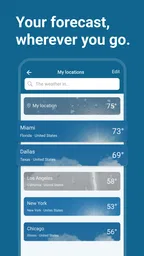
For households with more than one regular location, the practical question is whether the app makes switching between places comfortable for the way the family uses it. I would test that during setup rather than assume a particular household workflow. If people routinely check different neighborhoods, a dedicated location-based weather service with an interface they find clearer may be preferable. The best choice is the one that reduces confusion, not the one with the most layers on its map.
What younger users can reasonably rely on
The app is rated for Everyone, which makes its general subject matter suitable for a broad audience. That age context does not mean every child should make weather-related safety decisions alone. For a younger user, I would explain the difference between an outlook and a guarantee, and make clear that thunderstorms or hazardous conditions call for an adult’s judgment and appropriate local advice.
It can be a useful way to involve children in ordinary planning. Asking them to check whether a walk might be wet, then comparing the radar with what is happening outside, turns a routine decision into a simple lesson in observation. The limitation is that maps can be misread, especially when someone expects a precise answer for a particular street. I would keep the conversation grounded in practical choices—bring a coat, wait a little, or ask an adult—rather than treating the display as a safety authority.
On a shared household device, account boundaries deserve the same common-sense attention as age. If the phone belongs to one adult but children use it too, the device’s own settings and access arrangements determine what they can open; I would not assume the weather app itself provides separate family profiles or child-specific controls. That distinction matters for anyone deciding whether the app is suitable as a supervised shared tool or as an independent setup for each family member.
When the radar is worth opening
The strongest everyday use case is a plan that can shift by an hour: walking the dog, hanging laundry, cycling to a nearby appointment, or deciding whether to eat outdoors. In those situations, a visual sense of approaching rain can be more actionable than a single daily summary. One non-obvious tip is to check the map before leaving and again if the plan is flexible; the second glance can prevent overreacting to a shower that has already passed or underestimating one that is moving closer.
For a commute, I would use the app to decide whether rain gear is sensible, not to calculate a guaranteed dry departure window. For outdoor work, I would look at the radar alongside the broader forecast, because a momentary gap in rain does not necessarily mean the rest of the day will stay clear. These small distinctions are where the app’s visual approach becomes useful—and where a little restraint keeps it from becoming misleading.
Compared with the weather panel built into a phone, this app gives radar a more prominent role, which is a clear advantage for people who frequently track showers. A basic forecast widget may be faster for checking temperature without opening anything, and a specialist service may suit someone who wants more technical detail or a different presentation. I would choose this one when seeing weather move across a map is part of the decision, not merely because it is another way to read the temperature.
Free to start, with a few practical trade-offs
Weather & Radar Forecast is free to download, and optional in-app purchases range from $0.99 to $8.99 per item. That makes it easy to try as a household reference without an upfront purchase, but I would still inspect the app’s purchase prompts before letting a child use a shared device. The free starting point is appealing; the presence of paid items means it is worth keeping purchase approval under the account holder’s control.
Its broad adoption is notable: the app has more than 100 million installs, with an average rating of 4.8 from around 3 million ratings and about 15,000 written reviews. Those figures suggest that many people find it useful, but they do not tell me whether its map style fits a particular household. I would judge that by opening the radar during changing weather and seeing whether everyone can interpret it comfortably.
The app first appeared on July 17, 2012, and supports operating systems from version 10 onward. That long presence gives it an established place in the category, although an older release date alone is not a reason to choose it. What matters in daily use is whether the interface feels clear on the household’s device and whether the short-range radar answers the questions people actually ask.
Who should use it—and who may prefer another option
I would recommend it to households that regularly make plans around passing rain and want a shared visual reference for the next few days. It is also a good fit for anyone who finds a moving map easier to interpret than a stack of hourly symbols. The app’s strongest contribution is helping people discuss timing with something more concrete than a guess.
I would skip it, or pair it with another source, if the household mainly wants a minimal glance at temperature, needs highly specialized weather analysis, or expects the radar to provide certainty for an exact location and minute. People who rarely consult maps may find a simpler phone forecast less distracting. And when safety is at stake, such as during severe weather, I would rely on official alerts and adult judgment rather than use any consumer forecast as the sole authority.
My household verdict is positive with realistic expectations. WetterOnline’s app works best as a practical planning aid: check the broader outlook, use radar when timing is the real question, and talk through the decision rather than treating the map as a guarantee. For a shared device, keep purchase settings and account access in mind, and make sure younger users understand what the display can—and cannot—tell them. If those boundaries suit your family, it is a useful way to turn “Should we go now?” into a better-informed conversation.
What we like
- Radar maps make approaching precipitation easy to track.
- Hourly forecasts help with planning short outings.
- Severe weather alerts can provide useful advance notice.
- Multiple map layers offer a clear view of local conditions.
- The interface makes key forecast details easy to find.
What could be better
- Some features may require a paid subscription.
- Radar coverage can vary by location.
- Frequent alerts may feel distracting.
- Forecast accuracy can decline further into the future.
- The app may use extra battery when location tracking is enabled.





