Live Weather Forecast review
 Analysis by Appsdrops
I judge a weather app by what happens when I need an answer quickly: before leaving home, while deciding whether to bring a coat, or when plans hinge on a passing shower. Live Weather Forecast is a free weather app from Ten Stars Lab, and its appeal is straightforward: it aims to make local forecasts easy to check throughout the day. In my view, it works best as a practical everyday reference, provided you have a connection when you want current information.
When a forecast depends on a connection
Weather information changes, so a live forecast is only as useful as its latest update. I would treat this app as something to open when I have a reliable mobile or Wi-Fi connection, especially before setting off for a walk, commute, or outdoor appointment. A forecast viewed earlier can still help with planning, but it should not be mistaken for a fresh reading if conditions have shifted.
That distinction matters most in unsettled weather. If the sky is clear when I leave but rain is possible later, checking again before the return trip is more sensible than relying on a morning glance. The app’s central role is to give me a convenient weather check, not to remove the uncertainty that comes with changing conditions or a delayed connection.
I also avoid treating any single forecast as a guarantee. Weather apps are decision aids, and the sensible choice depends on the cost of being wrong. For a short walk near home, a quick glance may be enough. For a long drive or an event that cannot easily move indoors, I would check close to departure and keep a backup source in mind if the forecast is crucial.
What “live” means in daily use
The short description presents it as a live weather forecast, which sets an expectation of timely information. In practice, I would look for the update time and pay attention to whether the app appears to be refreshing, rather than assuming that opening the screen automatically means every detail is current. This is a useful habit with any connected weather app, and particularly so when you have just moved between networks or are in an area with patchy reception.
If you are indoors with Wi-Fi, checking the forecast before heading out is a low-effort routine. On mobile data, the same check can be useful, but a slow or unstable connection may make it less convenient. I would not plan around an instant update in every location; if a decision is urgent, allow time for the app to load and compare the result with what you can see outside.
Small workflow improvements
A practical way to use the app is to check it at decision points rather than repeatedly throughout the day: once while getting ready, again before a weather-sensitive trip, and then only if the situation changes. That keeps the forecast relevant without turning a simple tool into a constant distraction. It is also a better test of whether the information is helping: does it change what you pack, when you leave, or where you go?
Another useful habit is to check the location shown before acting on a forecast, especially after travelling. A prediction for home is not necessarily helpful when you are across town or visiting somewhere new. I would make location accuracy part of my routine instead of assuming that the app has followed me correctly. That extra glance can prevent a very ordinary mistake: dressing for the weather where you started, not where you are going.
On the move: useful checks, with practical limits
For a commuter, the app is most valuable at the moments when a small weather adjustment makes a real difference. I might check before leaving to decide whether to carry a light jacket, then take another look before walking from a station or office. That is a more grounded use than expecting a forecast to dictate every detail of the day.
For parents, dog walkers, and people who spend time outdoors, a quick check can help decide whether to shorten a walk or shift it earlier. The key trade-off is that these decisions often happen while moving, when reception can vary and attention is limited. I would check before setting out rather than depend on being able to load a fresh forecast at the exact moment conditions change.
It can also help when plans involve a place different from home, but the user needs to be deliberate about the location being consulted. Before a day trip, I would check the destination rather than use my current area as a substitute. That sounds obvious, yet it is one of the most useful habits for avoiding misleading comparisons when the weather differs across nearby places.
A realistic day with changing plans
Imagine I am planning to walk to an appointment after lunch. In the morning, I check the forecast while connected to Wi-Fi and decide whether to take a compact umbrella. Before leaving, I check again using mobile data. If the update loads slowly, I do not keep tapping impatiently or assume the first screen is current; I wait for a stable connection or use another reliable source before making a decision that matters.
On the way home, I may not need another check if the weather is steady and the walk is short. If clouds gather or the route is exposed, a fresh look becomes more worthwhile. This is where a weather app earns its place: not by making every choice for me, but by making a few timely decisions easier. The value comes from fitting the check into a real routine.
People who travel frequently should be especially mindful of the difference between a forecast for their current location and one for a destination. I would confirm the place before relying on the result, then check again once I have a dependable connection there. If connectivity is a recurring problem on a route, a service designed around the user’s particular travel needs may be a better fit than relying on any app to refresh at the roadside.
When loading is slow, and how I would recover
The main friction to expect from a connected forecast is not complicated: weak reception, a network change, or a delayed refresh can interrupt the quick check you wanted. If that happens, I would first make sure the phone has a usable connection, then try again once the signal is steadier. Repeatedly reopening the screen in a dead zone is unlikely to make a time-sensitive answer more dependable.
If the app does not seem to show a current result, I would avoid making a high-stakes decision from information whose freshness is unclear. For everyday choices, waiting until I am back on Wi-Fi may be perfectly reasonable. For severe or rapidly changing conditions, I would consult an additional trusted source rather than letting one delayed screen become the sole basis for a plan.
That is a limitation of the use case, not a reason to dismiss the app. Weather forecasts need fresh information, and mobile connectivity is not equally dependable everywhere. Users who often travel through remote areas, work underground, or need uninterrupted updates should weigh that constraint carefully and look for a solution that meets their specific reliability needs.
Keeping the experience sensible on mobile data
If you are conscious of mobile data, the most practical approach is to use the app deliberately: check when the forecast can change a decision, and avoid opening it repeatedly just out of habit. I would use Wi-Fi for routine planning at home and reserve mobile checks for the moments when I am about to go out or conditions appear to have changed.
I would also pay attention to the phone’s own data controls if usage is a concern. Those settings can help you understand or limit network activity across apps, without assuming that a weather app has a particular data-saving mode. If your plan is restrictive, checking the forecast before leaving a Wi-Fi connection is a simple, low-effort precaution.
Battery and attention matter too. A forecast check is most useful when it answers a question, such as whether to take a layer or adjust a walk. If you keep refreshing without a reason, you may spend time and connectivity without gaining much certainty. I prefer a few purposeful checks over constant monitoring, unless the day’s weather genuinely calls for close attention.
How it fits among other weather choices
Compared with the default weather app on a phone, this one is another option for checking local conditions, rather than a replacement that everyone needs. If your built-in app already gives you the location and forecast information you need, switching may not improve your routine. The case for trying this app is stronger if you want a separate weather reference and find its presentation convenient for quick daily checks.
Compared with specialist services, a general local forecast app is usually best for ordinary planning rather than niche requirements. Someone who needs detailed tools for aviation, marine activity, mountain travel, or professional work should choose a service built for that job. I would not use a general-purpose app as the only source where a forecast error could create a safety risk.
The app has an average rating of 4.6 from around 131,000 ratings, and it has been installed over 10 million times. Those figures suggest broad interest, but they do not tell me whether the app will suit an individual’s preferred layout, network conditions, or level of detail. I would use the free download as an opportunity to judge the day-to-day experience personally rather than treating popularity as proof of a perfect fit.
It is rated for everyone and supports devices running Android 7.0 or later. The current version is 2.2.3. The app is free to install, with in-app purchases ranging from $2.99 to $3.99 per item. I would check what an optional purchase offers before paying; a free starting point makes it easy to see whether the basic experience already meets your needs.
Who should choose it, and who should look elsewhere
I can see this app working well for someone who wants a straightforward local weather check and is usually connected when planning the day. It is especially suitable for routines built around a few quick decisions: choosing outerwear, timing a walk, or checking whether an outdoor plan needs a backup. Ten Stars Lab has made a weather app for everyday use, and that simple purpose is its clearest strength.
I would skip it if you need a specialized forecasting tool, depend on frequent updates in places with unreliable reception, or already have a weather app that fits your habits perfectly. It may also be the wrong choice if you expect a forecast to remove uncertainty. No app can make changing weather completely predictable, and a connection-dependent check is less useful when you cannot get a current result at the point of need.
Before relying on it for an important outing, I would try it on an ordinary day: check the location, see how readily the forecast updates on your usual network, and decide whether the information is clear enough for your routine. That quick trial will answer practical questions better than a feature list, including whether the app feels convenient on your phone and whether its connected checks work well where you live.
Overall, Live Weather Forecast makes sense as a convenient companion for everyday planning, not as a substitute for judgement or a specialist safety service. Its usefulness depends on checking the right place at the right time and having a connection when fresh information matters. If that matches how you use weather forecasts, I think it is worth trying; if your needs are more demanding, a more specialized option is the better choice.
What we like
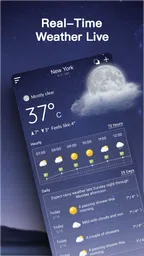
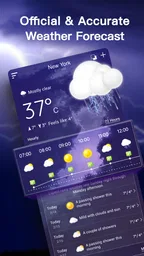
- Hourly forecasts make it easier to plan short trips.
- Weather alerts can help users prepare for changing conditions.
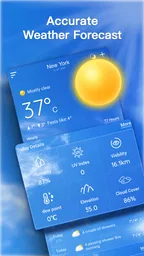
- The interface presents current conditions at a glance.
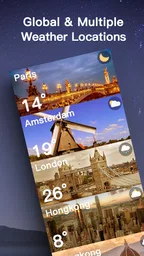
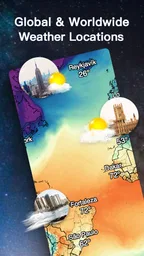
- Multiple locations are useful when checking weather elsewhere.
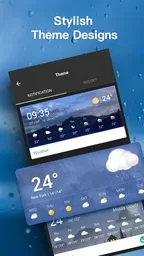
- Widgets provide quick access to forecast details.
What could be better
- Forecast accuracy can vary by location and provider.
- Frequent alerts may feel distracting to some users.
- Some features may require an internet connection.
- Location access may be needed for local forecasts.
- Widgets can use extra battery and screen space.





