Weather Radar - Meteored News review
 Analysis by Appsdrops
I like a weather app best when it helps me make a decision, not when it gives me another stream of numbers to scroll through. Weather Radar – Meteored News aims to be a practical companion for checking conditions, following storms and deciding whether to change a plan. It is a free weather app from Meteored, and its mix of forecasts, radar, alerts and news makes it broader than a simple temperature-at-a-glance tool.
Trust starts with what the app actually shows
Weather information can affect ordinary choices: whether to walk, drive, take a bike, or bring outdoor plans inside. I therefore judge a forecast app not just by how many features it offers, but by whether I can quickly understand what it is telling me and decide how much to rely on it. Meteored’s app has a clear practical focus on forecasts and weather events, with radar and alerts alongside news.
The app has been available since April 3, 2012, and its current version is 8.13.2_free. It has a 4.7 average from around 3.1 million ratings and has passed 50 million installs. Those figures suggest a widely used, established product, but they are not proof that every forecast will be right for every neighborhood or that it suits every user. Weather can shift quickly, and I still treat an app’s forecast as guidance rather than a guarantee.
For me, the most useful way to approach a weather app is to separate broad planning from decisions that depend on immediate conditions. A forecast can help me choose clothes or schedule an errand; a radar view and alert can be more relevant when rain or a storm is already approaching. Keeping those jobs distinct makes the information easier to use and reduces the temptation to treat one screen as a complete account of the weather.
Useful breadth, with a little extra noise
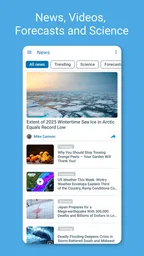
The app’s combination of weather information and trending news is a genuine point of difference from a minimalist forecast app. I can see the appeal: weather events often matter beyond the local forecast, and news can add context to a day when storms are affecting plans. The trade-off is that people who only want the current temperature and a straightforward outlook may find extra content distracting. If that describes you, a simpler weather app may be a better fit.
Weather Radar – Meteored is rated for Everyone, and the app itself is free to download. It also offers in-app purchases, with items ranging from $0.99 to $7.99. I would decide whether the free experience covers my needs before paying for anything; the presence of purchases does not, by itself, tell me which option is worthwhile. The important practical point is to review the choices shown in the app store and inside the app rather than assume every feature requires payment.
How I would use its radar and alerts
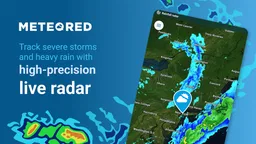
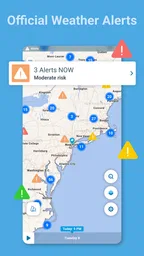
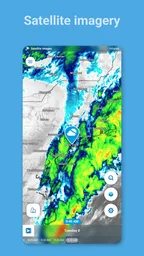
Radar is most helpful when I use it to answer a specific question: is precipitation moving toward the place I need to be, and should I leave earlier or change plans? It is less useful as a guarantee about what will happen at one exact address. A radar image describes a changing weather situation, so I would check it again before a time-sensitive trip instead of relying on a single glance hours beforehand.
One realistic example is planning a walk after work. I would first check the forecast to see whether the general outlook makes the plan sensible. If rain looks possible, I would then look at radar nearer departure time and use any relevant alert as a reason to reassess. That workflow is more useful than repeatedly opening the app without a decision in mind: forecast for planning, radar for changing conditions, alert for a prompt to pay attention.
For a longer drive or outdoor event, I would also avoid treating a notification as a substitute for checking the latest view. Alerts can help bring attention to changing weather, but the user still has to decide what action makes sense. If the forecast and what I see outside disagree, I would give the current conditions and a fresh check more weight than an earlier expectation.
Controls and choices deserve a deliberate check
Weather apps can involve sensitive moments because location is useful for local forecasts. I recommend checking the permission prompts on your device and choosing the location access level you are comfortable with. If you prefer not to grant location access, consider whether entering or selecting a place manually is available in the version you use; if it is not, another app with a location workflow that suits you may be preferable. I would not grant broader access simply because an app asks for it without first considering what I need.
The same cautious approach applies to alerts. I would enable only the notifications that help me act, then review them after a few days. If a weather alert arrives at a time when I cannot use it, or if updates become distracting, notification settings are a sensible place to regain control. The best setup is not the one with every prompt switched on; it is the one that gives me useful notice without making the phone feel noisy.
I also think about the difference between a permission and an account choice. Before signing in or sharing additional details in any app, I pause to ask whether the feature I want actually requires it. If an account option is presented, I would check the available account controls and privacy information in the app or its official materials before deciding. I cannot judge data handling from a weather screen alone, so I avoid treating a familiar brand or a large user base as a substitute for reading those controls.
Where it fits among weather alternatives
Compared with a phone’s built-in weather panel, Meteored’s stronger case is its more focused combination of radar, alerts and weather-related news. A built-in app may be more convenient for a quick glance because it is already part of the device experience. If I only need a temperature and a basic daily outlook, I might not need a separate download at all.
Compared with a specialist radar tool, this app’s broader mix may be more convenient for everyday use, while a dedicated radar product could suit someone whose main concern is tracking precipitation in detail. I would not choose a single weather app for every purpose automatically. For routine errands, a readable forecast may be enough; for a storm-sensitive activity, I would want to inspect the radar and keep checking conditions as the situation develops.
There is also a personal preference question around news. Some users like seeing weather context and trending stories together; others want their forecast screen to stay quiet and focused. Neither preference is wrong. If you are easily distracted by a busy feed, test whether the layout lets you get to the information you need without spending time on unrelated content. If not, a leaner alternative may feel better day to day.
Small habits that make the app more useful
I get more value from a forecast when I check it at the point a decision is still flexible. For a picnic, that means looking before I shop or travel, not only once everyone has arrived. For a commute, it means checking again close to departure if the day looks unsettled. This habit is especially useful with radar: its value comes from watching a changing picture, not treating one screenshot as a promise.
I would also keep the app’s alerts selective and use the forecast as a comparison tool rather than a command. If a warning or alert changes my plans, I can check the current radar and the conditions around me before deciding whether to leave, delay, or choose another route. That is a more grounded use of the app than reacting automatically to every notification.
Another practical tip is to notice which screens answer your recurring questions. If you mostly check rain before walking the dog, make that check quick and repeatable. If you mainly use it to plan outdoor weekends, look at the outlook early and return closer to the event. A little routine helps the app feel like a tool rather than an endless feed.
Who should choose it, and who might not
I would recommend Weather Radar – Meteored to someone who wants more than a basic daily forecast and expects to use radar or weather alerts as part of planning. It also makes sense for readers who appreciate weather news in the same app. Its free starting point makes it easy to try, while the in-app purchases mean I would check the available options before deciding whether any paid extras are useful to me.
I would steer a person toward a simpler alternative if they want only a clean temperature display, dislike news content, or prefer to avoid notifications altogether. Someone making a high-stakes decision based on severe conditions should not rely on a single app screen; they should consult appropriate official alerts and use their own judgment. The app can support a decision, but it cannot remove uncertainty from weather.
My verdict: Weather Radar – Meteored is most convincing when I use its forecast, radar and alerts as separate tools for practical decisions. It offers a substantial everyday weather experience without a download charge, and its established audience is reassuring context, not a promise of perfect local accuracy. I would try it if I wanted radar and weather news in one place, keep permissions and notifications intentional, and move on to a simpler or more specialized alternative if its broader approach felt like more than I needed.
What we like
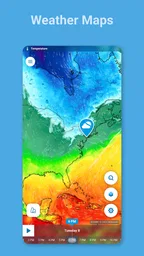
- Radar maps make approaching rain easier to track.
- Customizable alerts can warn you about changing weather.
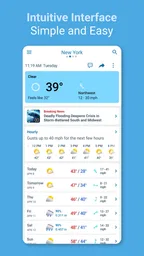
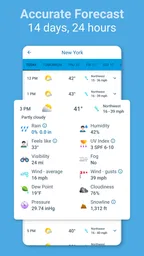
- Hourly forecasts help with planning short outings.
- Widgets show key conditions without opening the app.
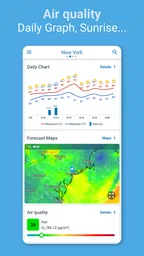
- The interface makes forecast details easy to browse.
What could be better
- Some features may require a paid subscription.
- Radar coverage can vary by location.
- Frequent alerts may become distracting.
- Forecast accuracy depends on local weather data.
- The app may show advertisements in the free version.





