
1Weather Forecasts & Radar review
 Analysis by Appsdrops
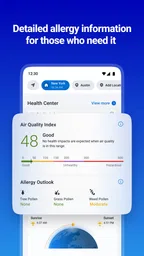
When I open a weather app, I want to answer a practical question quickly: should I take a jacket, change my route, or move an outdoor plan indoors? 1Weather Forecasts & Radar is built around that kind of everyday decision, pairing local forecasts with radar, severe-weather alerts, and home-screen widgets. It is a free weather app from OneLouder Apps, and its large audience—over 100 million installs and an average rating of 4.3 from around 1.1 million ratings—suggests it has become a familiar option for checking conditions at a glance.
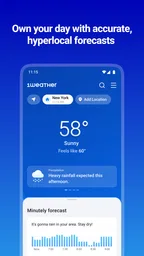
My first impression is that it aims to be more than a single temperature tile without demanding that you become a weather enthusiast. The useful path is straightforward: set a location, look at the forecast, then use the radar or alerts when the sky looks uncertain. That makes it a sensible starting point if you are switching from a basic phone weather panel, although the number of things to inspect can feel less focused than a minimalist forecast app.
What to expect from the forecast and radar
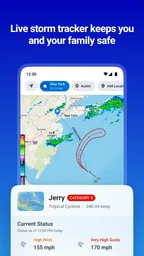
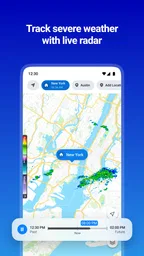
The central appeal is having several kinds of weather information close together. A quick forecast check helps with routine choices, while live radar is there for situations where the next few hours matter more than the general outlook. Severe-weather alerts add another reason to keep the app available, particularly if you live somewhere that changing conditions can disrupt a commute or outdoor plans.
These tools answer different questions, and it helps not to treat them as interchangeable. A forecast is useful for planning the day; radar can help you judge whether precipitation appears to be approaching your area; an alert is a prompt to pay attention to a potentially serious condition. None removes the need for judgment. For a long drive, a remote hike, or a rapidly changing storm, I would still check current local guidance rather than relying on one app screen as the whole picture.
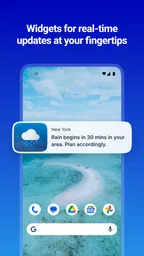
The widgets are especially useful when you want weather information without opening an app. I like that this offers a practical middle ground: a compact glance for ordinary mornings, with the fuller forecast available when a decision deserves more attention. A widget is not a substitute for checking radar before a time-sensitive trip, but it can make the first check easier to remember.
Compared with the weather panel already built into a phone, 1Weather has a stronger emphasis on putting radar and alert tools alongside the everyday forecast. Compared with a specialist weather service, it is more approachable as a general-purpose companion than as a deep analytical workspace. If you mainly need a clean temperature and a simple daily outlook, your phone’s built-in option may be enough. If you often want to inspect rain movement or keep a weather widget visible, this app has a clearer reason to earn a place on your home screen.
A helpful first setup
On first use, begin with the location you actually need to make decisions about. If the app offers a choice between using your current area and adding a place manually, choose the approach that suits your routine: current location is convenient for moving around, while a saved place is more useful when you regularly check weather for home, work, or family elsewhere. The key is to confirm that the forecast is for the right place before interpreting it.
Then spend a moment deciding what you want to see without opening the app. If a widget fits your home screen, use it for the information you check most often, rather than trying to make it display everything. A small, consistent glance is usually more valuable than a crowded panel you stop noticing. Keep the detailed forecast and radar for follow-up checks, especially when the weather could affect a specific plan.
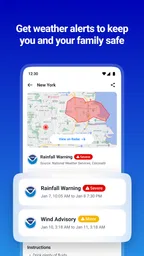
Alerts deserve a considered setup too. I would enable the severe-weather notifications that are useful for the places I care about, but I would not treat notifications as a complete safety system. A phone can be muted, out of reach, or temporarily disconnected. For important weather risks, use the app as one layer of awareness, not as your only source of warning.
It is also worth checking the app after setup rather than assuming every location and widget is showing what you intended. A quick comparison between the selected place and the forecast screen can prevent a common mistake: making a decision based on weather for a different saved location. This small check is particularly helpful if you travel between home and work or keep more than one place in view.
Your first useful check
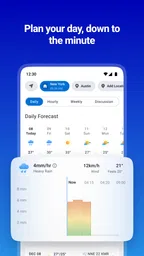
For a first meaningful success, try a simple real-world question instead of browsing every screen. Before leaving home, check the forecast for the hours you expect to be out. If rain is a concern, open the radar and look at the pattern around your location. Then decide whether a compact umbrella, a different departure time, or no change at all makes sense. That short workflow shows how the forecast and radar complement one another.
Here is a realistic example: you are about to walk to a nearby appointment and the sky looks clear, but rain is possible later. A quick widget glance tells you whether the day merits a closer look; the forecast gives you the broader plan, and radar can help you assess whether precipitation seems relevant to the time you will be outside. The useful outcome is not a perfect prediction. It is making a better-informed choice than leaving without checking.
For a commute, I would use the same sequence but pay more attention to timing and route. A general daily outlook can tell you that wet weather is possible, while radar gives a more immediate visual cue. If the trip is important or conditions look severe, build in a margin and consult official local information. The app helps me notice what deserves attention; I would not ask it to guarantee that a route will remain safe.
One practical habit is to check radar only when it can change what you do. Opening it repeatedly on a calm day adds little, and a moving map can tempt you to read more certainty into it than it deserves. Save that screen for a walk, outdoor event, or short journey where the near-term pattern matters. This keeps the app useful rather than turning every weather check into a longer investigation.
Where new users can get confused
The most common source of confusion is mixing up a broad forecast with a live-looking radar view. The forecast helps describe expected conditions over a period; radar is a visual aid for assessing precipitation patterns. Seeing a colored area near a location does not automatically tell you exactly when it will rain at your doorstep, so I use it as context rather than a minute-by-minute promise.
Another easy mistake is checking the wrong saved place. If you add multiple locations, make a habit of reading the place name before acting on the forecast. This matters most when you are planning for someone else or checking conditions at a destination. A correct forecast attached to the wrong town is still the wrong answer for your plans.
Widgets can also create the impression that the full app is redundant. They are best treated as a shortcut, not a complete view. When the widget gives you a reason to investigate—possible rain, a changing forecast, or an approaching severe-weather concern—open the app and look at the relevant detail. If the widget is visually busy or does not fit your home-screen layout, it is fine to rely on the app itself instead.
Finally, more information does not always mean a better decision. If all you need is whether to wear a coat, the basic forecast may be enough. If the question is whether to proceed with a weather-sensitive outdoor plan, use the radar and alerts as additional context. I find that choosing one question before opening the app prevents aimless scrolling and makes its different tools easier to understand.
Who will get the most from it
I would recommend 1Weather to someone who checks the weather regularly and wants a convenient route from a quick glance to a closer look at local conditions. It suits commuters, people who walk or cycle, and anyone whose plans depend on whether rain or severe weather might interfere. It is also a good fit if you like a home-screen widget but still want radar and alerts available when a glance is not enough.
It may be more than you need if your weather habits stop at checking the day’s high and low. A built-in phone forecast can be quicker and less distracting for that narrow task. Likewise, someone who needs highly specialized meteorological analysis may prefer a dedicated service designed around technical weather information. I see this app’s strength as a practical mix of everyday forecasting and useful checks, rather than a replacement for every other weather source.
The app is rated Everyone, so it is broadly suitable for general use. It is free to download, with in-app purchases listed from 49 cents to $19.99 per item. I would start with the free experience and see whether the features you actually use meet your needs before considering any purchase; there is no reason to pay simply because an option appears in the app.
Making it part of a routine
Once the basic setup works, give the app a small, repeatable role. I would check the widget in the morning, open the forecast when making a plan, and use radar only if near-term conditions could change that plan. This is a more useful routine than checking constantly, and it also helps reveal whether the app’s information is relevant to your life rather than merely interesting.
When traveling, remember to focus on the destination as well as your current location. A forecast that is accurate for home will not answer whether conditions will be comfortable where you are heading. If you often plan for multiple places, keep the place names clear and verify the selected one each time. That simple discipline matters more than having a crowded collection of locations you rarely use.
1Weather has been available since January 11, 2012, and version 12.11.1 is the current version. It requires Android 8.0 or later. Those details make it straightforward to judge compatibility before installing, while the app’s free entry point makes trying the basic workflow easy. The large number of ratings and installs indicates broad use, but I would still judge it by whether its forecast, radar, alerts, and widget fit your own habits.
My overall view is that 1Weather Forecasts & Radar is a practical choice for someone who wants more than a bare forecast but does not want to begin with a specialist weather tool. Start with one location, make a simple plan using the forecast, and open radar only when timing matters. If that flow helps you leave the house better prepared, the app is doing its job. If you only want a single temperature and a basic outlook, the simpler weather option already on your phone may be the better fit.
What we like
- The home screen puts current conditions and the daily forecast within easy reach.
- Radar maps help you follow approaching weather systems.
- Custom alerts can warn you about severe conditions.
- Multiple saved locations make travel planning easier.
- Widgets provide weather updates without opening the app.
What could be better
- Some advanced features require a paid subscription.
- Ads can take up space on the free version.
- Radar details may vary by location.
- Weather alerts depend on location access and notification permissions.
- Frequent updates can use mobile data in the background.





