
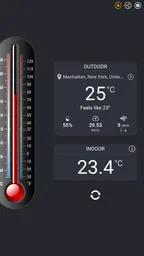

Thermometer++ Room Temperature review
 Analysis by Appsdrops
When I want a quick sense of the temperature around me, I don’t always need a full forecast. Sometimes I’m deciding whether a room needs airing out, or checking if conditions outside are comfortable enough for a walk. Thermometer++ Room Temperature is aimed at those practical moments: it brings together temperature and other local conditions in a weather app from Singulario Apps. Its appeal is straightforward, but it’s important to understand what kind of information it can offer—and when a conventional forecast app is the better tool.
Choose it for local conditions, not a complete forecast
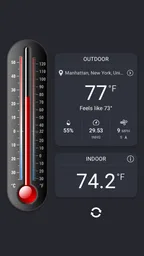
The first question I’d ask is whether you want a reading of nearby conditions or a broader picture of what the weather will do later. This app’s focus is the former. It covers temperature along with humidity, pressure, and wind, so it can be useful when one number alone doesn’t explain how a room or outdoor setting feels.
That distinction matters because a thermometer-style weather app is not automatically a substitute for a forecast service. If I’m planning a drive, checking for rain later, or comparing conditions across several days, I would start with an app built around forecasts. If I mainly want a quick local check, this is a more direct fit.
The name may lead some people to expect a dedicated indoor sensor. I’d be careful about that assumption: a phone app can present weather information, but a phone is not, by itself, a reliable room thermometer. For indoor decisions, treat the displayed conditions as a useful reference rather than proof of the exact temperature beside your sofa. If you need precise room readings for comfort, equipment, or health-related reasons, a purpose-built thermometer is the safer choice.
That makes the app easiest to judge when you know what you need from it. It can help answer, “What are conditions like around here?” It is less suited to answering, “What is the exact temperature at this particular spot in my home?” Keeping that boundary in mind makes the rest of the experience more useful.
Why the mix of readings can help
Temperature is only part of comfort. On a humid day, the same temperature can feel heavier than it does in drier air; wind can make an outdoor walk feel less pleasant than a temperature number suggests. Having humidity, pressure, and wind alongside temperature gives me more context before deciding what to wear or whether to open a window.
A practical example: before leaving home, I might check the temperature, then glance at wind rather than relying on the first number I see. If the conditions look breezy, I can take a light layer even when the temperature seems mild. That is a small but useful workflow, and it’s more thoughtful than treating one reading as the whole story.
Where Thermometer++ earns its place
Thermometer++ makes the most sense for people who prefer a focused check over a dashboard full of maps, alerts, and forecast graphics. If your habit is to look at local conditions before a short walk, a school run, or a quick trip to the shops, the combination of readings gives you a compact basis for a decision.
It can also be handy for checking whether a room feels stuffy before you reach for a fan or open a window. I’d use humidity as context, not as a direct measurement of air quality or ventilation. One useful approach is to compare the app’s local conditions with how the room actually feels over several checks. If the numbers and your experience consistently differ, that is a sign to rely on a separate indoor instrument for that room.
The app has a long-running presence: it was released in 2012, and its current version is 7.1.0. It has an average rating of 4.4 from around 236,000 ratings, with roughly 1,900 written reviews and more than 10 million installs. Those figures suggest many people have tried it, though popularity alone does not guarantee that its local readings will match every street, building, or phone setup.
For a first check, I’d compare its reading with the conditions I can observe outside rather than assuming it is exact. Weather can vary over short distances, and an app’s local estimate is not the same thing as a sensor placed at your window. This is especially relevant if you live in a dense area, near a large body of water, or in a home that warms and cools differently from its surroundings.
What to expect from the experience
Thermometer++ is a free weather app for everyone, and it is developed by Singulario Apps. That makes it easy to try without committing to a purchase up front. In-app purchases are available, ranging from $0.99 to $5.49 per item, so I would check the purchase screen carefully before paying and decide whether the free experience already covers your routine.
The useful question is not simply whether extra purchases exist, but whether you actually need anything beyond the basic local check. If you only open the app occasionally to see current conditions, it may be sensible to begin with the free option and keep your expectations modest. If you are comparing several weather tools, assess the information you use day to day rather than assuming that a paid option will solve the separate problem of measuring a room precisely.
Its minimum operating-system requirement is version 10. That is worth checking before installing, particularly if you keep an older phone in service. The age rating is Everyone, which makes the app broadly suitable from a content perspective; that does not change the practical need to supervise a child’s purchases or device use where appropriate.
When another kind of app is a better fit
For plans that depend on what happens later, a traditional forecast app is the more natural choice. Those apps are designed to help with questions about upcoming weather rather than just a quick read of present conditions. I would choose one when timing matters—for example, deciding whether to postpone an outdoor event or pack for a trip that spans several days.
For exact indoor measurements, a standalone thermometer or a home sensor is a better category of product. It can be positioned where the reading matters, while a general weather app is intended to describe local conditions. That difference is important if you are monitoring a nursery, a storage area, or a room where temperature has a specific practical consequence.
There is also a trade-off between a focused tool and a broad weather dashboard. A larger forecast app may offer more planning context, but it can feel like overkill when you only want a quick check. Thermometer++ may suit that lighter habit better, though people who depend on detailed forecasts, weather warnings, or extensive planning tools should compare it with apps built for those needs.
A low-friction way to decide
Trying a free app is a relatively easy way to see whether its approach fits your routine. I would install it, check the local conditions at a few different times, and compare them with what I can observe outdoors. For an indoor use case, I would place a separate thermometer in the room and compare the readings rather than treating the app as a replacement for that instrument.
This simple test also helps reveal whether the app adds anything to your usual weather app. If you already get the local temperature and the other conditions you care about from a forecast tool, switching may not improve your day. If you find yourself opening a crowded forecast app just to check how it feels outside, a more focused option could make that small task easier.
Switching has a modest cost in attention even when the app itself is free: you have to learn where its useful information is and decide whether to keep a second weather app around. I would avoid maintaining two tools that answer the same question unless one provides a clear benefit. Try it for the specific temperature-and-conditions check you want, then keep it only if it makes that decision simpler.
My recommendation
I’d recommend Thermometer++ to someone who wants a straightforward way to check local temperature with humidity, pressure, and wind in view. Its strongest use is the everyday pause before stepping outside or deciding whether a room seems comfortable enough to air out. The extra context makes a quick check more helpful than temperature alone, provided you treat the readings as local weather information rather than precision indoor measurements.
I would skip it if your main need is a detailed forecast, a dedicated indoor sensor, or dependable measurements for a specific room. In those cases, a forecast-focused app or a physical thermometer is a better match. For everyone else, the free starting point makes it reasonable to try, while the available purchases are a reason to review any upgrade choice instead of tapping through automatically.
In short, I see it as a convenient companion rather than an all-purpose weather authority. If your decisions are small and immediate—what to wear, whether the air outside feels comfortable, or whether to check a room with a real thermometer—it has a clear role. If you want one app to plan the entire day’s weather or one device to measure a precise indoor spot, choose a tool designed specifically for that job.
What we like
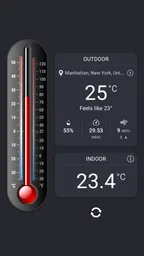
- Displays temperature in Celsius and Fahrenheit.
- Offers a simple interface that is easy to navigate.
- Can show readings for multiple locations.
- Includes humidity readings where supported.
- Useful for checking local weather conditions.
What could be better
- Phone sensors cannot reliably measure room temperature.
- Readings may depend on online weather data.
- Indoor measurements may require a separate sensor.
- Results can vary by location and weather source.
- Some features may require an internet connection.





