

CVS Health review
 Analysis by Appsdrops
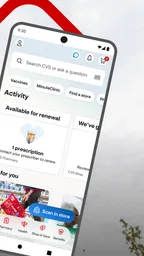
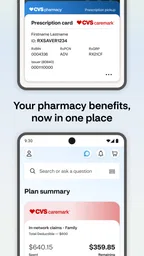
I see the CVS Health app as a practical choice for people who already use CVS Pharmacy or want one place to handle pharmacy errands, care scheduling, and ExtraCare shopping. Its appeal is not that it replaces every health app; it is that several familiar CVS tasks can sit together on your phone. In my view, that convenience matters most when you have a prescription to manage and a store visit to plan, rather than when you need a broad medical record or an independent pharmacy service.
What matters when choosing a pharmacy app
Before installing a pharmacy app, I would ask what I actually want to do on my phone. If the main need is checking on prescriptions, handling refills, or arranging a pharmacy visit, CVS Health has a clear purpose. It is a medical app from CVS Pharmacy, and its central strength is connecting digital health errands with the company’s pharmacy and retail experience.
The app is free, rated for Everyone, and has a 4.5 average from around 507,000 ratings. Those figures suggest that many people find it useful, but popularity alone does not tell you whether it suits your routine. The more important question is whether you are comfortable making CVS your hub for these tasks.
I would also distinguish between managing a pharmacy relationship and managing all of your health information. CVS Health is most compelling for the first. If you mainly need a symptom checker, a general wellness tracker, or a consolidated view of care from multiple providers, a different kind of app may be a better starting point. The app’s value comes from its connection to CVS services, not from trying to be every kind of health tool at once.
That focus makes the app easier to judge. You do not need to use every part of it to benefit: a person might care about prescriptions, while a family member might be more interested in scheduling care or checking ExtraCare savings. I would install it with one or two concrete errands in mind, then see whether those tasks are easier to handle there than through separate channels.
Why the CVS combination can be useful
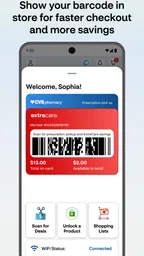
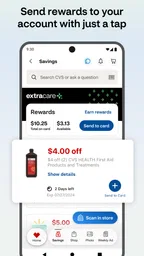
The biggest advantage is having pharmacy and shopping-related tasks under one roof. Prescription handling and ExtraCare savings often belong to the same real-world trip: you may collect medication, pick up household basics, and want to check available savings along the way. Keeping those activities in one app can reduce the small bits of searching and switching that make routine errands feel scattered.
Health care scheduling adds another useful strand. It means the app is not only a digital counter for pharmacy business; it can also help users plan care. For someone already accustomed to CVS locations and services, that connection may feel more natural than juggling a pharmacy app, a separate store app, and another place to arrange care.
One practical tip is to use the app before you leave home, not only when you are standing at the pharmacy counter. Checking the relevant prescription task and looking at ExtraCare savings in advance can help you decide whether a CVS stop belongs in that day’s route. That is a modest benefit, but it is exactly the sort of small planning improvement that makes an everyday app worthwhile.
A realistic example is a busy weekday when you realize a prescription needs attention while you are also planning a quick shopping trip. Instead of treating those as unrelated errands, you can open CVS Health to deal with the pharmacy side, consider whether a care appointment needs scheduling, and review savings before heading out. The advantage is not a dramatic transformation; it is fewer separate steps for tasks already tied to CVS.
There is also a useful trade-off in that integration. The app makes the most sense when CVS is part of your routine. If you rarely visit CVS or use its pharmacy, the combined experience becomes less valuable, because the central benefit is access to the company’s own services rather than a neutral tool that works equally well with any provider.
Where it may beat separate alternatives
Compared with relying on a pharmacy counter, phone calls, and paper reminders, a dedicated app can make routine tasks easier to revisit on your own schedule. I find the strongest case for CVS Health is not that every interaction must move onto a screen, but that common errands can be started or organized digitally before they become urgent. That can be helpful for people who prefer to handle practical details between work, school, or family responsibilities.
Compared with a standalone shopping app, CVS Health has a more health-oriented role because prescriptions and care scheduling sit alongside savings. And compared with a general health-management app, its advantage is the direct link to CVS Pharmacy. These are different categories of usefulness: one is about coordinating a particular retailer and pharmacy, while another may be better for tracking information across a broader range of providers.
For regular CVS customers, the ExtraCare element can make the app more relevant than a pharmacy-only tool. It gives users a reason to open the app even when they are not dealing with a prescription. My advice is to treat savings as a helpful companion to pharmacy management, not as a reason by itself to expect a complete health platform.
The app is also an established option, with more than 10 million installs and about 160,000 written reviews. I would take that as evidence that it serves a broad audience, not as proof that every user will find every workflow smooth. A large, mixed user base includes people with very different needs: occasional shoppers, frequent pharmacy customers, and people trying to coordinate care. Your own fit will depend on which of those jobs you need it to do.
Where another option may fit better
If you fill prescriptions at several pharmacies, a CVS-centered app may not be the best single place to manage everything. In that situation, the app associated with each pharmacy—or a broader health organizer you already use—may better match your reality. CVS Health is a sensible choice for CVS tasks, but I would not assume it can serve as a universal medication dashboard for services outside that ecosystem.
Likewise, people who want to speak directly with a pharmacist or care professional may still prefer a conversation by phone or in person for questions that need context. An app can help organize an errand, but it should not become a substitute for asking a qualified professional about a medication concern or a health decision. I would use the digital route for convenience and turn to human support when the issue is complex or unclear.
Some users may also prefer separate apps because they want a sharper division between health matters and shopping. CVS Health brings those purposes together, which is convenient for one person and distracting for another. If you do not want retail savings mixed into a health-related routine, a pharmacy-focused alternative may feel more focused.
There is a further practical consideration: app-based convenience depends on being willing to manage these tasks on a phone. If you prefer a quick counter conversation, do not shop at CVS, or only need pharmacy help once in a while, installing another app may add little. I would not recommend it just because it has a broad set of functions; I would recommend it when at least one of those functions solves a recurring problem for you.
Switching without making a mess of your routine
Moving to CVS Health is easiest if you treat it as an addition to your routine rather than an instant replacement for every existing channel. Start with the task you repeat most often, such as handling a pharmacy need or checking care scheduling, and see whether the app makes that task more convenient. Keep any existing reminders or contact methods in place until you are confident the new habit works for you.
For a household, it is worth deciding who will use the app and for which errands before relying on it as the family’s shared plan. One person may handle pharmacy visits, while another keeps track of appointments or shopping. Being clear about that division can prevent the common problem of assuming that everyone is looking at the same information or has completed the same task.
My most useful workflow suggestion is to separate “needs attention soon” from “useful to check next time.” Prescription-related tasks and care scheduling may deserve a timely look, while ExtraCare savings can be reviewed when you are planning a store trip. That simple distinction helps keep shopping incentives from crowding out the health task that brought you to the app in the first place.
The app is currently at version 26.10.33 and supports iOS 11 or later. If you use an older device, checking compatibility before making it part of your routine is sensible. CVS Pharmacy is the developer, so the app is best understood as a direct channel into that company’s services rather than as an independent health platform.
My recommendation for the right user
I would recommend CVS Health to people who use CVS Pharmacy often enough to appreciate having prescription tasks, care scheduling, and ExtraCare shopping in one place. It is especially appealing if you already make CVS part of your weekly errands and want to handle small administrative steps before you arrive. The free price also makes it easy to try without committing money, though the real cost is the attention required to maintain another app in your routine.
I would be more cautious if your pharmacy use is spread across different providers, if you want a comprehensive health record, or if retail savings have no place in the way you manage medical tasks. In those cases, a broader health organizer, a different pharmacy’s app, or direct contact with a provider may be a better fit. The right alternative depends on whether you need cross-provider organization, a focused pharmacy relationship, or simply a person to answer a question.
For my decision, the key is whether CVS is already part of the user’s life. CVS Health is most useful as a practical companion to CVS Pharmacy, not as a one-size-fits-all medical app. If that distinction matches your needs, the combination of pharmacy errands, care planning, and savings is a convincing reason to give it a try.
Overall, I see CVS Health as a focused convenience app with a clear audience. It can make recurring CVS-related tasks easier to organize, especially when you plan pharmacy and shopping stops together. I would choose it for that specific purpose, while keeping another option in mind for health information or services that extend beyond CVS.
What we like
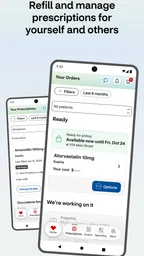
- Prescription refills can be requested through the app.
- Users can manage family members’ prescriptions from one account.
- The app supports prescription delivery for eligible medications.
- ExtraCare members can access digital coupons and rewards.
- Store and pharmacy hours are easy to check.
What could be better
- Some prescriptions may not qualify for delivery.
- Insurance details may need to be entered again after updates.
- Certain features require an ExtraCare account.
- Prescription status updates may take time to appear.
- Some services are available only at participating CVS locations.




