




Teladoc Health review
 Analysis by Appsdrops
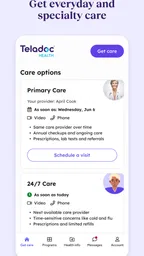
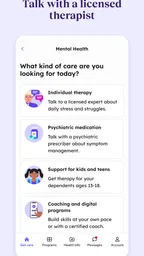
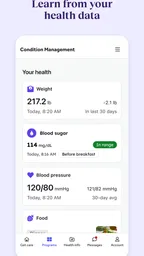
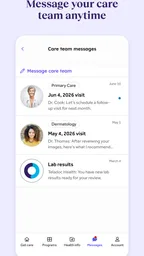
When I’m feeling unwell, the hardest part is often deciding what to do next: wait, call a clinic, or try to arrange a visit. Teladoc Health is built around getting medical support remotely, along with tools for managing health conditions. I find that focus useful when the problem is not obviously an emergency but still deserves professional attention. It is less a replacement for every kind of care than another route into it.
Getting past the first points of friction
Teladoc Health is a free medical app from Teladoc, Inc., available to users of all ages. Its history goes back to September 30, 2013, and version 5.35 is the current release. Those details suggest a well-established service, but the experience still depends on a practical first step: making sure the app is relevant to your situation and that you can complete its setup before you need care.
Telehealth apps can feel less straightforward than ordinary appointment-booking tools because the visit is only one part of the process. You may need to understand how to access the service, describe what is bothering you, and decide whether a remote conversation fits the issue. My advice is to explore the app while you are well enough to think clearly, rather than waiting until a symptom is making every extra step feel difficult.
It is also worth distinguishing the app from a general symptom-search tool. A search engine can return possibilities, but it cannot conduct a clinical conversation. Teladoc Health is intended to connect people with online medical care and condition management, so its value is in using the service as a care pathway—not treating an app screen as a diagnosis.
For a grounded sense of its reach, it has a 4.3 average rating from around 81,000 ratings, and it has passed five million installs. That makes it a familiar option for many people, but popularity alone does not tell me whether it fits a particular person’s needs. What matters more is whether you can access the service you need and whether your concern is suitable for remote care.
Check the basics before you need an appointment
Before relying on any telehealth app, I would check that it runs on your device and that you can sign in or otherwise reach the relevant service. Teladoc Health supports devices running OS 9 or later. If you are helping a parent or another family member, it is especially useful to test the basic steps together in advance: open the app, find the appropriate care option, and make sure the person knows how to return to it later.
A small but useful preparation step is to write down the reason for seeking care in plain language. Note when the problem began, whether it has changed, what makes it better or worse, and any questions you do not want to forget. This is not a substitute for medical advice; it simply makes it easier to explain the situation during a remote consultation, especially if you are tired or anxious.
I would also keep a short list of current medicines and relevant health conditions where you can refer to it. That preparation is helpful in any clinical visit, and it can reduce the chance of overlooking a detail when you are speaking through a phone. If you are arranging care for someone else, make sure you can accurately describe their symptoms and history rather than guessing.
Teladoc Health has 34,000 reviews, which gives prospective users a substantial body of user feedback to consider. I would read recent comments for patterns rather than treating a single positive or negative account as decisive. App experiences can vary with device, account circumstances, and the type of care someone is trying to arrange.
Recovering when a care workflow stalls
If you reach a point where you are unsure what to do next, avoid repeatedly tapping through screens without knowing whether the previous action worked. Pause, note what you were trying to accomplish, and return to the app’s main navigation. Then check whether you are signed in and whether the care option you want is still the one you selected. This kind of calm reset is often more useful than starting the same process several times.
If the app seems unresponsive, close and reopen it, then check that your device has a working internet connection. A remote consultation depends on connectivity, so a weak signal can make the experience feel like an app problem when the underlying issue is the connection. If you can, move to a more reliable network or location before attempting a time-sensitive conversation.
There is a practical trade-off here: remote care can save a trip, but it asks you to manage a few things that an in-person clinic handles for you, such as being ready to communicate clearly and having a usable connection. If a consultation is interrupted, write down the point at which it stopped and the question you still need answered. That gives you a concise way to explain the issue when you try again or contact the service through its available support route.
Another useful workflow is to separate the medical question from the technical one. If you are worried about a symptom, do not let troubleshooting consume the time you should spend seeking appropriate care. Try a reasonable app reset, but switch to another suitable care channel if you cannot get through and the concern needs timely attention.
When the problem is not the app
Not every health concern is a good match for an online visit. A remote clinician cannot examine you in person, and some problems need hands-on assessment, tests, or urgent treatment. If you believe you may be facing an emergency, seek emergency help rather than waiting to resolve a login or connection issue. That distinction matters more than getting every feature of the app to work.
For less urgent concerns, the right route depends on what you need. A local primary-care clinician may be a better fit when continuity, an in-person examination, or coordination with existing records is important. A pharmacist may be able to help with a straightforward medication question, while a clinic can handle needs that require physical assessment. Teladoc Health is most appealing when remote medical access or condition-management support is a sensible part of the plan.
It is also not a substitute for a personal health record or a reliable reminder system. I would not assume that installing the app means every detail of your medical history is available to a clinician. Be prepared to share relevant information yourself, and keep your own records organized if you have ongoing care from multiple providers.
How it compares with familiar care options
Compared with calling a clinic, a telehealth app gives you a digital route to care rather than beginning with a phone conversation or an in-person visit. That can be convenient when you are at home, have limited time, or want to explore whether a remote consultation can address your concern. The trade-off is that you may have less direct control over the clinical context than when speaking with a clinician who already knows your history.
Compared with symptom-checker apps, Teladoc Health is more directly oriented toward medical services and ongoing condition management. A symptom checker can help you organize thoughts, but it is easy to mistake a list of possible causes for a real assessment. I prefer using informational tools to prepare questions and using a clinician for decisions about care.
Against in-person care, the choice is not simply convenience versus inconvenience. A face-to-face appointment is better when someone needs an examination, a procedure, or a close review of a complex issue. Remote care can be a more practical first step for suitable concerns, but it should not become a reason to delay a visit that clearly requires physical evaluation.
Who I would recommend it to
I can see Teladoc Health working well for someone who wants a remote option available before a minor or manageable health concern arises, or for someone seeking a digital way to engage with condition management. It may also suit people who find a trip to a clinic difficult and whose needs can reasonably be addressed at a distance. The strongest benefit is having another path to medical support, not a guarantee that every issue can be handled in the app.
Consider a realistic weekday situation: you wake up with a concern that is disrupting your plans, but it does not appear to require emergency attention. Rather than spending the morning searching the web and trying to decide what a symptom means, you can use the app to pursue an online care option, explain when the issue began, and ask a clinician what to do next. Having your medicines and questions written down beforehand can make that conversation more focused.
I would be more cautious about recommending it to someone who needs frequent hands-on care, has limited access to a dependable internet connection, or is uncomfortable explaining symptoms remotely. It may also be the wrong choice for people who expect one app to coordinate every aspect of their care without their own participation. In those cases, an established local clinician or clinic may be a better anchor, with telehealth serving only as a supplement.
My practical verdict
Overall, I see Teladoc Health as a useful option to have ready, especially if online medical access and condition management fit the way you prefer to handle suitable health concerns. It is free to install and use as an app, but the important question is whether the services available through it meet your needs; the app itself should not be confused with a promise that every kind of care is free or available in every situation.
The best way to avoid frustration is to set it up before you are unwell, learn where to begin, and keep a few notes about your health handy. If a screen or connection gets in the way, try a simple reset and then use another appropriate care route rather than letting the technical problem dictate your medical decision. That is the most sensible way to treat this app: a potentially convenient bridge to care, with clear limits when an in-person assessment or urgent help is needed.
What we like
- Connects users with clinicians from home.
- Offers several ways to access virtual care.
- Can help users avoid travel for some appointments.
- Provides access to specialists in some locations.
- Keeps care options available outside traditional clinics.
What could be better
- Available services vary by location and health plan.
- Some visits may require an appointment rather than instant access.
- Virtual care cannot replace every in-person examination.
- Costs may apply depending on coverage and service.
- A stable internet connection is needed for video visits.





