

Walgreens review
 Analysis by Appsdrops
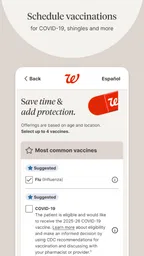
I think of Walgreens as a practical companion to the chain’s everyday errands rather than a general-purpose shopping app. It brings pharmacy tasks, coupons, photo orders, and retail shopping into one place, which is useful when those jobs overlap. The key question is whether you already shop at Walgreens or use its pharmacy: if you do, having those tasks together can save a few small steps; if you do not, the app has much less to offer.
Free to install, with value tied to how you use Walgreens
The app is free, so trying it does not require an upfront purchase. That is the clearest cost fact, and it makes sense to judge its value by whether its tools fit errands you already make—not by assuming that installing it automatically makes shopping cheaper. Walgreens Co develops it, and the app is listed for Everyone, making it broadly accessible from an age-rating standpoint.
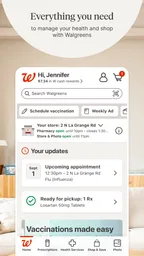
For a shopping app, the combination is more distinctive than a simple product catalog. Prescriptions, coupons, photo services, and ordinary shopping all sit under the same Walgreens umbrella. I find that useful when a pharmacy pickup and a household purchase belong to the same trip. It is less compelling if you only want to compare products across retailers or browse a broad marketplace.
The app has a 4.6 average from around 1.6 million ratings, and it has passed 10 million installs. Those figures suggest it is widely used, but they do not guarantee that every pharmacy or shopping task will feel equally smooth. My practical test would be whether the particular Walgreens location and services you rely on work well for your routine.
What the app can bring together
The most useful idea here is consolidation. Rather than treating pharmacy errands, coupon browsing, photo orders, and shopping as separate destinations, Walgreens gives them a shared starting point. That can be convenient for an existing customer who wants to check a prescription-related task and then add a few store items without switching apps.
Coupons are most valuable when they influence a purchase you were already considering. I would browse them before making a shopping list, then use the relevant offers to decide what to buy at Walgreens. That is a more grounded approach than treating every coupon as a reason to spend; a discount on something unnecessary is still an unnecessary purchase.
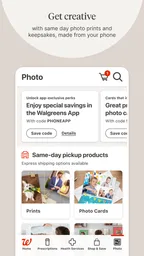
The photo side also makes the app more than a pharmacy tool. If you already plan to order prints or another photo product through Walgreens, having that task alongside shopping may reduce the number of places you need to manage. I would still treat the photo workflow as its own errand: prepare the images and order details when you have time, rather than trying to make a rushed pickup trip do everything.
Everyday workflows where it earns a place
Imagine you are planning a pharmacy visit and realize you also need a couple of household essentials. I would open the app before leaving, check the pharmacy task I need to handle, look through relevant coupons, and make a short shopping list. The benefit is not a dramatic transformation; it is fewer separate searches and a clearer plan for one stop.
A second useful routine is to separate browsing from buying. When you have a quiet moment, look over the shopping and coupon sections and note only what you genuinely need. Then, when it is time to run the errand, you are less likely to scroll aimlessly in the store or let a promotion dictate the whole basket. This is a small workflow improvement, but it is the sort of practical value that can make a retailer’s app worth keeping.
For photos, I would use the app when Walgreens is already a convenient place to fulfill the order, rather than assume it is automatically the best option for every photo project. A person who wants a specialized photo service or a different retailer’s products may be better served elsewhere. Walgreens is most persuasive when the photo order naturally fits into an existing visit or a familiar shopping routine.
One trade-off of an all-in-one app is that its breadth can make it feel less focused than a dedicated pharmacy, photo, or shopping tool. If I open it for a single task, I may not care about the other sections at that moment. The advantage is convenience when needs overlap; the drawback is that people who want one streamlined purpose may prefer a narrower app.
Where the convenience has limits
The app’s usefulness depends heavily on your relationship with Walgreens. If the chain is not a convenient place for your prescriptions, shopping, or photo needs, the combined menu does not solve that basic mismatch. A nearby pharmacy’s own app may be the better choice for someone whose medication routine is tied elsewhere, while a general retailer or comparison service may suit someone focused on finding the right item across multiple stores.
Coupons also require a little restraint and attention. They can help organize a planned purchase, but they are not the same as a promise that every item you want will be discounted. I would check the offer details before relying on a coupon for a particular trip, and I would avoid building a basket around a promotion unless the products are genuinely useful to me.
There is another practical trade-off: using one app for several types of errands can save switching, but it also means you need to remember where each task lives. If you only need to manage prescriptions, a dedicated pharmacy workflow may feel more direct. If you only want to shop, a retailer with a broader selection or a stronger comparison experience could be a better fit. Walgreens is strongest for people who value the overlap, not for every person who shops online.
I would also keep expectations realistic around the word “all-in-one.” The app gathers several Walgreens-related activities, but that does not mean every errand becomes effortless or that a single screen replaces planning. I still find it sensible to check what I need before heading out, especially when a trip depends on a specific pharmacy or photo task. The app works best as an organizer for familiar Walgreens errands, not as a substitute for making sure the errand itself suits your needs.
Who is most likely to get real value
I would recommend trying it if you regularly use Walgreens and want a convenient place to handle more than one kind of task. People who combine pharmacy visits with shopping, use coupons selectively, or order photos through the chain have the clearest reason to keep it. Because the app costs nothing to install, it is also reasonable to explore whether its layout fits your habits before deciding to rely on it.
It may be a poor fit if Walgreens is rarely convenient for you, if you prefer to compare prices across several retailers, or if you want a dedicated tool for just one service. Someone who already has an established pharmacy routine elsewhere should not switch simply because this app combines more categories. The convenience matters only when it supports the places and services you actually use.
The app first appeared on June 3, 2010, and its current version is 117.1. It requires iOS or Android 10 or later. Those details matter most when checking whether an older device can run it; if your phone is below that requirement, the app is not a practical option on that device. For compatible phones, the free price removes the purchase decision, but it does not remove the question of whether Walgreens is the right retailer for you.
My buy-or-skip verdict
My verdict is to try Walgreens if you already have Walgreens errands to manage. Free access, pharmacy-related tasks, coupons, photos, and shopping can make it a useful everyday hub when those needs coincide. I would use it to plan a store trip, check relevant offers, and keep a photo or shopping task from becoming a separate errand.
I would skip it if you are looking for a universal shopping destination, a way to compare every retailer, or a reason to move away from a pharmacy that already serves you well. Its value is practical and conditional rather than universal: it is strongest when Walgreens is already part of your routine. For that audience, Walgreens is worth trying; for everyone else, the app’s free price is not by itself a reason to install another shopping tool.
What we like
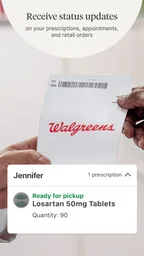
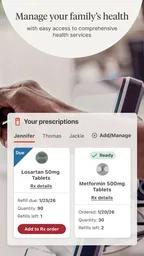
- Refill prescriptions through the app without calling the pharmacy.
- Set medication reminders to help keep doses on schedule.
- Use the store locator to check nearby Walgreens locations.
- Access digital coupons and rewards offers in one place.
- Order photo prints and choose pickup at a nearby store.
What could be better
- Some app features may require a Walgreens account.
- Prescription requests can take time for the pharmacy to process.
- Available services and products vary by location.
- The app may ask for sensitive health and personal information.
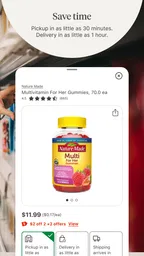
- Some orders may not qualify for same-day pickup.