




Healthy Benefits+ (Classic) review
 Analysis by Appsdrops
I judge a benefits app less by how polished its first screen looks and more by whether it helps me answer a practical question quickly: what can I use, and how do I make use of it without turning a routine purchase into a chore? Healthy Benefits+ is built around that everyday task. It is a free medical-category app from Solutran, Inc., intended to give eligible users a mobile way to access benefits and rewards. Its usefulness depends on whether you already have access to the program; it is not a general-purpose health tracker or a way to claim benefits simply by installing it.
What free access is worth here
The app costs nothing to download, which makes trying it a low-risk choice for someone who has been told they can use Healthy Benefits+. That free access is a real convenience, but it should not be confused with universal access to benefits: the practical value comes from the benefits available to your account, not from the download itself. If you are not eligible or do not have relevant benefits, the app has little reason to stay on your phone.
That distinction matters when comparing it with paid wellness apps. A subscription tracker may sell exercise plans, coaching, or health records to a broad audience. Healthy Benefits+ takes a narrower approach: it is useful when its benefits and rewards match your circumstances, rather than because it offers a broad catalogue of health tools. I would treat it as a free access point for an existing benefit, not as a substitute for medical advice, insurance support, or a paid health service.
The app has an average rating of 3.6 from around 133,000 ratings, with roughly 21,000 written reviews. Those figures suggest a substantial audience and a mixed experience, not a guarantee that every user will find the same value. Its 1M+ installs also show that it is used at meaningful scale. I would weigh those signals alongside the most important question for an individual user: whether the benefits tied to their own account are useful and easy to access.
Value depends on the benefit, not the download
For an eligible user, the strongest value is practical rather than entertaining. If benefits or rewards can help with purchases you already plan to make, having access through a phone may make it easier to check the program before heading out. The app’s purpose is specific enough that I would not expect it to replace a store’s own loyalty app, a payment wallet, or a health-record app. It serves a different job: bringing program-related access together in one place.
There is also a useful way to think about the trade-off before installing it. The download is free, but the benefit is conditional: it is only worthwhile if you can use the program and its available rewards fit your needs. Someone comparing apps solely by the number of general health features will probably find this one limited. Someone who has been directed to Healthy Benefits+ may care much more about reducing friction around a particular benefit than about having another all-in-one wellness dashboard.
Where it fits into an ordinary day
Imagine planning a routine shopping trip and wanting to know whether a benefit can help with something on your list. Rather than relying on memory or trying to interpret program details while standing in a checkout line, you can make checking the app part of preparing for the trip. I would look at the relevant benefit before leaving, then keep the app available in case I need to refer to it while shopping. That simple habit is more dependable than assuming every item or purchase will qualify.
A second useful workflow is to separate benefit planning from ordinary payment planning. I would check what the app shows first, make a short list of purchases that seem relevant, and still be prepared to use another payment method if the benefit does not apply as expected. This is not a claim that every purchase will qualify; it is a sensible way to avoid treating an app-based benefit as a guaranteed discount. The distinction can prevent an awkward surprise at checkout.
It may also help to check the app when you have time rather than waiting until you need an answer urgently. Benefit programs can involve account-specific details, and any account or app that needs to load at the point of purchase can become a source of friction if you are rushing. I would get familiar with the basic screens before relying on them during a time-sensitive errand. That small bit of preparation is especially worthwhile for anyone who does not often use phone-based benefits.
What to expect from the experience
Healthy Benefits+ is a focused utility, so I would assess it by whether the information and actions relevant to my own benefits are clear, not by how many unrelated tools it contains. Its medical category may set an expectation of clinical guidance, but the app’s stated role is access to benefits and rewards. Anyone looking for symptom checks, appointment management, medication reminders, or a personal health record should look elsewhere for those specific functions.
The main trade-off is that a focused benefits app can feel narrow, and its usefulness is tied to account eligibility and program relevance. That is not necessarily a flaw: a dedicated tool can be easier to approach than a sprawling health platform when all you need is benefit access. But it does mean I would not install it expecting broad medical features or a general reward system that applies to everyone.
Another sensible limitation to keep in mind is that having an app does not by itself settle whether a particular purchase or reward is covered. I would check the information shown for my account and follow the program’s own terms rather than assuming that a category of goods automatically qualifies. For a user who values certainty, checking before shopping is more useful than trying to resolve eligibility after selecting items.
The app is free, rated for Everyone, and its current version is 4.8.1. It supports Android 8.0 and later. It was released on December 21, 2018, so it is not a brand-new offering, but age alone does not tell me whether it suits a particular user. I would still make the decision based on eligibility and day-to-day usefulness rather than treating its release history as a reason either to trust it automatically or to dismiss it.
Who is most likely to benefit
I would recommend trying it to someone who already knows they have access to Healthy Benefits+ and wants a phone-based way to manage that benefit. It is especially relevant if you expect to check program details around routine purchases and would rather have a dedicated app than search through separate messages or paperwork. The value is strongest when you have a recurring reason to consult it, rather than a vague hope that a new app will uncover rewards you did not know you had.
It may be less useful for someone who has no confirmed access, rarely uses the relevant benefits, or prefers to handle everything through another established channel. If your main aim is to compare prices, track general fitness, manage appointments, or receive broad medical guidance, this is not the right tool for that job. In those cases, a retailer app, a dedicated health service, or your existing benefit contact may be a better fit.
For people deciding whether to install it, I would first confirm that Healthy Benefits+ is the program they are meant to use. Then I would check whether the benefits available to them cover purchases or rewards they genuinely care about. If both answers are yes, trying a free app is a reasonable next step; if either answer is no, the app may add little beyond another login and another icon.
My verdict on the trade-offs
Healthy Benefits+ is a practical, specialized app rather than a complete health companion. Its appeal is straightforward: eligible users can access benefits and rewards through a free mobile app from Solutran, Inc. Its limitations are just as important: value depends on having access, the app is not a general medical tool, and users should verify how their own benefits apply instead of assuming every purchase qualifies.
I would install it if I had been directed to use the program and had a concrete reason to check benefits during ordinary errands. I would skip it if I lacked eligibility or wanted a broad health app. That is the clearest way to judge its value: the download is free, but the worthwhile part is whether the benefit attached to your account makes your everyday routine easier. For the right user, that focused help can be enough; for everyone else, a different app or the usual program channel is likely the better choice.
What we like
- Shows eligible rewards in one convenient place
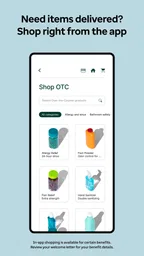
- Makes it easy to browse qualifying products
- Barcode scanning helps check product eligibility
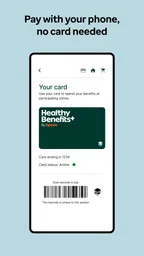
- Offers a digital card for use at checkout
- Can help users make the most of their benefits
What could be better
- Eligibility depends on your specific benefit plan
- Some purchases may require receipt submission
- Rewards and eligible products can change over time
- Requires an internet connection for many features
- Availability and features vary by location





