
Microphone Amplifier review
 Analysis by Appsdrops
I’d treat Microphone Amplifier as a practical listening aid, not as a replacement for hearing care or a promise of clearer sound in every situation. Its purpose is straightforward: it uses a phone’s microphone or a headset microphone to make nearby sound easier to hear. That can be useful when a quiet voice or a low-level sound is hard to pick up, but the result depends on the room, the microphone, and how the phone is positioned. My main advice is to try it in a calm, controlled setting first and keep the volume comfortable.
Microphone Amplifier is a free medical app from DOSA Apps. It has an average rating of 4.2 from around 72,000 ratings, and it has been installed over 10 million times. Those figures suggest broad interest, though they cannot tell me whether it will suit a particular person’s hearing or phone. The app is rated for Everyone, and its current version is 13.1.1. In-app purchases are available, with listed prices ranging from $0.99 to $99.99 per item, so I would check the purchase details in the app store before choosing any optional item.
Trust starts with a narrow, understandable purpose
For a listening tool, trust begins with knowing what job it is meant to do. This app is an audio amplifier: it takes sound from a microphone and makes it louder for listening. That is different from a hearing test, a diagnostic service, or a device that corrects hearing loss. I would use it as an occasional aid for hearing nearby speech or sound, not as evidence about my hearing health.
That distinction matters in ordinary life. If I am struggling to follow a conversation in a quiet room, a microphone close to the speaker may help me hear more of their voice. In a noisy restaurant, however, the same approach may also make clatter, nearby conversations, and other unwanted sounds more prominent. Amplification can increase the level of what the microphone captures; it does not know which sound I care about.
The app’s maker is DOSA Apps, and the app has been available since August 16, 2019. It runs on Android 5.0 or later. That broad minimum makes it relevant to some older Android phones, but compatibility alone does not guarantee good results: microphones differ, and a phone tucked into a pocket will capture sound differently from one placed near the person speaking.
What I would check before relying on it
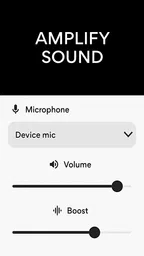
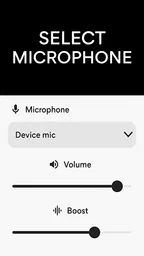
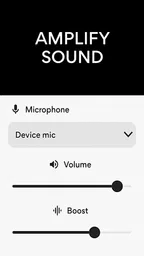
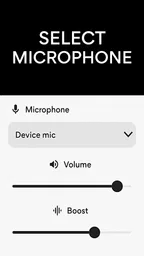
The store summary describes microphone input from either the phone or a headset microphone. That gives the app two useful starting points, but it also makes the microphone choice part of the experience. A headset microphone can be positioned near the speaker or listener in ways that a phone microphone cannot, depending on the setup. Before an important conversation, I would test both available input options and choose the one that gives the most intelligible sound without uncomfortable loudness.
I would also listen for feedback or echo when the microphone and listening output are close together. This is a practical issue with amplified audio, not a reason to assume the app is faulty. Moving the phone or headset, lowering the level, and avoiding a setup where the microphone faces the speaker can make a meaningful difference. A brief test in the actual room is more useful than assuming one setting will work everywhere.
Permissions and visible choices deserve a careful look
A microphone-based app needs microphone access to perform its core job. I would expect Android to request that permission when microphone use is needed, and I would grant it only if I intend to use the amplifier. I would also check Android’s permission controls if I stop using the app. That is a concrete way to manage access without guessing about what happens to audio after it is captured.
I cannot responsibly infer broader data practices from the app’s purpose alone. A microphone permission does not, by itself, establish whether audio is stored, transmitted, or processed in a particular way. If those details affect your decision, read the privacy information and permission prompts shown in the app store and on your device before use. I would avoid using any microphone app for confidential conversations unless its data practices are clear enough for my comfort.
There is also a useful distinction between granting access and choosing when to use it. I would open the app for a specific listening task, keep the phone in a deliberate position, and stop microphone use when the task is over. If Android offers a permission choice that limits access to active use, that is the kind of visible control I would favor. The exact controls can depend on the Android version, so it is worth checking the device’s own settings rather than assuming every phone presents them the same way.
Small workflow choices can improve the result
One non-obvious trade-off is microphone distance. Moving the phone closer to a speaker may improve the balance between that voice and room noise, but it can make the setup awkward or intrusive. For a family conversation, I might place the phone on a table near the person speaking and explain why it is there. For a one-to-one chat, a headset microphone may be less conspicuous, if its position gives a clean pickup.
Another practical tip is to begin at a low listening level, then raise it gradually. Starting high can make a sudden sound uncomfortable, especially if a door closes or someone speaks loudly near the microphone. I would test with ordinary speech first, then decide whether the app is helping enough to keep using it. If sound becomes harsh or tiring, turning it down or changing position is preferable to simply pushing the volume higher.
Room choice matters too. A quiet room with soft furnishings is generally a more sensible first test than a hard-surfaced room full of reverberation. The reason is simple: an amplifier cannot separate the original voice from echoes that the microphone also picks up. This is a useful boundary to remember when deciding whether poor clarity is a setup issue or a sign that this kind of tool is not the right solution.
How it fits beside other listening options
The usual alternatives range from asking someone to speak more clearly, to moving closer, to using a headset, to relying on dedicated hearing equipment. Microphone Amplifier is most appealing when I want to try a phone-based option without first committing to specialized hardware. Compared with simply turning up a phone’s media volume, its core idea is different: it uses a microphone to pick up surrounding sound rather than just making a saved recording or video louder.
That convenience has limits. A purpose-built hearing device may be a better choice for frequent conversations, consistent all-day use, or situations where a phone-and-microphone setup is cumbersome. A medical professional is the better route if hearing difficulty is persistent, worsening, or affecting safety. The app may help with a specific listening situation, but I would not treat it as a substitute for assessment or a device selected for individual needs.
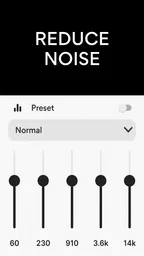
It is also not my first choice for a loud public space. There, increasing microphone input can bring up background noise along with the desired voice. If I need to follow someone in that setting, changing seats, reducing distance, or using equipment designed for that environment may be more effective than relying on general amplification.
Who may find it useful—and who may not
I can see this app helping someone who occasionally wants to hear nearby speech or environmental sound more clearly and is comfortable setting up a phone or headset. It may suit a quiet conversation at home, a lecture where the phone can be placed sensibly, or a brief moment when a small sound is difficult to catch. The useful test is whether it improves understanding at a comfortable level, not merely whether it makes everything louder.
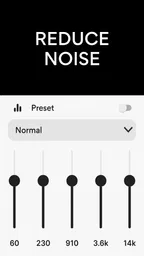
I would skip it if you need dependable hearing support throughout the day, expect it to filter noise automatically, or do not want a phone microphone involved in your listening setup. I would also avoid relying on it to hear alarms or other safety-critical sounds without testing the complete arrangement carefully. A phone can be misplaced, muted, out of battery, or too far from the sound source; those are ordinary limitations of turning a phone into an amplifier.
For a realistic everyday example, imagine trying to follow a relative speaking from across a quiet kitchen. I would place the phone nearer to them, connect the listening output I plan to use, and check that the voice is clear at a modest level. If dishes clatter or another person talks nearby, I would reposition the phone or decide that the environment is too noisy for this approach. That small experiment tells me more than a long session at an arbitrary setting.
A cautious recommendation
Microphone Amplifier is worth trying if you want a simple, phone-based way to make nearby sound louder and understand that the microphone and surroundings shape the result. Its free download lowers the barrier to a short test, while in-app purchases mean I would review any optional purchase carefully rather than assuming every feature is included at no cost. The large audience and 4.2 average offer context, but neither should replace your own comfort and privacy judgment.
My recommendation is conditional: use it for occasional, low-risk listening in a quiet place, keep the volume conservative, and pay attention to microphone access and the app’s visible privacy information. If it consistently helps, it may be a handy tool to keep available. If you need predictable support, clearer speech in noisy settings, or help with ongoing hearing problems, a dedicated hearing solution or professional advice is the more responsible next step. Use it as a listening aid, not as a diagnosis or a guarantee.
What we like
- Simple controls make amplification quick to adjust.
- Works with wired headphones for convenient listening.
- Can help make quiet audio easier to hear.
- Useful for monitoring microphone input in real time.
- Lightweight design is easy to use on the go.
What could be better
- Audio quality depends on the phone's microphone.
- High amplification can introduce background noise.
- Wired headphones may be required for monitoring.
- Some devices may not support every feature.
- Amplification can cause feedback with nearby speakers.





