

UnitedHealthcare review
 Analysis by Appsdrops
I find that UnitedHealthcare is most useful when I treat it as a practical companion to my health plan, rather than as a general medical app. Its focus is helping members find care and understand what that care may cost, which can be valuable when I am choosing where to go or trying to make sense of a plan-related decision. The key is that its usefulness depends on the details of your coverage and the providers available to you; it is not a substitute for a clinician or a guarantee that a particular service will be covered.
Published by UNITED HEALTHCARE SERVICES, INC., this free medical app is rated for Everyone. It has a 4.6 average from around 250,000 ratings and over 5 million installs, which suggests that many people use it as part of managing their healthcare. I would recommend trying it if you already have a UnitedHealthcare plan and want a convenient way to explore care options. If you are not a member, its central purpose may not match what you need.
Where finding care can get confusing
The most useful way to approach the app is with a specific question in mind: where might I look for care, and what should I check before choosing? Searching without first considering your plan can produce a less useful experience. Health coverage is personal, and provider availability, costs, and plan rules can differ. I would therefore treat results as a starting point for a decision, not as a final promise about the bill.
That distinction matters most when time is short. Imagine you are arranging a routine appointment and comparing possible care options. Rather than choosing the first convenient result, I would check that the provider appears relevant to my coverage, compare the cost information shown, and confirm important details before booking. A quick check can help narrow the choices, but calling the provider or the insurer may still be sensible if the visit is unusual or the price has a major effect on your decision.
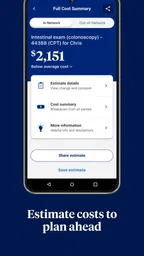
Cost information is helpful only when you understand what it represents. An estimate is not necessarily the same as the amount you will ultimately owe: the service performed, the provider’s billing, and the specifics of your plan can all matter. I see the app’s value as making a comparison easier to begin, not removing every uncertainty from healthcare pricing. If a number looks surprising, pause and verify what service and circumstances it applies to.
There is also a practical difference between finding a place to receive care and deciding what kind of care is medically appropriate. The app can support the first task, but it cannot assess symptoms or replace professional advice. For a serious or rapidly worsening health concern, I would prioritize appropriate medical help rather than spend time trying to optimize a routine search or estimate.
Make a specific search more useful
A small but useful habit is to decide what you need before opening the search. Are you looking for a particular kind of provider, checking a likely cost, or comparing locations? Keeping the question narrow makes it easier to notice whether the information answers it. It also reduces the temptation to treat a broad set of results as a recommendation.
I would also keep a note of the exact provider, service, and plan details involved in a decision. That makes it easier to ask a clear follow-up question if something does not line up. In healthcare, a small difference in the service or billing description can change what an estimate means, so remembering what you actually compared is more useful than relying on a vague impression from a quick search.
Setup checks that prevent avoidable frustration
Before relying on the app for a care decision, I would make sure I am using the correct UnitedHealthcare account and that the plan information shown is the one I expect. This is a basic check, but it can prevent a common kind of confusion: looking at information associated with the wrong coverage or assuming that an old detail still applies. If something seems inconsistent, check the account and plan context before drawing conclusions from a search result.
It helps to have the information needed to sign in or verify the account ready before starting. If access fails, I would first check that the credentials are entered as intended and follow the app’s own account-recovery prompts. I would avoid repeatedly guessing details, especially if the account may have a security check or a temporary access issue. If the app cannot resolve the problem, using UnitedHealthcare’s official support channels is a more reliable next step than trying random fixes.
Keep the app current as well. The installed version is 3.16.0, and the minimum operating system is version 10. If you run into a problem, checking for an available update and confirming that your device meets the operating-system requirement are sensible first steps. These checks do not guarantee that every issue will disappear, but they help separate basic compatibility trouble from a problem with a particular search or account.
One useful trade-off is that an app can make plan information feel close at hand, while still requiring you to interpret it carefully. I would not assume that a visible estimate answers every coverage question, especially before a costly or specialized service. In those cases, prepare the provider’s name and the exact service you are considering, then confirm the relevant details through an appropriate UnitedHealthcare contact or directly with the provider.
Use the app as a planning aid, not a final confirmation
For non-urgent care, I would use the app early in the process, when I still have time to compare options. That is a better moment to investigate likely costs and check a provider than when I am already at an appointment. For a decision with financial consequences, a second confirmation can be worthwhile even when the app’s information appears clear.
If you are helping a family member, do not assume that information for one person automatically applies to another. Check that you are considering the right member and coverage before using the results to make plans. This is a simple, non-technical check, but it is especially important in households where more than one person uses the same device or where plan details differ.
Recovering a stalled search or account task
When a search does not produce what I expect, I would first review the wording and the details I entered rather than immediately concluding that the app is broken. A narrow or highly specific search can be harder to interpret than a broader one. Try simplifying the request, then compare the result with the provider or service you intended to find. If the app presents cost information, make sure you are comparing like with like rather than treating two different services as equivalent.
If a page appears not to load or an action seems stuck, a calm sequence is better than repeating the same tap. I would give the app a moment, check that the device has a working connection, then close and reopen the app if needed. If the issue continues, check for an update and try again later. These are general troubleshooting steps, not a promise that a temporary service interruption can be fixed on the device.
For sign-in trouble, separate account access from search trouble. If you cannot reach your account, use the recovery process offered in the app rather than spending time changing unrelated search settings. If you can sign in but one particular result is unclear, keep a note of what you searched for and seek clarification through an official support route. This makes the follow-up more focused and can save you from repeating the whole process.
A practical recovery tip is to preserve the decision context: the plan you were checking, the provider or service, and the question that remains unresolved. That information is useful whether you return to the app later or contact support. It also helps prevent an estimate from being remembered as a confirmed charge after the details have slipped from view.
When the app may not be the cause
Not every disappointing result points to a technical fault. A provider may not appear for reasons connected to the search, the coverage being checked, or the information available for that particular situation. I would avoid assuming that a missing result proves a provider is unavailable, just as I would not assume that a result guarantees coverage. When the choice matters, confirm it with the relevant provider or UnitedHealthcare before relying on it.
Likewise, a cost that differs from what you expected may reflect a mismatch between the service you searched and the service eventually provided, or other details of the visit. The app can help you investigate, but it cannot make every billing circumstance predictable in advance. If you receive an estimate that seems inconsistent, ask what assumptions it uses and verify the details before making a decision based on it.
This is where the app compares well with general-purpose search tools, but also where its limits become clear. A web search or map can help locate nearby care, yet it may not give the same plan-oriented context. On the other hand, neither a map result nor a cost estimate should replace direct confirmation when coverage, availability, or a complex service is at stake. I would use a general search for broad location discovery and UnitedHealthcare for plan-related exploration, then verify the important details with the people involved.
It is not the right choice for someone seeking diagnosis, emergency guidance, or a complete medical record in place of professional care. Its purpose is narrower: to support finding care and considering price. If you want a broad wellness tracker or an independent directory that is not tied to UnitedHealthcare, another tool may suit you better. The app makes the most sense when its connection to your plan is an advantage rather than a limitation.
Who should use it, and my practical verdict
I would suggest UnitedHealthcare to members who want to do some groundwork before arranging care, especially when they are comparing providers or trying to understand likely costs. It is most helpful when you can use it without pressure: check the plan context, explore the available information, and follow up on anything that could change your decision. For someone who already knows exactly where they are going and does not need plan-related information, the app may add little to that particular task.
The strongest approach is to use it in stages. Start with a clear care question, check that you are looking at the right account and plan, and use the result to narrow your options. Then confirm important provider or cost details if the decision is expensive, specialized, or time-sensitive. That workflow gets practical value from the app without asking it to do more than a care-finding tool reasonably can.
There is a small learning curve in knowing how much confidence to place in what you see. I would treat the app as a useful guide, not an authority over every real-world detail. That balanced expectation is important: the convenience of checking care information on a phone is real, but health coverage can involve context that a quick search cannot settle on its own.
Overall, UnitedHealthcare is worth considering if you are covered by UnitedHealthcare and want a mobile starting point for care and price decisions. It is free, has a broad user base, and has a clear purpose. I would keep it available for planning and comparisons, while relying on direct confirmation and professional care when the situation calls for more certainty. Its best role is helping you ask better questions before you choose—not making the choice for you.
What we like
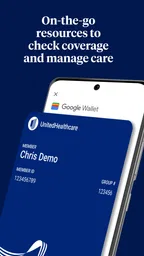
- Offers access to digital health ID cards and plan details.
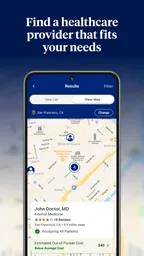
- Includes tools for finding in-network doctors and care facilities.
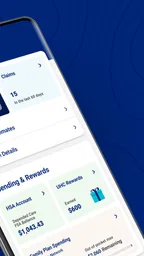
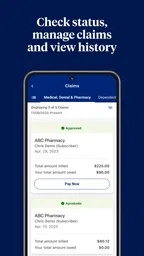
- Lets members review claims and track deductible progress.
- Provides access to wellness programs and health resources.
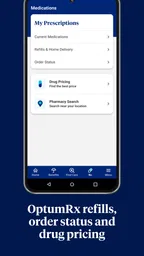
- Supports appointment and prescription management for eligible plans.
What could be better
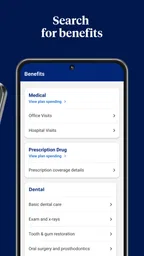
- Features and access vary depending on the member's specific plan.
- Some tools require a separate account or additional verification.
- Provider directory information may need confirmation before booking.
- Certain services may not be available in every location.
- The app is mainly useful to UnitedHealthcare members.




