
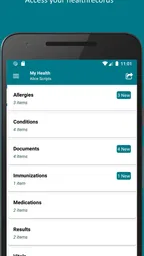
FollowMyHealth® review
 Analysis by Appsdrops
I think of FollowMyHealth® as a place to organize healthcare information, not as a replacement for a clinic’s own care or for an urgent call to a medical professional. That distinction matters when judging how quickly it feels: a record-management app is useful when it helps me find or keep track of information, while the time-sensitive parts of care still depend on the healthcare providers and services involved.
Developed by Veradigm LLC, this free medical app is designed around a universal health record. Its rating averages 4.7 from around 190,000 ratings, and it has been installed over 5 million times. Those figures suggest that many people find a record-focused mobile tool worth keeping, but they do not guarantee that every clinic, record, or task will work the same way for every user. My recommendation is to treat it as a practical organizing layer and judge its usefulness by how well it fits the healthcare relationships you already have.
What to expect when opening a health-record app
FollowMyHealth is not the kind of app where speed should be measured only by how quickly a screen appears. The meaningful question is whether I can get to the information I need without confusion, and whether that information is available through the healthcare setup I use. A fast interface cannot make a record useful if the relevant provider information is not connected or kept current.
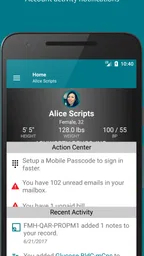
For ordinary planning, that can still be valuable. Before an appointment, I may want to check what I have already recorded, gather details to discuss, or avoid relying on memory alone. The app’s central promise is having a healthcare record in one place; the practical benefit is less about browsing for its own sake and more about arriving at a conversation better prepared.
I would not assume that every action will feel immediate. Healthcare information may involve systems and records beyond the app itself, so apparent waiting can be different from a sluggish phone screen. If something important is taking time to appear, I would avoid repeatedly tapping or assuming that a delayed display means the information is missing. For urgent symptoms or time-critical instructions, I would contact the appropriate care provider directly rather than wait on an app.
Use it to prepare, not to replace care
A useful habit is to open the record when I have time, rather than first reaching for it in the middle of a stressful appointment or a rushed conversation. I can check what information is available, note questions, and make sure I know where to look later. That small preparation step makes a record tool more helpful than treating it as an emergency reference.
For example, before a routine visit, I might review the information I have access to and write down questions about something I want to raise. During the appointment, I can use that preparation to keep the discussion focused. This is a realistic role for a health-record app: it helps me manage my side of the conversation, while the clinician remains the source for diagnosis and treatment decisions.
Where heavier use can become demanding
The app is most likely to feel demanding when I expect one screen to answer every healthcare question at once. A universal record sounds simple, but healthcare information is often spread across providers, visits, and the patient’s own recollection. The practical work is deciding what I need from the app and then checking that the information I am relying on is relevant to that purpose.
I would also be cautious about using a single digital record as the only preparation for an appointment. If a detail is essential, I would confirm it with the provider or consult the original instructions I received. That is not a criticism unique to this app; it is a sensible safeguard whenever a person uses a mobile record to support real medical decisions. The app can help me organize, but I should not treat it as a substitute for professional interpretation.
One useful trade-off is that a central record can reduce the effort of keeping track of healthcare information, yet it can also create an expectation that everything is complete and instantly available. I would approach it as a convenient reference, not a guarantee that every part of my history is represented. For a complicated care situation, keeping a personal list of questions and confirming key details with the care team remains worthwhile.
There is also a difference between frequent use and useful use. Someone who checks health information often may appreciate having a dedicated place to return to. Someone who only needs an occasional appointment reminder or a single provider’s instructions may find that a clinic-specific tool or the original paperwork is simpler. The better choice depends on whether organizing records across healthcare needs is an ongoing task for you.
Reliability means knowing what to trust
For me, reliability in a medical app is not just whether it opens consistently. It also means knowing when the app is a convenient reference and when I should verify something directly. If I am preparing for a routine discussion, a record can help me remember what to ask. If I need a definitive answer about a current treatment instruction, I would use the provider’s guidance rather than infer an answer from a general record view.
This distinction makes the app more useful, not less. It gives me a clear role for the tool without asking it to do the work of a clinician. If an item seems outdated, incomplete, or different from what I was told, I would treat that as a prompt to clarify the discrepancy. I would not silently assume that whichever version I saw most recently must be correct.
For day-to-day stability, I would keep the app updated and use a dependable connection when I need to review information. Those are sensible practices for any record-oriented app, especially when I am planning around a visit. They do not guarantee that every record will be immediately available, but they help separate a local device or connection issue from a question that belongs with the healthcare provider.
Device fit and sensible expectations
The app is rated for Everyone and is free, which makes it approachable for people who want to try a healthcare-record tool without paying up front. It requires Android 10 or newer, so an older Android device may not be suitable. That compatibility requirement is worth checking before relying on the app as part of an appointment routine.
I would also consider the device in practical terms. A phone with little free storage, an unreliable connection, or a screen that is difficult for the user to read can make any healthcare workflow more frustrating. If another family member helps manage appointments, it is sensible to agree on who is responsible for checking information and how important details will be confirmed. The app does not remove the need for careful communication between the patient, helper, and provider.
On performance, I would not judge it by an invented benchmark or promise that every device will behave identically. A health-record tool can feel responsive for ordinary navigation and still depend on circumstances outside the phone when information is being retrieved. If access is slow at a particular moment, I would try again when the connection is stable, then use the appropriate provider contact if the information is needed promptly.
FollowMyHealth is currently at version 2026.10.21. For a person who relies on a digital record as part of their routine, keeping an app current is a reasonable way to avoid using an old build. I would still make sure that I know how to reach my provider outside the app, because a mobile record should not be the only route to information or help.
How it compares with familiar alternatives
The usual alternative is to rely on separate provider apps, printed paperwork, or personal notes. A provider-specific app may be more direct when I only need to handle tasks tied to one healthcare organization. Paper instructions can be easier to consult when I am offline or when I want to bring a physical copy to a visit. A personal note can be the quickest way to collect questions, but it requires me to maintain the information myself.
The appeal of FollowMyHealth is its focus on a universal health record rather than a single, narrow task. That makes it a better fit for someone who wants a central place to manage healthcare information, while a clinic’s own app may be more convenient for a task that belongs solely to that clinic. I would not choose one by reputation alone; I would choose based on where my useful records and care relationships actually are.
A practical approach is to keep the app as the organizing reference while retaining the original instructions or provider contact details for anything consequential. That gives me the convenience of a digital record without making a phone screen the sole authority. It is especially sensible for people who manage appointments across more than one part of their care, or who want to arrive with better questions prepared.
Who is likely to get the most from it
I would recommend the app to people who want a dedicated way to manage healthcare information and are willing to make it part of their routine. It may be particularly helpful for someone who has several appointments to keep straight, wants to prepare before speaking with a clinician, or prefers a digital reference to scattered notes. The benefit grows when I return to it with a clear purpose rather than expecting it to solve every administrative or medical task.
I would be less enthusiastic about it for someone who only needs a single provider’s service and already has a simple way to access that information. A clinic-specific option may be more direct in that situation. It may also be a poor fit for anyone who expects immediate answers in an urgent situation, or who is uncomfortable relying on a phone for personal healthcare organization. In those cases, direct provider contact and a familiar offline backup are more appropriate.
The large audience and strong average rating make it a credible option to consider, but neither should outweigh personal fit. A record tool is only useful if it works with the way you manage care and if you understand its limits. I would try it with a low-pressure task first, such as preparing for a routine appointment, before depending on it as part of a more involved workflow.
My performance verdict
FollowMyHealth is best judged as a practical healthcare organizer, not as a promise of instant access or a substitute for medical advice. Its main strength is the idea of having a universal record to support the way I prepare for and manage care. Its main trade-off is that a central app can encourage expectations of completeness and immediacy that should be checked against the information and guidance provided by the care team.
My advice is to use it deliberately: open it ahead of routine appointments, use it to organize questions, and confirm consequential details with the appropriate provider. Keep an alternative contact route for urgent needs, and do not assume that a delay or discrepancy should be resolved by guessing. If you want a free medical app for managing healthcare information and your device meets the Android 10 requirement, FollowMyHealth® is a reasonable tool to try. I would recommend it most to people who value a central record and least to those who need a single clinic task or immediate clinical guidance.
What we like
- One account can connect you with multiple participating healthcare providers.
- The app supports biometric sign-in on compatible devices.
- You can manage appointments without calling the provider's office.
- Medication lists are easy to review between visits.
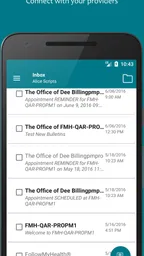
- Secure messaging offers a convenient way to contact care teams.
What could be better
- Features vary depending on whether your provider participates.
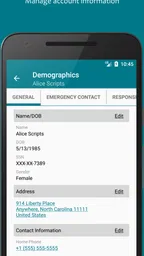
- Some account setup steps require identity verification.
- Messages may not receive an immediate response.
- Not every appointment can be booked or changed in the app.
- Access to records can depend on provider data-sharing settings.





