


Period Tracker and Calendar review
 Analysis by Appsdrops
I see Period Tracker and Calendar as a practical everyday log, not a crystal ball. It helps organize cycle dates, fertility estimates, and symptoms in one place, which can make patterns easier to notice over time. That distinction matters: a calendar prediction is a planning aid, not a diagnosis or a guarantee of when ovulation will happen.
A familiar tracker with a broader purpose
SimpleInnovation’s medical app is free to start, rated for Everyone, and has reached more than ten million installs. Its average rating is 4.9 from around 561,000 ratings, with about 13,000 written reviews. Those figures suggest a widely used product, but they are not a substitute for deciding whether its approach suits your own needs.
The current version is 13.6.0, and the app first appeared on August 16, 2015. That long-running presence and continuing version number show that it is an established product rather than a newly launched tracker. They do not, by themselves, tell me exactly what has changed between releases, so I would not treat them as proof of any particular new feature or redesign.
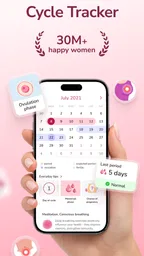
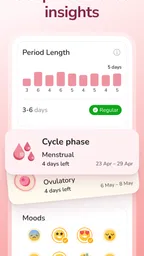
In use, the core appeal is straightforward: record period dates and symptoms, then refer back to a calendar that estimates upcoming cycle milestones. Fertility tracking and a pregnancy mode give the app a wider role than a simple monthly reminder. I would choose it if I wanted one place to build a personal history and check likely dates, rather than relying on memory or scattered notes.
Why the calendar is useful—and where it stops
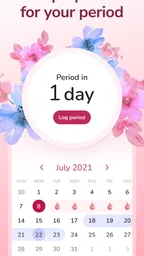
A prediction becomes more useful when it has consistent entries behind it. If you log the first day of each period and keep symptom notes reasonably current, the calendar can help you plan around your usual rhythm. It may also prompt you to notice that a symptom tends to appear at a particular point in your cycle. That is a useful observation to take to a clinician, though it cannot explain the cause on its own.
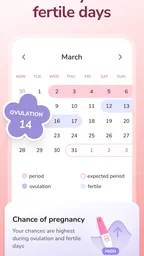
I would be careful about treating the fertile window as a precise schedule. Cycle timing can vary, and an app’s estimate cannot confirm ovulation or prevent pregnancy. If you are using fertility awareness to make a high-stakes decision, a prediction alone is not an adequate method; seek guidance from a qualified health professional and use a suitable approach for your circumstances.
One useful habit is to enter a date as soon as you can, rather than reconstructing several months from memory later. A second is to distinguish a symptom you actually experienced from one you are merely monitoring. That keeps the record more meaningful and reduces the temptation to read too much into a calendar that is built from your entries.
How I would fit it into an ordinary week
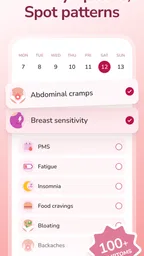
Imagine noticing cramps and a headache during a busy workweek, then wondering later whether they appeared before your period last month too. A quick symptom entry gives you something more reliable than a vague recollection. When the next cycle arrives, you can look back for a possible pattern and decide whether it is worth discussing with a clinician. The app is most helpful in that modest role: it helps you remember and compare, rather than telling you what a symptom means.
For someone trying to conceive, fertility estimates can make a cycle calendar easier to use for planning. I would still treat those dates as a rough guide and avoid assuming that a predicted window guarantees the best timing. If cycles are irregular, entries are incomplete, or dates change unexpectedly, the estimate may be less useful. In those situations, a clinician or a more tailored fertility plan may be a better next step than expecting a tracker to resolve uncertainty.
Pregnancy mode may appeal to users whose needs shift after conception, since it gives the app a purpose beyond predicting the next period. I would approach that as a tracking convenience, not as prenatal care or a source of medical reassurance. People who need clinical monitoring should follow the advice of their healthcare team and use the app only as a supporting record if it helps them.
What the long-running product does—and does not—establish
The app’s version history is a reason to expect that it has been maintained, but the confirmed current version does not establish which capabilities were added or changed over time. I can speak to the product’s present-day scope—cycle and symptom tracking, predictions, and pregnancy mode—without claiming that any one of those elements arrived in a particular update. That separation is useful for existing users: a version number tells you what build you are using, not whether your favorite workflow has changed.
If you have used it for a while, the practical test is whether your saved routine still works for you. Check that you can enter the dates and notes you care about, and review the calendar before relying on an estimate for planning. If an update changes an interaction you depend on, adapting your routine may be more useful than assuming that the displayed prediction is automatically more accurate simply because the app is newer.
For a first-time user, the main benefit of starting now is that you can begin building a record from this point onward. Do not expect a detailed personal pattern to appear immediately: a tracker can only work with the history you give it. A few careful entries are more valuable than trying to log every possible detail and then abandoning the habit.
Where it compares well with basic alternatives
Compared with writing dates in a phone calendar, this app is purpose-built around cycle history, symptom tracking, fertility estimates, and a pregnancy mode. A general calendar can be simpler if you only need a reminder for an expected period and do not want to keep health notes. A paper diary may suit someone who prefers a fully offline-feeling routine or wants total control over how records are organized, while a clinician-guided tool is more appropriate when symptoms or fertility concerns need individualized advice.
The trade-off is that a specialized tracker encourages you to collect intimate health details in an app. Before entering anything you would consider sensitive, I would review the app’s privacy information and decide whether you are comfortable with the way it handles your records. This is a sensible check for any health app, not a claim about a particular policy. If you would rather not keep cycle data digitally, a paper record may be the better fit.
It also may not be the right choice for someone seeking a diagnostic tool, a guaranteed contraception method, or a substitute for a medical appointment. The app can help you organize observations, but it cannot determine why cycles are irregular or whether a symptom is medically significant. If your priority is clinical interpretation, professional care is the better option.
Cost, compatibility, and everyday friction
The app is free to download, with in-app purchases ranging from $1.99 to $69.99 per item. That makes it possible to begin without an upfront purchase, but I would check what a paid item includes before buying and decide whether the free experience already covers your routine. The range is broad enough that a user should make that choice deliberately rather than assuming every feature is included at no cost.
It requires operating system version 7.0 or later. That is helpful if you are checking compatibility on an older device, though compatibility alone does not say how smoothly the app will run on every phone. If you share a device, consider whether a personal health tracker is appropriate for that arrangement before adding private entries.
The main friction is the commitment to logging. Skipped dates and inconsistent notes weaken the value of later comparisons, while recording too much can make the habit feel like work. I recommend starting with period dates and only the symptoms you genuinely want to understand. Add more detail only if it helps answer a real question you have.
Who should use it, and what to watch next
I would recommend it to someone who wants a dedicated place to follow cycle dates, keep symptom notes, and consult fertility estimates, especially if they have been relying on memory. It is also worth considering for users who want pregnancy mode available as their needs change. I would steer away from it if you expect exact ovulation dates, medical conclusions, or a hands-off tracker that produces a useful personal history without regular entries.
As the product continues at version 13.6.0, the sensible things to watch are whether future releases make everyday logging clearer, whether the calendar remains easy to interpret, and whether the app keeps its paid options understandable. Those are expectations for what would matter to a user, not claims about changes already made. I would judge any update by whether it improves a real task—entering a date, finding a pattern, or reviewing a prediction—rather than by a larger version number alone.
Overall, Period Tracker and Calendar is a solid fit for personal organization when you understand the limits of its predictions. I like the combination of cycle history, symptom notes, and pregnancy mode, but I would use it as a record-keeping companion rather than a medical authority. If that is the role you want, starting with a few consistent entries is the best way to find out whether it earns a place in your routine.
What we like
- The calendar makes it easy to review cycle dates at a glance.
- Custom reminders can help you prepare for upcoming periods.
- Logging symptoms may reveal patterns across multiple cycles.
- A cycle history can help you discuss changes with a healthcare provider.
- Personalized settings let you tailor tracking to your routine.
What could be better
- Cycle predictions may be less reliable when periods are irregular.
- Frequent manual logging can feel tedious over time.
- Health data may be sensitive so review the privacy policy carefully.
- Notifications can be easy to miss if alerts are disabled.
- Tracking estimates should not be used as medical advice.





