

Life360: Family Safety & GPS review
 Analysis by Appsdrops
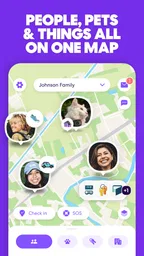
I find Life360 most useful when a family wants a shared way to check that everyone has arrived safely, rather than another stream of messages asking “Where are you?” It brings location sharing together with crash alerts, driver reports, and other safety tools. That combination can make everyday coordination calmer, but it also asks everyone in the group to be comfortable sharing location. Whether that feels reassuring or intrusive is the decision to make before installing it.
What the free access does—and what paid plans change
Life360 is a free lifestyle app from Life360, with in-app purchases listed from $1.49 to $249.99 per item. That broad range makes one point especially important: the free download and paid options are different parts of the value question. The app is available without an upfront purchase, while the price of any particular paid option depends on what is offered in the app. I would check the current purchase screen and its terms before paying, rather than assume that every safety feature is included at no cost.
For someone considering a shared location tool, the free entry point makes it easier to try the basic family workflow before committing money. But “free” does not mean that every feature or level of service is free. I would first decide what the household actually needs—routine location checks, driving-related information, or more—and then see whether the app’s current paid choices address that need. If the free experience already solves the practical problem, there may be no reason to buy anything.
The app is rated for Everyone, which makes it broadly accessible, though that age label does not settle the more personal question of whether a child or adult should share their location. I would treat consent and expectations as a family conversation, not as a setting to skip through. Explain who can see what, when location sharing is expected, and how the group will use alerts. A safety app works best when it supports trust rather than becoming a tool for constant checking.
Where the value shows up in daily life
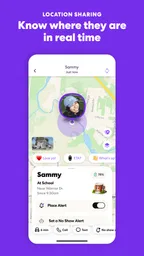
The strongest case for Life360 is the way it can turn several separate check-ins into one shared routine. Imagine a teenager heading home after an evening activity while a parent is preparing dinner. Instead of sending repeated texts, the parent can use the shared location view to see whether the trip is progressing, then pay attention to an alert if one arrives. That is a small convenience, but it can remove a surprising amount of low-level worry from a busy evening.
Location sharing is most useful when it answers a specific question: has someone left work, is a family member close to the agreed meeting point, or has everyone made it home? It is less useful as a reason to monitor every movement. I recommend agreeing on a few practical situations where checking the app is welcome. That boundary keeps the tool focused on coordination and helps prevent routine location updates from turning into a substitute for conversation.
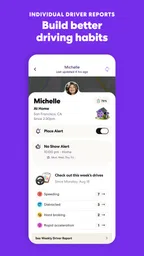
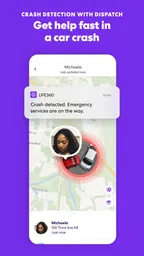
Crash alerts and driver reports add a different kind of value from a map. They make the app relevant to households with people who drive, not just families trying to coordinate pickups. A parent might use the location view to know when a driver is likely to arrive, while treating a crash alert as a prompt to check in directly. Driver reports can also make driving behavior part of the discussion, but I would use them as a starting point for a calm conversation, not as a definitive verdict about someone’s driving.
A practical setup tip is to agree on who belongs in the shared group and what each person expects from it before relying on the app. Families often have different needs: one person wants reassurance during a commute, another only wants to share during a long trip. Discussing those expectations early can prevent an everyday feature from feeling like a demand for permanent oversight. It also helps members understand that an alert is a cue to follow up, not a complete account of what happened.
Life360’s scale suggests that it has broad appeal: it has more than 100 million installs, around 2.5 million ratings, and an average rating of 4.8. Those figures may help a new user feel that the app is established, but they cannot tell you whether a particular household will like sharing location. The more useful test is whether your family can agree on a clear purpose for using it and whether its alerts fit that purpose without adding unnecessary friction.
How it compares with simpler alternatives
The usual alternative is a mix of messaging, calls, and the location-sharing tools already available on a phone. Those options can be enough if the family only needs occasional coordination. A quick message is often better than opening a dedicated app when the question is simply “Are you on your way?” Likewise, a household that already shares location through its phone’s built-in tools may not gain enough from adding another service.
Life360 makes more sense when a family wants location sharing alongside driving-related alerts and reports in one place. That is its practical distinction from a basic map share or a family group chat. The tradeoff is that every additional safety feature can add another reason to check the app. If your goal is only to find one person during a trip, a simpler option may be easier to understand and less demanding to maintain.
I would also separate “having an alert” from “knowing the full situation.” A notification can prompt a timely call, but it should not replace asking the person what happened. This matters especially when families use driver reports to judge an individual’s habits. The app can inform a conversation; it cannot provide the empathy or context that conversation requires.
Tradeoffs worth considering before installing
The main tradeoff is privacy. Shared location can be reassuring for someone who wants their family to know they have arrived, but uncomfortable for someone who sees continuous visibility as too much. It is worth discussing the boundary before asking relatives to join. If a family member does not want to participate, pressuring them may damage trust and undermine the very sense of safety the app is meant to support.
There is also the practical cost of attention. Alerts can be helpful when they correspond to a meaningful event, yet a household that checks the map constantly may end up more anxious rather than less. I would avoid turning every trip into a running commentary. Decide which alerts deserve a response, and when a normal delay should simply be handled with a direct message or call.
Paid options deserve the same careful approach. The listed in-app purchase range is wide, so I would not treat the lowest price as representative of all paid access or assume the most expensive option is necessary. Compare the specific purchase details shown in the app with the features your family will genuinely use. If you cannot identify a clear benefit over the free experience, waiting is a sensible choice.
Life360 is currently at version 26.40.0 and requires Android 10 or later. Before building it into a family routine, check that everyone’s device can run it and that each person is willing to keep using it. A shared system is only useful when the people who need it can participate consistently; if one member cannot or does not want to, the family should keep a simpler backup plan, such as agreed check-in messages.
Who is likely to get the most from it
I think the best fit is a household with several people who regularly travel separately and genuinely want a shared safety routine. Parents coordinating school pickups, relatives checking on one another during commutes, or families with drivers who want crash alerts and driving information may find the all-in-one approach worthwhile. The value comes less from staring at a map and more from having a shared place to coordinate and respond when a meaningful alert appears.
It is a weaker fit for someone who wants an occasional location share, dislikes being tracked, or already has a simple arrangement that works. It may also be the wrong choice for a family that would use driver reports to police each other rather than discuss safety openly. In those cases, a phone’s basic location-sharing option, direct messages, or a clear check-in agreement may deliver enough reassurance with fewer expectations attached.
Life360 is a free app in the lifestyle category, developed by Life360, and it has been available since April 7, 2010. Its broad adoption and high average rating are encouraging, but the right reason to choose it is more specific: your household has a real coordination or driving-safety need that the shared tools can address. The content rating is Everyone, while the app’s usefulness still depends on adults setting sensible boundaries and making sure younger family members understand those boundaries.
My buy-or-skip verdict
I would try Life360 if my family wanted location sharing and driving-related safety features in one place, and if everyone involved agreed on how to use them. I would begin with the free access, set a narrow purpose for checking the app, and consider a paid purchase only after seeing a concrete need for the particular option. That approach makes the cost decision practical instead of letting a long feature list decide for you.
I would skip it if the family only needs occasional check-ins, if people are uncomfortable with ongoing location sharing, or if the app would create more arguments than reassurance. In that situation, a short message or a simpler built-in location tool is probably the better fit. For households that want a shared safety routine and can use it respectfully, though, Life360 offers a useful combination of location visibility, crash alerts, and driver information without an upfront charge. The best value comes from purposeful use, not constant monitoring.
What we like
- Location alerts can help families coordinate arrivals and departures.
- The driving report can provide useful feedback about driving habits.
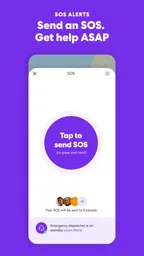
- An SOS feature can help members request assistance in an emergency.
- Place notifications reduce the need to repeatedly ask where someone is.
- Circle settings let families choose who can see their location.
What could be better
- Continuous location sharing can raise privacy concerns.
- Some useful features require a paid subscription.
- GPS accuracy may vary indoors or in areas with weak signal.
- Background location tracking can increase battery use.
- All Circle members need compatible devices and app access for full use.




