
Great Clips Online Check-in review
 Analysis by Appsdrops
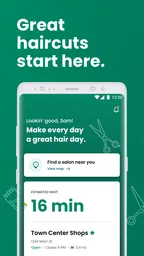
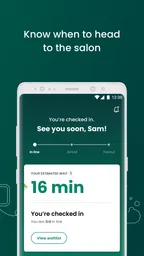
I see Great Clips Online Check-In as a practical companion for one particular errand: getting a place in line at a Great Clips salon without having to begin the process at the counter. The appeal is straightforward, but the useful part is knowing what the app can—and cannot—make easier. It can help me check wait times and check in ahead of a haircut; it does not turn a walk-in salon visit into a guaranteed appointment or remove every uncertainty from a busy day.
Where the check-in process can feel unclear
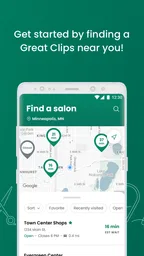
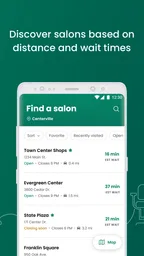
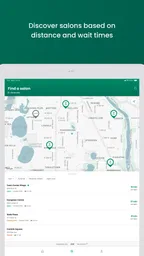
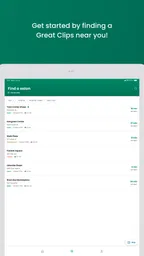
The first thing I’d do is choose the salon I actually plan to visit and look at its wait time before setting out. That sounds obvious, but it matters when several locations are convenient: a short wait at one salon is only helpful if that branch works for my route and schedule. Checking the wrong location can create confusion that looks like an app problem when it is really a selection mistake.
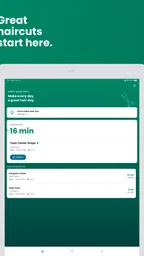
Online check-in is best understood as a way to join a salon’s line ahead of arriving, rather than as a conventional appointment booked for a precise time. I wouldn’t plan a tightly timed commitment around an estimated wait. Salon traffic can shift while I’m travelling, and a wait-time display is a planning aid, not a promise that a stylist will be ready at an exact minute.
That distinction is especially useful for families or anyone with a narrow window between errands. I can use the displayed wait to decide whether to head over, choose another time, or reconsider the visit. If the estimate already makes the trip impractical, checking in anyway may not solve the real problem. The app helps me make a better decision; it cannot make a crowded period move faster.
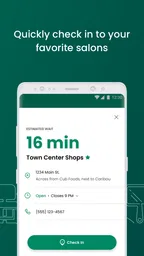
Another potential stumbling point is assuming that every screen represents a completed check-in. I’d take a moment to read the final status shown in the app and make sure I have selected the intended salon before relying on it. If I’m unsure whether the process finished, repeating actions without checking could add uncertainty rather than fix it. A quick review of the selected location and current status is a more sensible first step.
Make the location and timing work together
My practical approach is to compare the wait with the whole trip, not just the time spent in the salon. If I’m already nearby, a longer wait may be acceptable. If I’m driving across town specifically for a haircut, the same estimate could make another day or location the better choice. This simple calculation is more valuable than treating the displayed wait as a stand-alone number.
I’d also avoid checking in far in advance and then assuming I can continue with an unrelated day indefinitely. The point is to coordinate arrival with the salon’s line, so I would check the current information close to when I can realistically leave. That workflow reduces the chance of basing plans on details I saw much earlier.
Setup checks before relying on it
Great Clips is a free lifestyle app from Great Clips, Inc., and its purpose is focused rather than broad: salon wait information and online check-in. It is listed for Everyone and requires iOS 12 or later. The current version is 6.91.0 (2026102002). I’d make sure the app is installed on a compatible device and updated through the app store if something seems out of step, then reopen it and check the salon selection again.
Before starting, I’d confirm that the app is showing the branch I intend to visit. This is a small but important check because the most common useful decision—whether to go now—depends on the right location’s wait, not a nearby branch with a more attractive estimate. If I’m going to a salon I haven’t visited before, I’d verify the location on the screen rather than relying on memory or a familiar-looking name.
A second helpful habit is to check that the phone has a working internet connection before trying to view current information or submit a check-in. If a screen does not update, I’d first move to a reliable connection or briefly reopen the app, then inspect the status again. This is general troubleshooting, not a claim that a particular connection type or device setting is required.
For a first visit, I’d leave enough time to understand the app’s flow before I’m already in a hurry. Open it while planning the errand, select the salon, review the wait, and follow the on-screen steps. That way, if I need to reconsider the location or timing, I can do so calmly instead of trying to troubleshoot while standing outside or driving.
A useful routine for ordinary haircut days
Imagine I finish work earlier than expected and want to fit in a haircut before heading home. I would open the app, check the wait at the salon that fits my route, and decide whether the trip still makes sense. If the wait is manageable, I’d complete the check-in steps and travel over; if it isn’t, I’d avoid treating the initial glance as a commitment and make another plan. The value is in connecting the estimate to a real decision.
For a parent coordinating a child’s haircut with shopping, the same routine can help avoid spending the whole wait inside the salon. I’d check before leaving the other errand, then make sure the selected location and check-in status still look right. It’s a modest time-management benefit, but it can make an ordinary outing less awkward when children are tired or the schedule is already crowded.
There is a trade-off: using online check-in adds a step before arrival, and it still requires me to pay attention to the salon and timing. Someone who prefers to walk in spontaneously may find it easier to skip the app and ask the salon directly. For me, the extra step is worthwhile when I want a better sense of the line before making the trip.
How I’d recover from a confusing check-in
If the app appears not to respond, I would avoid immediately submitting the same action several times. First I’d check whether the selected salon is correct, whether the display has refreshed, and whether the check-in status is clear. Then I’d close and reopen the app or try again after confirming the connection. These are basic steps, but they help separate a temporary display issue from a mistaken location or an unfinished process.
If the wait changes after I’ve made plans, I’d treat the latest information as more useful than an earlier estimate and reassess whether I can still make the visit. I wouldn’t assume that an old screen remains current simply because I already checked in. For a time-sensitive situation, the sensible choice is to confirm what the app currently shows and contact or ask the salon if I need an answer that the screen does not provide.
If I arrive and the salon’s understanding does not match what I expected, I’d explain that I used online check-in and ask the staff to clarify the next step. The app is a planning and check-in tool, while the salon is where the service itself is handled. Staying calm and showing the relevant current status is more useful than repeatedly tapping through the app at the counter.
When the problem may be outside the app
Not every mismatch points to a software fault. A wait can change as customers arrive or leave, and travel time can turn a reasonable estimate into a poor fit for the rest of the day. If the app opens and shows the intended salon but the timing no longer works, the issue may simply be that circumstances have changed. I’d use the information to decide what to do next rather than expect the original plan to remain fixed.
Likewise, a check-in screen cannot answer every question about a haircut. If I need guidance about a particular style, a service detail, or what to expect at a specific branch, I would ask the salon rather than infer an answer from the wait-time tool. This is where a direct conversation is more useful than an app: it can address a personal request that a simple line-management workflow is not designed to resolve.
For someone who wants a fixed appointment time, a service menu, or a broader salon-management experience, this is probably not the right tool to depend on. I’d look for a direct booking option if precise scheduling is essential, or contact the salon to confirm what arrangements are available. Great Clips Online Check-In is more appealing to someone comfortable with a walk-in style of visit who mainly wants to check the line and get started before arrival.
Who will get the most from it
The app makes the most sense for regular Great Clips customers, people choosing among nearby salon locations, and anyone who would rather check a wait before committing to a trip. It is also useful when I’m fitting a haircut into an already busy day and need one extra piece of information to choose the right moment. The focused design is a strength: I don’t have to treat it as a general beauty app to get value from it.
Its scale suggests that many people find that narrow purpose useful: it has more than 10 million installs, an average rating of 4.8, and hundreds of thousands of ratings. Those figures are context, not a guarantee that every check-in will match a particular user’s expectations. I’d judge it by whether the local salon’s wait information helps me plan and whether I’m comfortable with a less precise alternative to an appointment.
There are good reasons to skip it. If I rarely visit Great Clips, prefer another salon, or need an exact service time, the app may not improve my routine. The same is true if I’m already at the salon and would rather speak to the staff directly. It is designed around this chain’s check-in workflow, so its usefulness depends on choosing one of its salons and being happy with that style of visit.
My practical verdict
After considering how I’d use it, I’d recommend Great Clips Online Check-In to someone who wants a simple way to check a salon’s wait and get in line before arriving. I like that it targets a real, everyday inconvenience rather than trying to do everything. The most effective habit is to check the correct location shortly before leaving, read the current status carefully, and keep enough flexibility for the wait to change.
I wouldn’t use it as a substitute for an appointment when punctuality is essential, and I wouldn’t expect it to answer questions that need a conversation with salon staff. But for a routine haircut when I’m choosing whether to go now or later, it offers a useful planning advantage without a complicated setup. Its limits are clear once I treat check-in as help with the line—not a guarantee of a particular time.
What we like
- Check in at participating salons before you arrive.
- Choose a salon using location search or a map.
- View estimated wait times before selecting a location.
- Add your name to the list without creating an appointment.
- The app is free to download and use.
What could be better
- Online check-in is not available at every Great Clips salon.
- Estimated wait times can change before you arrive.
- You may still need to wait after checking in.
- A check-in does not reserve a specific stylist.
- Salon services and availability vary by location.





