

SmartThings review
 Analysis by Appsdrops
My first impression of SmartThings is that it makes the most sense when you already own a Samsung TV or appliance and want one place to manage it. It is a free lifestyle app from Samsung Electronics Co., Ltd., and its reach is broad: it has more than a billion installs, with an average rating of 4.6 from around 5.7 million ratings. That popularity reflects a useful idea, but not a guarantee that every device in a home will fit neatly into the same setup.
From a scattered home to one starting point
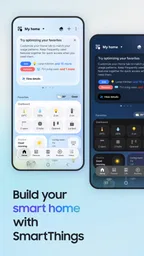
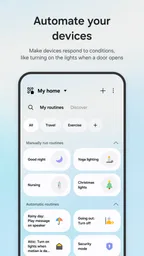
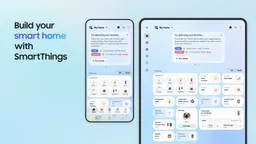
The everyday problem SmartThings addresses is familiar: the TV has its own remote, appliances have separate controls, and compatible smart-home devices may each have a different app. Instead of treating it as a universal remote for everything, I’d think of it as a shared control point for supported Samsung products and devices that work with SmartThings.
That distinction matters before you install it. The app is most compelling if Samsung products are already part of your routine. If your household relies on a mix of devices from many brands, it may still be useful, but compatibility is the first thing to check—not an assumption to make after spending time arranging your home in the app.
SmartThings is listed for everyone and is free. Those details make it easy to try, though the real cost of getting started is attention: you need to identify which devices are supported, connect them, and decide how you want the app to organize everyday controls. I would begin with one device I actually use often, rather than trying to bring the whole home into the app at once.
Set up around the task you want to simplify
For a first run, choose a practical goal. Perhaps you want a more convenient way to control a Samsung TV, or you want to check and manage a compatible appliance without reaching for its usual controls. Starting with one clear task helps you see whether the connection and the app’s layout are genuinely useful in your home.
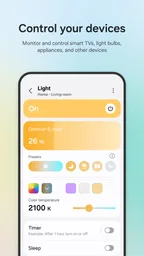
After adding a device, take a moment to learn where its controls live and what the app lets you do with it. Device support can differ, so I wouldn’t expect every product to offer identical controls just because it appears in the same household. A sensible habit is to test the specific action you care about—such as changing a TV setting or checking an appliance—before relying on it when you are in a hurry.
One useful, slightly overlooked approach is to treat the app as a place for frequent actions, not as a reason to abandon every physical control. If you still find a TV remote faster for a particular adjustment, keep using it. SmartThings earns its place when it reduces switching between apps or makes a task easier from where you happen to be.
A realistic evening, from decision to result
Imagine coming home and wanting to settle in without going from room to room to check the television and an appliance. You open SmartThings, select the relevant device, and use the controls available for that product. The benefit is not magic automation; it is having compatible devices represented in one app so the next action is easier to find.
That workflow is most convincing when the device is already connected and the control you need is easy to reach. If you are setting everything up for the first time while dinner is waiting, the same app can feel like extra work. My advice is to connect and test devices at a relaxed moment, then rely on the app for the routine once you know how each handoff works.
For a TV, the handoff is from the phone to the television: select the TV in the app, find the relevant control, and check that the change takes effect on the screen. For an appliance, it is from the app to the connected product and back to your own routine. The practical result is convenience when the connection is dependable, not a replacement for the appliance’s normal operation or a promise that every action can be done remotely.
Where a shared control point helps—and where it doesn’t
Compared with using a separate app for each product, SmartThings can reduce the number of places you need to look, especially in a Samsung-focused home. Compared with a dedicated remote, however, a phone app may take more taps for a simple television adjustment. And compared with a brand-neutral smart-home platform, SmartThings is a more natural fit when its supported devices match what you own than when your equipment is spread across products that do not work with it.
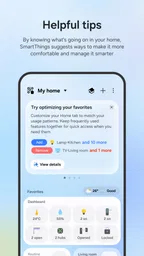
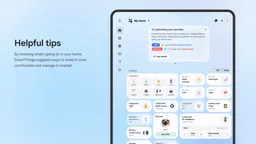
This is why I’d use it selectively. Put the devices and controls you reach for regularly into your routine, but don’t assume that moving everything into one interface automatically makes the home simpler. A crowded control screen can be less convenient than a small set of familiar, reliable options.
There is also a useful trade-off in how you organize the app: broad coverage can be satisfying, but it creates more setup and more places to troubleshoot. Adding devices one by one gives you a chance to notice whether a particular product connects consistently and whether its controls are worth keeping at hand. If one device is awkward in the app, using its usual control method instead is a reasonable choice.
When the handoff breaks
The main friction is the boundary between the app, the device, and the home connection. A device must be compatible and properly connected before the app can be useful for it. If it does not appear or a control does not produce the expected result, first confirm that you selected the right product and that it is available to the app; then check the device’s own normal controls. This helps separate an app-navigation problem from a device or connection problem.
Another limitation is expectation. The word “control” can sound as if every appliance or TV feature will be available in the same way, but the experience depends on the individual product. I would not choose SmartThings solely because you want one app to operate a collection of unrelated devices. Check that the exact devices you care about are supported and that the particular actions you need are offered.
It may also be the wrong choice if your current routine is already smooth. If you use a television remote without frustration and rarely need app-based appliance controls, adding another interface could create more steps rather than fewer. The app is strongest when it solves a recurring inconvenience, not simply because a connected-home app sounds useful.
Who I’d recommend it to
I’d recommend SmartThings first to someone with Samsung devices who wants to bring compatible controls together and is comfortable spending a little time on setup. It is also worth considering if you want to manage supported devices from a phone rather than keep switching between their individual apps. Samsung’s app has a substantial audience—around 72,000 written reviews as well as its millions of ratings—but I’d still judge it by how well it handles the devices in your own home.
I’d be more cautious if you own a varied collection of smart products and need every brand to behave consistently in one place. In that case, compare compatibility before committing to a workflow, and keep a dedicated manufacturer app or physical control where it does a better job. The best setup may be a modest combination rather than forcing every device into one hub.
My practical recommendation is to begin with one Samsung TV or appliance, test the exact action you want to make easier, and add compatible devices only when they improve a real routine. If the app helps you move from opening several controls to one reliable handoff, it has done its job. If you find yourself searching through it for an action that is quicker on the device itself, there is no need to make it the center of your home.
Overall, SmartThings is a useful, free control app with a clear advantage for households already invested in Samsung products. Its strongest result is everyday convenience through a shared interface; its weak point is that compatibility and device-specific controls shape how seamless that experience feels. I’d try it for a concrete task, keep expectations tied to the devices you actually own, and let the app earn a larger role only if it makes your routine simpler.
What we like
- Works with a broad range of Samsung devices and compatible smart home products.
- Lets you control devices and check their status from one place.
- Automations can trigger actions based on time or device activity.
- Device sharing helps household members manage connected products.
- Find feature can help locate supported Samsung devices.
What could be better
- Many features depend on having compatible devices.
- Some integrations may require a Samsung account.
- Setup can be confusing when pairing multiple device types.
- Automations may not work as expected if a device goes offline.
- The app offers fewer controls for products from unsupported brands.





