
My Verizon review
 Analysis by Appsdrops
My Verizon is most useful when I want to deal with my Verizon account without turning a quick task into a phone call or a trip to a store. I see it less as a general lifestyle app and more as a practical account companion: its value depends on whether you already use Verizon and how often you need to check or manage something related to that service. For an existing customer, keeping those tasks in one place is a sensible idea. For anyone who is not a Verizon customer, there is little reason to install it.
One app for the account tasks that come up
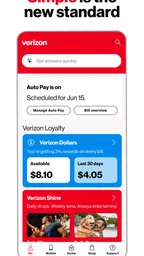
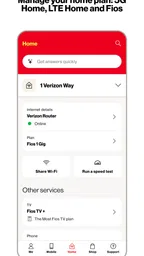
The appeal is straightforward: rather than treating account management as something to do only on a computer, My Verizon puts the carrier relationship on your phone. That can make routine checks easier to fit into a busy day. If you are trying to sort out a billing question, check something about your plan, or handle an account-related task while away from home, an app is a more convenient starting point than searching through old messages or waiting until you can get to a desktop.
That convenience is most convincing when the task is small and time-sensitive. Imagine noticing a charge you do not recognize while reviewing your spending. Opening the carrier’s app lets you start from the account itself, instead of guessing which customer-service route to use. Even if the issue ultimately needs help from a person, having the account context close at hand can make that first step less cumbersome.
I would not expect every account question to become effortless just because it is handled on a phone. A complicated billing dispute or a situation involving several lines may still take patience and careful checking. The app’s role is to provide a direct place to begin and to make ordinary account upkeep more accessible, not to guarantee that every complicated problem can be settled in a few taps.
That distinction matters when judging a carrier app. It is not competing with entertainment or social apps for my attention; it is competing with the browser, customer-service channels, and the habit of putting off an account task. Its strongest case is reducing the friction between noticing something and taking action.
Convenience is strongest for repeat customers
Once you are already a Verizon customer, account tasks are not one-off curiosities. They recur: you may want to review a charge, check your service details, or make an adjustment when your needs change. A dedicated app gives those tasks a familiar home on the device you probably already carry. That can be especially useful for people who manage their phone service themselves rather than relying on another household member to handle it.
There is also a practical advantage to starting with the official account tool rather than a general search. When the question concerns your own service, an account-specific place is a more natural route than trying to piece together an answer from broad help pages. I would still slow down before confirming a change that affects billing or service, but having one place to review the account is a helpful first step.
My useful habit would be to open the app when I have a clear task in mind, complete that task, and then leave. That keeps a utility app from becoming another place to browse aimlessly. For an account question, I would check the relevant details before making a decision and keep a note of anything I need to follow up on. This is a simple workflow, but it helps prevent the familiar mistake of starting a change and then forgetting what prompted it.
Where it sits among the alternatives
The usual alternatives are a mobile browser, customer support, or waiting until you can handle the account on a computer. A browser can be perfectly adequate for an occasional task, and a computer may feel more comfortable when comparing several details at once. Customer support is the better route when you need clarification, an explanation, or help with a problem that does not fit a straightforward self-service step.
The app’s advantage is not that it makes those other options unnecessary. It is that it gives regular customers a purpose-built starting point on mobile. If you only need to look something up once in a while, the browser may be enough. If a matter is confusing or consequential, speaking with support can be more appropriate than relying on a sequence of screens. I see the app as a convenient middle ground for routine account management, not a replacement for every kind of assistance.
There is a trade-off in that focus. A carrier app is tied to the relationship it serves. It is not a neutral tool for comparing mobile providers, and it is not especially useful if your needs are about general budgeting rather than Verizon service. That narrowness is not a flaw for its intended audience, but it does make the decision to install it easy: existing customers may benefit; everyone else can skip it.
Who will get the most from it
I would recommend it first to people who prefer handling everyday service matters themselves and want their account close at hand. It also makes sense for someone who has recently become responsible for managing a household’s Verizon service, since a dedicated account app can be easier to return to than a collection of browser bookmarks and support pages.
It is less compelling for a person who rarely checks their account and prefers to contact support for every change. That approach is valid, especially if account screens feel stressful or if you are dealing with a complicated issue. The app may help you get oriented, but it cannot remove the need to understand what you are agreeing to. If you are comparing carriers or shopping for a service plan, use a comparison source instead; this is an account-management tool, not an independent buying guide.
Another useful case is being away from your usual computer when an account question occurs. Rather than postponing it until later, you can start by checking the account on your phone. I would avoid rushing through a change in a noisy or distracting moment, though. The convenience of mobile access is most valuable when it helps you address a task promptly, not when it encourages you to make a decision without reading the details.
Scale, audience, and practical expectations
My Verizon is a free Lifestyle app from Verizon Consumer Group, with an average rating of 4.5 from around 1.3 million ratings. It has been installed over 100 million times, which signals that it serves a large audience of Verizon customers. Those figures are useful context, but they do not tell me whether a particular account task will be simple or whether every user will find the experience equally comfortable.
The app is rated Mature 17+, so it is intended for an adult audience rather than as a tool for children to manage independently. Its current version is 22.3.5, and it requires Android 10 or later. That minimum is worth checking before installing on an older Android phone. The app is also available in the iOS context for this review, though the Android version requirement is the relevant compatibility detail for Android users.
A large audience can be reassuring in the limited sense that this is an established way for Verizon customers to interact with their service. It should not be treated as proof that every feature will match an individual’s preferences. I would judge it by a simple standard: can I find the account information or task I came for without unnecessary detours? If yes, it earns a place on my phone. If I repeatedly end up switching to a browser or support for routine matters, its convenience matters less.
The friction worth keeping in mind
The central limitation is also the app’s defining boundary: it is built around Verizon. That means its usefulness falls sharply if you leave the service, are only considering it, or want one tool to manage accounts across different providers. In those situations, the carrier’s app is not a broad solution and should not be mistaken for one.
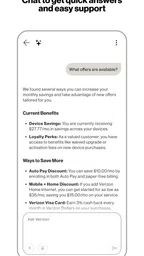
There is a second, more everyday limitation: putting account access on a phone makes it easy to start a task, but not necessarily easy to resolve every question. When something is unclear, a self-service interface can leave you wanting an explanation rather than another screen. I would use the app for direct, familiar account work and turn to support when I need a person to interpret a situation or help me weigh a complicated choice.
It is also worth being deliberate with changes that can affect your service or bill. Convenience can make a consequential action feel casual. Before confirming anything important, I would review the details and make sure I understand the effect. That is good practice with any account tool, but it matters particularly in a carrier app, where the account concerns an ongoing service rather than a one-time purchase.
My recommendation
My verdict is positive but specific: My Verizon is a practical choice for existing Verizon customers who want a mobile place to begin routine account tasks. I like the clear purpose and the possibility of dealing with service matters when they come up, rather than saving every question for later. The app makes the most sense as a utility you open with a task in mind, not as something every phone owner needs.
If you are already with Verizon and prefer self-service for straightforward account matters, I would give it a try. If you rarely need to manage your service, are comparing providers, or want help with a complex issue, the browser, a comparison resource, or customer support may be a better fit for that particular need. That is the honest balance: useful in its lane, but not a substitute for judgment or human help when the situation calls for either.
What we like
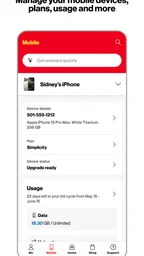
- The app makes it easy to check your data usage.
- You can pay your bill without visiting a store.
- Account alerts help you stay aware of important changes.
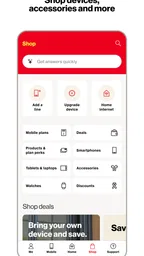
- Eligible devices can be upgraded through the app.
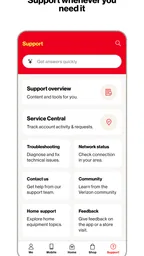
- Support tools provide help directly from your phone.
What could be better
- Some features require a Verizon account login.
- The app offers limited value to customers of other carriers.
- Certain account changes may still require contacting support.
- Usage information may not update instantly.
- App performance can vary across devices and software versions.





