





SmartLife: Smart Living review
 Analysis by Appsdrops
Smart home control is convenient only when I can understand what an app is doing and decide how much of my home to connect to it. SmartLife is a lifestyle app from Volcano Technology Limited, built around managing compatible smart-home products. I find its appeal straightforward: one place to interact with devices can be easier than juggling separate brand apps. But a connected-home app also deserves a more careful look than a simple utility. The useful question is not just whether it can bring devices together, but whether its setup and everyday controls feel manageable for the person using them.
Convenience depends on what you connect
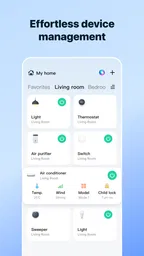
In practice, SmartLife makes the most sense when you already own compatible devices or are choosing products that work with it. It is not a reason by itself to replace equipment that is already working well. Before buying a new plug, light, or other connected product, I would check its packaging and instructions for SmartLife compatibility. A shared app is useful only if the particular devices you want to use can actually join it.
The app has been available since May 26, 2016, and its current version is 7.12.6. Its scale is notable: it has more than 50 million installs and a 4.6 average from around 1.4 million ratings, alongside roughly 19,000 written reviews. Those figures suggest a widely used product, but they do not tell me whether a specific device will pair smoothly or whether its controls will fit my routine. Compatibility and a clear setup path matter more than popularity once I am standing beside a device that will not connect.
I would approach the first setup as a small household project rather than a quick download. Keep the device’s instructions nearby, use a stable home connection, and add products one at a time. That makes it easier to identify whether a problem belongs to a particular product or to the phone, network, or account setup. It also avoids the confusion of giving several newly connected devices similar names and then guessing which one is which.
Trust begins with visible choices
Connected-home software can sit between a person and everyday objects, so I would pay attention to the choices shown during installation and while adding devices. I would read permission prompts before accepting them, look at the account options presented in the app, and check the device’s own instructions for any setup requirements. These are practical checks, not proof of how information is handled behind the scenes. I would not treat a familiar interface or a large user base as a substitute for understanding the choices visible on my own phone.
That distinction matters because the app can only be judged responsibly from what I can actually inspect. A prompt should be considered in context: what action am I trying to take, what access is being requested, and can I proceed without granting something that does not seem relevant? If I cannot make sense of a request, pausing to consult the product documentation is wiser than tapping through simply to finish setup.
SmartLife is free to install, though it includes optional in-app purchases priced from five cents to $369.99 per item. That wide range makes it sensible to review any purchase screen carefully and distinguish an optional charge from the basic act of installing the app. I would not assume that every household needs to spend money inside the app, nor would I make a purchase without understanding what the item offers and whether it relates to a device I own.
Make the controls understandable at home
One of the most useful habits with any multi-device controller is naming products for the way people actually refer to them. “Hall lamp” is more helpful than a product model number, particularly if another person in the household may need to use the same controls. I would also keep names distinct across rooms. This small bit of organization can prevent the more serious annoyance of switching off the wrong light or adjusting a device in another part of the home.
For a shared home, I would agree on a simple naming convention before adding lots of products. Room first, then purpose, is an easy pattern to remember. If an item is moved, I would update its label promptly instead of leaving a name that no longer matches its location. That is not a flashy feature, but it makes a central controller more dependable for everyday use, especially when someone else is trying to operate it in a hurry.
It is also worth separating convenience from reliance. If a household task is important, I would keep a usable physical control where the device provides one, rather than assuming the phone is always the best route. A phone may be elsewhere, out of battery, or in the hands of another family member. SmartLife can make remote interaction easier, but a sensible backup keeps an app from becoming the only way to operate something people need.
Choose what belongs in the connected home
My cautious approach would be to connect only the devices I have a clear reason to manage through an app. Before adding a product, I would ask what I expect to gain: easier control from one place, less need to reach a switch, or a more convenient way to check a device. If the answer is vague, I would leave it out until the benefit is clear. Each additional connected product adds another setup step and another control to maintain, so more devices do not automatically make a home smarter.
This is especially important for people who are sensitive about data or who share a home with others. I would explain what is being connected and make sure everyone who may use it knows which app controls it. For any account or device options that appear during setup, I would choose deliberately rather than accepting defaults without reading them. The goal is not to assume a problem; it is to keep the household’s choices visible and understandable.
If a device has controls that could affect another person’s comfort or routine, I would test those controls when the people involved are present. For example, before relying on an app to adjust a shared room’s lighting, I would confirm that the right product responds and that everyone knows how to use the ordinary switch as well. A short test can catch mislabeled devices or confusing controls before they become an everyday irritation.
A realistic evening test
Imagine arriving home with shopping in both hands and wanting to turn on a compatible light without crossing the room. A phone-based control can be genuinely handy in that moment. To make the convenience real, I would first verify the light’s name, test the control from the room where I expect to use it, and check that another household member can identify it too. If it responds inconsistently, I would not build a routine around it until I had checked the device’s instructions and connection.
The same approach applies to a small group of devices: add one, give it a clear name, test it, then move on. This incremental workflow is more useful than setting up everything at once because it narrows down errors. It also lets me decide whether centralizing control actually improves the household’s routine. If I end up opening the app only to perform a task that was already easier at the wall switch, the extra connection may not be worthwhile.
Where it fits among alternatives
Compared with using each manufacturer’s own app, a shared controller can reduce the friction of switching between different interfaces. That advantage depends on product compatibility, and it does not mean every device will behave identically or expose the same options. The original manufacturer’s app or instructions may still be the better place to troubleshoot a specific product. I would keep that distinction in mind instead of expecting SmartLife to replace every device-specific resource.
Compared with controlling products manually, an app can be more convenient when the phone is already in hand or when several compatible devices are involved. But a physical switch is often faster for a single light, and it does not require opening an app or navigating to a control. If you want a simple, offline-feeling routine and have little interest in phone-based management, traditional controls may suit you better.
SmartLife is intended for everyone, and its minimum operating-system requirement is version 7.0. That broad age rating does not guarantee that every setup will be effortless for every user; pairing connected products still involves following device-specific instructions and making choices on a phone. I would recommend it most to someone who enjoys having compatible products in one place and is willing to spend a little time organizing them.
My cautious verdict
I see SmartLife as a practical option when compatibility is confirmed and the value of a shared control point is clear. Its large user base and strong average rating are reassuring signs of reach, but my recommendation would still depend on the devices, the setup experience, and the choices presented on your own device. I would begin with one nonessential product, learn how it behaves, and decide whether the convenience earns a larger role in the home.
If you want to minimize connected devices, avoid optional purchases, or prefer physical controls over phone management, you may be happier keeping your setup simpler. If you do try it, take time to inspect prompts, name products clearly, test controls in their real locations, and keep a practical backup for important tasks. For me, that is the right balance: use the app where it removes genuine friction, but let deliberate choices—not the promise of putting everything on a phone—set the boundaries.
My recommendation is measured: SmartLife is worth considering for compatible-device owners who want centralized control, provided they treat setup, permissions, and purchases as decisions to review rather than boxes to rush through.
What we like
- Control compatible smart devices from a single app.
- Create routines that automate tasks at home.
- Manage devices remotely when away from home.
- Set schedules for lights and other connected devices.
- Share device access with family members.
What could be better
- Many features require compatible Tuya-based devices.
- Device setup can involve several pairing steps.
- Some devices may need a stable 2.4 GHz Wi-Fi connection.
- App features vary depending on the connected device.
- Cloud-dependent controls may not work during outages.





