




MapQuest: Get Directions review
 Analysis by Appsdrops
I reach for a navigation app when I need more than a line on a map: I want a route I can follow without constantly checking my screen, plus a quick sense of whether traffic is changing the plan. MapQuest: Get Directions is built around that practical job. It is a free mapping and navigation app from MapQuest, with GPS guidance, voice directions, and live traffic as its central appeal. My impression is that it suits everyday drivers who want a familiar, straightforward route-finding tool rather than a deep travel-planning system.
What matters when choosing a navigation app
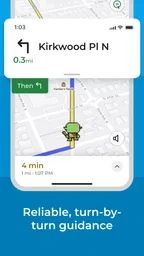
For ordinary driving, I judge a navigation app by three things: how quickly I can turn an address into a route, whether the directions are easy to follow while moving, and how useful the traffic picture is before I commit. MapQuest brings those needs together in one place. Its spoken guidance is especially useful when I am driving through an unfamiliar area and would rather keep my attention on the road than repeatedly glance down.
The app belongs in the maps and navigation category, but the important distinction is its focused role: helping a driver get from a starting point to a destination. It is not a reason to abandon every other map tool you use. I would think of it as a practical option to try alongside your usual navigation app, then keep it if its directions and route choices work well for the roads you travel.
MapQuest has a 4.4 average from around 76,000 ratings, and it has passed 10 million installs. Those figures suggest that it is an established choice, though popularity alone cannot tell you whether its routing will suit your commute. Roads, traffic patterns, and personal preferences vary, so the useful test is to compare a few familiar journeys rather than judge it on a single trip.
Where MapQuest earns its place
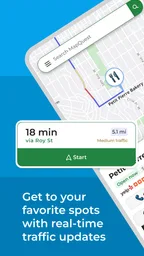
The clearest strength is the combination of GPS navigation, spoken directions, and live traffic. Each part supports a different moment in a drive: GPS guidance keeps the route usable on the move, voice instructions reduce the need to watch the display, and traffic information can help you reconsider a route before or during a journey. I find that combination more useful than a map that only shows where I am, particularly when I have a tight arrival window or need to concentrate on unfamiliar streets.
A realistic use case is a weekday errand across town. I can enter the destination before leaving, check the proposed route, and listen for turns while driving. If traffic is building, the live view gives me a reason to pause and reassess instead of assuming the quickest-looking route will stay that way. That does not mean I would blindly follow every suggested change: I still consider road layout, the time lost by turning off a main route, and whether I know a simpler alternative.
A small but useful habit is to check the route while parked, not at the first turn. That gives me time to catch an incorrect destination or an awkward starting point before I pull into traffic. If I am going somewhere with several entrances, I also make sure the pin points to the entrance I actually need. Navigation apps can guide you to an address while still leaving the final approach to your judgement, so that brief check can save a frustrating loop around a block.
Voice navigation is valuable for more than hands-free convenience. In a busy junction sequence, a spoken cue can let me keep my eyes on signs and surrounding traffic rather than trying to read a map at the last moment. I still keep the screen available when it is safe to glance at it, because audio instructions can be easy to miss in a noisy car or when a turn comes up sooner than expected. The strongest workflow is to use voice as the primary prompt and the map as a quick visual confirmation.
Live traffic is best treated as decision support, not a promise. Conditions can change between checking a route and reaching a bottleneck, and an alternate route may trade congestion for more complicated turns. When I am unfamiliar with an area, I would rather compare the practical shape of the route than chase every apparent time-saving suggestion. MapQuest is most helpful when its traffic information informs a choice I can understand, not when I follow a reroute automatically.
Another useful way to evaluate it is to try the same recurring journey at different times. A morning commute, a school pickup, and a weekend trip can expose different weaknesses in any routing tool. If MapQuest consistently gives directions that make sense on your regular roads and its traffic view helps you plan, that is a stronger reason to keep it than a good first impression on an easy, empty route.
Where another kind of app may fit better
MapQuest is a sensible candidate for drivers who want a dedicated navigation app, but people often need more than turn-by-turn directions. If your priority is public transit, walking routes, cycling, or exploring places before you leave, compare it with broader map platforms that put those activities at the centre of their experience. I would not choose a driving-focused tool as my only map simply because it handles car trips well.
There is also a difference between navigation and travel research. Someone planning a multi-stop day may care about organizing many destinations, checking detailed place information, or coordinating a trip with other people. MapQuest’s stated strengths are route guidance and traffic, so I would test whether its workflow matches that planning style instead of assuming it will replace a dedicated itinerary or destination-research tool.
For a driver who already trusts another navigation app, switching only makes sense if MapQuest solves a real irritation: perhaps you prefer its route presentation, want to compare traffic guidance, or simply want another option ready for a particular journey. I would not keep two apps open while driving or make last-minute comparisons at the wheel. Compare them before departure, choose one route, and let that app guide the trip.
The right choice also depends on how you use your phone. If you have limited data access during a journey, check your own connectivity situation before relying on live traffic or online navigation. Live traffic is inherently most useful when current information can reach the app; for a trip through areas with unreliable service, a tool with offline maps that you have prepared in advance may be a better fit. I would verify that capability in any alternative rather than assume all navigation apps behave the same way.
Trying it without making navigation complicated
Because MapQuest is free to download, it is relatively easy to test without making it your permanent choice. The app includes in-app purchases priced from $1.99 to $39.99 per item, so I would look carefully at any purchase prompt and decide whether the offered item is relevant to how I use the app. You do not need to treat an optional purchase as part of the basic decision: first see whether the free experience handles your typical routes.
MapQuest is rated for Everyone, and the current version is 10.30.0. It supports devices running version 7.0 or later of its operating system. Those details help with basic compatibility checks, but I would still confirm the app is available for your particular device through its app store before planning a trip around it.
Switching navigation apps has a small but real learning cost. You need to get used to where route details appear, how the map presents turns, and how quickly you can recognize a suggested change. I recommend testing MapQuest on a route you already know, preferably at a calm time, before relying on it for a high-pressure appointment. Familiar roads make it easier to notice whether the directions are clear without adding the stress of learning both a new area and a new interface at once.
Keep your first test simple: navigate to a familiar destination, listen to the voice prompts, and note whether the route makes sense at the turns where you know the road well. On a second trip, try a destination in an unfamiliar area and pay attention to how the traffic information affects your decisions. That two-step check gives you a much more useful comparison than installing the app and judging it from the map screen alone.
MapQuest was released on February 15, 2011, and its developer is MapQuest. Its long presence in navigation makes it recognizable, but I would still decide based on current performance on your own device and routes. A familiar name is a starting point, not proof that every suggested path will be ideal for your circumstances.
My recommendation for the right driver
I recommend MapQuest: Get Directions to drivers who want a free app centred on route guidance, voice directions, and traffic awareness. It is particularly worth trying if you make regular car journeys, often visit unfamiliar addresses, and value hearing turns rather than managing directions entirely by sight. For that kind of use, the app’s practical mix is easy to understand, and testing it on familiar roads makes the decision low-risk.
I would skip it as my main navigation choice if I mainly travel by transit or on foot, need a carefully organized multi-stop planning workflow, or depend on prepared offline maps for areas with weak connectivity. In those situations, a map or travel-planning app built around that specific need is likely to serve better. I would also keep my current app if it already gives clear directions and dependable traffic guidance on the routes that matter to me; switching without a concrete benefit adds another interface to learn.
My bottom line is that MapQuest is a worthwhile alternative to compare, not an automatic replacement for every map on your phone. Try it on a familiar drive, then on one trip where traffic could change your route, and judge whether its spoken guidance and route choices help you feel more prepared. If they do, keep it in your navigation toolkit. If they do not, choosing an app better matched to your travel habits is the more sensible call.
What we like
- Voice-guided navigation helps you follow routes without watching the screen.
- Offline maps can help when mobile coverage is unavailable.
- Multiple route options make it easier to compare ways to reach a destination.
- Traffic updates can help you avoid delays on the road.
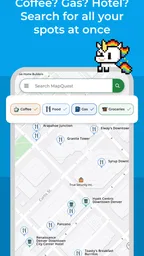
- The app includes useful tools for finding nearby places and services.
What could be better
- Map data and place listings may be less complete in some areas.
- Offline maps require storage space on your device.
- Some features may depend on a reliable internet connection.
- Ads can interrupt the navigation experience.
- Route suggestions may not always reflect current road conditions.




