
Wordscapes: Word puzzle game review
 Analysis by Appsdrops
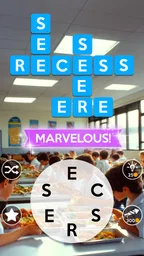
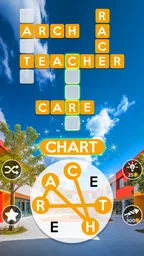
I find Wordscapes works best as a small, repeatable word puzzle rather than a game you need to settle in for. You’re given a handful of letters and connect them to fill spaces in a crossword-style board. The pleasure is in spotting a word that was sitting in plain sight, then watching it click into the grid. It suits a coffee break, a quiet commute, or a few minutes when I want something more engaging than scrolling but less demanding than a long game session.
PeopleFun’s free word game has a calm pace and a simple premise, but it can still make me pause over a board I thought I had solved. The landscapes give the puzzles a gentler feel than a bare word list, while the central challenge remains vocabulary and pattern recognition. With an average rating of 4.7 from around 1.4 million ratings and over 100 million installs, it has clearly found a large audience; the more useful question is whether its particular rhythm fits you.
How a typical puzzle unfolds
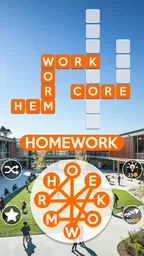
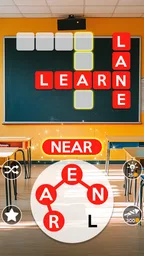
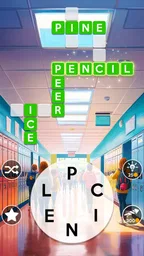
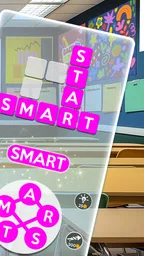
Each board asks you to form words from a limited set of letters and place them into crossing spaces. I usually begin by trying the obvious combinations, then use the gaps in the grid to work out which lengths and letter positions remain. A word that seems unlikely in isolation can become clear once a crossing has supplied its first or last letter. That back-and-forth between the letter wheel and the board is the core pleasure.
The game is easy to understand without a tutorial-heavy introduction. The challenge comes from the fact that a small group of letters can suggest many possibilities, while only some fit the board. I like that the puzzle gives me enough structure to narrow the search: instead of guessing an unlimited word list, I can look for a specific pattern. When I get stuck, changing focus from “What word can I make?” to “What word fits these open spaces?” is often more useful than repeatedly trying the same combinations.
There’s also a distinction worth knowing before you start: solving the crossword spaces is the main task, but finding every possible word from the letters can be a separate test of curiosity. I don’t treat every extra word as necessary progress. If I’m playing to relax, I stop when the board is complete; if I want a little more mental exercise, I keep searching for combinations I overlooked. That choice lets the same puzzle feel either brisk or more exploratory.
For an everyday routine, I’d use it in short sessions rather than trying to turn it into a marathon. On a bus ride, for example, I can open a board, fill a few entries, and put the phone away without needing to remember a complicated sequence of actions. At home, I might return to a puzzle after a break and see the missing pattern more clearly. The game’s appeal is not that it demands constant attention, but that it gives a small, satisfying problem whenever I have a spare moment.
Settings and habits that make a difference
Before settling into a long run of puzzles, I’d check the available settings and choose a presentation that is comfortable for your eyes and playing conditions. This is especially useful if you tend to play in short bursts throughout the day: a screen that is easy to read and controls that feel natural matter more than they might during a quick first try. I wouldn’t assume a particular option exists on every device or version; the sensible approach is to inspect what your copy offers rather than build a routine around an unconfirmed feature.
One useful habit is to change how you approach the letter set after a first pass. Start with the shortest obvious words, because they can reveal crossing letters, then look for longer words that use the same letters in a different order. If that stalls, work backward from a blank slot: note its length, check any letters already fixed by crossings, and try to complete that pattern. This makes the board do some of the thinking for you instead of relying on a vague feeling that a word “ought” to be there.
I also recommend treating any help or hint option as a tool for learning the board, not as the default move whenever progress slows. First, shuffle your attention by scanning the grid from a different direction or pausing for a moment. Then try a fresh arrangement of the letters. If you still need assistance, use the game’s available help judiciously and notice what kind of pattern you missed. Repeating that process can make later puzzles feel less dependent on hints.
Small interruptions are part of phone play, so I prefer a habit that doesn’t punish me for stopping: finish a word or a clearly defined section, then leave the puzzle rather than tapping hurriedly while distracted. That’s particularly helpful in a noisy waiting room or during a short break at work, where attention can be divided. The game is low-pressure, but a rushed guess can make a simple board feel needlessly frustrating.
Getting quicker without turning it into a chore
Experienced play is less about finding one magical shortcut and more about avoiding unproductive repetition. When I cycle through the same letter sequence over and over, I’m usually stuck in a narrow mental groove. A better reset is to look at the board’s empty spaces, group them by length, and focus on the ones with the most crossing letters. A nearly complete pattern gives stronger clues than a blank slot, so solving those first can unlock several others.
Another practical technique is to keep track of which letters you’ve already used in a promising arrangement. Because the same letters can form multiple words, it’s easy to overlook a different order or to assume a word is impossible after one failed attempt. I try a word, check what it reveals in the grid, then deliberately move on rather than tapping it repeatedly. This makes each attempt informative: either it fits, or it tells me something about the remaining pattern.
When the board is nearly finished, I slow down instead of speeding up. The last few entries are often harder precisely because the obvious words have already been found. I scan for common endings and beginnings, but I don’t force them; crossing letters should support a candidate rather than merely make it feel familiar. If no candidate fits, I take a short pause. Returning with fresh attention is often more effective than adding more guesses, and it keeps the relaxing tone from turning into a test of stubbornness.
There’s a trade-off between pace and completeness, too. Someone who wants a quick, clean win can focus on the required spaces and leave optional discoveries alone. A vocabulary-minded player may prefer to search for every plausible combination, accepting that this takes longer and can involve words that feel less familiar. Neither approach is the “right” way to play. I’d choose based on whether I want a quick mental reset or a more demanding word hunt on that particular day.
Where the format can frustrate
The same letter set that makes the game approachable can also make it feel repetitive. If you already enjoy crossword-style word puzzles, the basic action may become familiar quickly: test combinations, use the grid, and repeat. The calm presentation helps, but it won’t transform the central loop into a varied strategy game. Players who want a story, direct competition, or a continuously changing set of mechanics should look elsewhere in the broader games category.
Vocabulary is another source of friction. A word that is obvious to one player may be obscure to another, and a board can feel unfair when the answer relies on a form or term you don’t naturally use. That doesn’t mean every difficult entry is unreasonable; sometimes the issue is simply that you’re searching from the wrong pattern. Still, anyone who dislikes being challenged by unfamiliar words may find the occasional standstill irritating rather than satisfying.
The optional search for extra words can also cut both ways. It gives curious players a reason to keep exploring after they have solved the board, but it can tempt completionists to spend too long trying every possible arrangement. I find it healthier to decide before a session whether I’m aiming to finish the grid or to keep hunting. That small boundary prevents a relaxing break from becoming an open-ended task.
It’s free to download, with in-app purchases priced from $0.99 to $99.99 per item. I’d keep that range in mind if you’re considering purchases: the game can be tried without an upfront price, but the purchase options mean it’s worth being deliberate about spending. The content rating is Everyone, so its word-puzzle format is broadly suitable for a general audience. Its current version is 3.14.30, and it requires Android 7.1 or later on Android devices.
Who should choose it—and who may prefer another puzzle
I’d recommend it to people who like an unhurried word challenge, want a game that works in brief sessions, or enjoy using crossword crossings to narrow down possible answers. It can also suit someone trying to build a steadier puzzle habit: one board provides a clear stopping point, and the rules are simple enough that you don’t need to relearn them every time you return.
If you prefer a traditional crossword with clues, a word-search grid where you scan for visible words, or a competitive word game that puts another player across the table, those alternatives may be a better match. Wordscapes asks you to generate words from letters and fit them into a crossing pattern; it is not the same kind of challenge as answering clue-based questions or racing an opponent. I’d skip it if you need constant novelty or dislike word puzzles whose difficulty can hinge on recognizing an unfamiliar combination.
The broad reception suggests it has lasting appeal: it holds a 4.7 average across roughly 1.4 million ratings, and its review count is around 268,000. Those figures are useful context, not a guarantee that its pace will suit everyone. The title launched on June 14, 2017, and its continued presence makes sense to me because the basic loop is easy to revisit. Still, personal fit depends more on whether you enjoy this particular mix of letter play and crossword structure than on popularity alone.
A calm word game with a clear kind of challenge
My verdict is that Wordscapes is a strong choice when I want a gentle puzzle that still rewards attention. Its best moments come when a crossing letter suddenly makes an overlooked word obvious, or when a short pause helps me see a board differently. The landscapes and relaxed pace support that experience, but the real reason to keep playing is the satisfying process of fitting a limited set of letters into a useful pattern.
I’d approach it with a simple routine: solve the clearest short words first, use the grid to guide longer guesses, change tactics when I start repeating myself, and decide whether extra words are worth the time. That approach makes the game feel deliberate without making it serious. If you enjoy quiet, self-paced vocabulary puzzles, I think it’s easy to recommend. If you want clue-led crosswords, head-to-head play, or more dramatic changes from one session to the next, another word game will likely serve you better.
What we like
- Daily puzzles offer a fresh reason to return.
- Offline play works well during travel.
- Hints can help when a puzzle gets difficult.
- The calm visuals make sessions feel relaxing.
- Progress saves automatically between sessions.
What could be better
- Some levels can feel repetitive over time.
- Hints are limited unless you earn or buy more.
- Ads may interrupt play between puzzles.
- Later stages can require obscure word knowledge.
- The game offers little variety beyond word searches.







