






Spades - Classic Cards review
 Analysis by Appsdrops
I judge a card game partly by what happens between hands: can I quickly understand the table, keep track of the important choices, and play without fighting the controls? Spades - Classic Cards makes a familiar trick-taking game available in a straightforward mobile format, and that familiarity is a real advantage. I can focus on following the cards and planning with a partner rather than learning a complicated interface or a new set of rules.
At a glance, and what the game asks of you
This is a free card game from Tripledot Studios Limited, designed around Spades rather than a collection of unrelated activities. It has an average rating of 4.8 from around 53,000 ratings, and more than a million installs. Those figures suggest that it has found a substantial audience, though popularity alone cannot tell you whether its presentation will suit your eyes, hands, or playing habits.
The game is rated for Everyone, with a minimum operating-system requirement of 7.1 and a current version of 1.16.00. It was released on August 23, 2024. Optional in-app purchases range from $0.99 to $99.99 per item, so the free entry point is useful, but players who are careful about spending should keep purchase prompts and device settings in mind.
For someone who already knows Spades, the appeal is easy to understand: open a card game, make a bid, and play tricks without needing a physical deck or other people at the same table. If you are new to the game, it may still be approachable, but the central challenge is not simply choosing a high card. You need to estimate how many tricks you and your partner can take, then adjust as the hand unfolds.
Reading the table without losing the thread
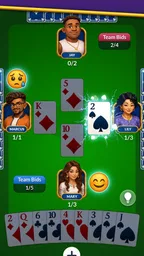
Spades depends on information that changes quickly: which suits have appeared, whether the trump suit has been broken, how many tricks remain, and what your partner’s plays might mean. On a phone, that can make visual clarity more important than decorative detail. I find this kind of game easiest to follow when the current trick and the cards already played are visually distinct, and when I can inspect the screen without having to remember several hidden details at once.
A practical habit is to pause before bidding and make a small estimate rather than trying to calculate the whole hand perfectly. Count likely winners, then consider whether your partner’s bid makes the team’s target realistic. During play, track one useful clue at a time: for example, note when a player has run out of a suit. That observation can matter more than remembering every card in every trick, and it keeps the game mentally manageable during a quick session.
Navigation matters for players who rely on a predictable sequence. Spades has a stable rhythm—bid, play a card, review the outcome, continue—which is less demanding than a game full of constantly changing menus. Still, card games can involve small targets and dense information on a compact screen. If you have low vision, try a short session on your own device before settling in, and check whether the cards and controls are comfortable at your usual viewing distance. A game being easy to understand does not automatically make every screen easy to read.
Hands, attention, and sensory comfort
Spades is turn-based, which gives it a useful advantage over games that demand continuous movement or split-second reactions. I can think through a bid and choose a card at my own pace within the game’s flow. That makes it a more natural fit for someone who prefers deliberate decisions, has limited time for uninterrupted play, or finds fast action tiring. It is also a good reason to use a phone stand or place the device on a table if holding it steadily is uncomfortable.
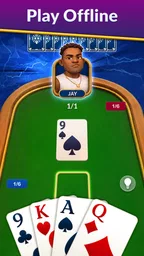
Touch accuracy can still be a consideration. Choosing among several cards requires a deliberate tap, and a cramped display may make it harder to distinguish a card or hit the intended choice. If your hands are unsteady or touch input is difficult, play with the phone supported and avoid rushing your selection. I would not assume that a card interface is effortless for everyone just because it uses simple taps; the physical screen and the player’s comfort make a real difference.
The game’s pace also offers a gentler sensory profile than action-heavy alternatives: the core task is watching cards and making decisions rather than reacting to a stream of motion. But prolonged attention is still involved. Following bids and suits can become tiring, especially if you are playing while distracted. For a short break, one hand at a time is a sensible way to enjoy it; for a longer session, take a pause when you notice that you are no longer tracking the table carefully.
One useful trade-off is that concentration can be both the game’s pleasure and its main demand. If you enjoy quiet strategic thinking, a hand gives you a compact problem to solve. If you want something that can remain in the background while you read or talk, Spades may not be ideal: missing a bid or a sequence of plays can make the rest of that hand harder to interpret.
Where it fits into an ordinary day
I can see this working well during a wait at a café or while taking a quiet break between tasks. The game’s familiar structure means I do not need to set up a physical deck, find a table, or coordinate everyone’s schedules. A short session can be a satisfying change of pace, especially when I want to engage my attention without committing to a lengthy story or learning a new control scheme.
That convenience has limits. A phone game is not the same social experience as sitting with friends, reading their expressions, and negotiating the pace of a real table. If your favourite part of Spades is conversation and partnership with people you know, an in-person game or a multiplayer option built specifically around playing with friends may be a better choice. This edition is most compelling when easy access to the card game matters more than recreating that shared setting.
Compared with solitaire, Spades asks you to think about a partner and opponents rather than only arranging your own cards. Compared with a broad card-game collection, its focused design is a plus if Spades is what you actually want, but a drawback if you like switching between poker, rummy, and other formats in one app. It also differs from a physical deck in a practical way: the device handles the dealing and table, while you lose the tactile feel and the flexibility to make your own house rules.
If you are trying Spades for the first time, spend the opening hands learning the relationship between your bid and your team’s result instead of treating each trick as an isolated win. A high card can be valuable, but playing it at the right moment matters. When you already know the rules, use the early part of a hand to notice which suits opponents can no longer follow. That is a more useful planning cue than simply trying to take every available trick.
Limits worth considering before you settle in
The game’s narrow focus is also its clearest limitation. It is not the right pick if you want a visually rich adventure, a broad set of card variants, or a social game centred on a group of friends around one table. Its appeal rests on enjoying Spades itself. If you find bidding and tracking suits repetitive, a different card game with more varied rounds may hold your interest better.
Purchases are another point to approach deliberately. The game is free to start, but individual in-app purchases span from $0.99 to $99.99. That wide range does not mean you need to buy anything to enjoy the basic idea, but it does make it sensible to check purchase controls before handing the phone to a child or anyone likely to tap through a prompt without considering it.
There is also a difference between familiar rules and an easy experience. New players may need time to understand why a conservative bid can be wiser than an optimistic one, or why following suit changes what a card can accomplish. The game can provide the setting for learning, but patience is still required from the player. If you want a card game that explains every strategic decision as you go, a guided tutorial-focused alternative may be a better first stop.
For accessibility, I would make the decision on the actual device rather than assuming the game will suit every need. Check whether the card faces are comfortable to distinguish, whether taps land reliably, and whether the pace lets you think without pressure. If text or symbols are hard to see, or if touch selection is frustrating, those barriers can outweigh the convenience of having Spades on hand. A physical deck, a larger-screen option, or a game with controls and presentation better suited to you may be more comfortable.
Who is likely to enjoy it
I would recommend Spades - Classic Cards to someone who already likes the strategy of bidding and partner play and wants a convenient way to enjoy that familiar challenge. It also makes sense for a curious beginner who is happy to learn through repeated hands and does not need a fast, flashy presentation to stay engaged. The strong 4.8 average is encouraging, but your own experience with the screen and controls should carry more weight than any rating.
I would steer away from it if you mainly want face-to-face company, a large assortment of card games, or a low-attention activity you can ignore while doing something else. It is also not an automatic fit for players who have difficulty reading small card details or making precise taps; trying it briefly is more informative than relying on the game’s familiar premise.
My overall view is that this is a focused, convenient way to return to Spades, with a turn-based pace that can suit thoughtful play and short breaks. Its strongest quality is that it keeps the central appeal of the card game intact: make a reasoned bid, watch the table, and adapt. Its limits are just as specific—screen comfort, touch accuracy, concentration, and the absence of a real group around the table can shape whether it feels welcoming. If those trade-offs work for you, it is a solid free starting point, provided you keep optional purchases in perspective.
What we like
- Familiar trick-taking rules make it easy to start playing.
- Solo play offers a way to practice without needing friends online.
- Short rounds fit well into quick breaks.
- Card play is easy to follow on a phone screen.
- A classic theme suits players who prefer traditional card games.
What could be better
- Computer opponents may not offer much challenge to experienced players.
- Random card deals can make some rounds feel unfair.
- Spades requires careful bidding and may frustrate newcomers.
- The game can feel repetitive after many matches.
- Ads may interrupt play depending on the version.







