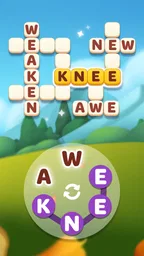
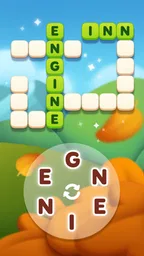
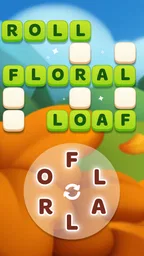
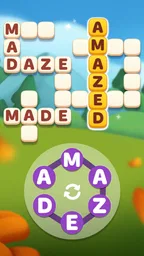
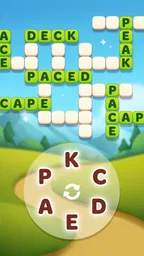
Word Spells: Game for Adults review
 Analysis by Appsdrops
I like word games best when they give me a small, clear task rather than demanding a long session. Word Spells: Game for Adults fits that mood: it is a word puzzle game from Malpa Games, built around letter challenges that are easy to pick up when I have a few quiet minutes. Its offline play is especially useful when I want something to do without relying on a connection. The experience is calm and focused, though that same simplicity may feel limiting if you want a word game packed with social competition or lots of different modes.
How a typical puzzle session feels
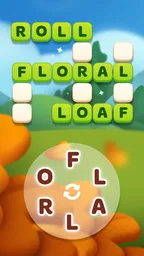
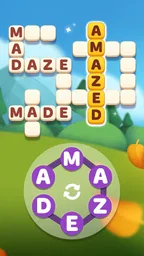
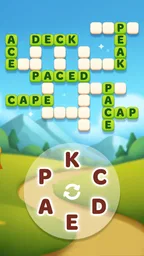
The basic appeal is straightforward: look at the available letters, think through possible words, and work through the puzzle at your own pace. I find that this makes the game suitable for short breaks. It does not ask me to set aside a large block of time or learn a complicated control scheme before getting started. The challenge is in noticing useful letter combinations, not in mastering elaborate mechanics.
For a realistic everyday use, imagine waiting for a meeting to begin or sitting on a train with a few minutes to spare. A quick puzzle gives that time a little structure, and offline access means the game can still be useful when mobile service is patchy. I would treat it as a quiet brain teaser, rather than a game that needs my full attention for an extended stretch.
The store presents it as a word game for adults, but its Everyone age rating makes clear that it is not restricted to an adult audience. In practice, I would recommend it to anyone who enjoys finding words from letters, including younger players who are comfortable with the vocabulary involved. The game is free to download, so it is easy to try before deciding whether its particular rhythm suits you.
The strongest reason to try Word Spells is the low-friction combination of letter puzzles and offline play. That makes it a sensible choice for a commute, a waiting room, or a short screen break when I do not want to open a demanding game. It is less compelling if your main goal is to compete with friends or to explore a wide range of puzzle formats.
Build a repeatable solving habit
I get more out of this sort of puzzle when I avoid guessing the same obvious short words over and over. Instead, I scan the letters for common endings and beginnings, then try rearranging the remaining letters around them. For example, spotting a familiar ending can make it easier to test several possible starts without losing track of the letters already used. This is a simple habit rather than a special feature, but it makes each session feel more deliberate.
Another useful approach is to pause briefly before reaching for help or moving on. I look for a different arrangement, say the letter sequence quietly, and check whether a word comes to mind when I stop staring at it as a jumble. That small reset can be more satisfying than immediately treating every stubborn puzzle as a roadblock. It also helps me notice which kinds of letter patterns I tend to miss.
Check the practical details before settling in
Before making the game part of a daily routine, I would check that the device runs Android 8.0 or later. The current version is 2.66, and the game has been available since May 26, 2021. Those details are useful if you are deciding whether an older phone can run it or comparing it with a word game you already have installed.
There are in-app purchases, with items priced from $0.99 to $99.99. Since the game is free to start, I would pay attention to any purchase prompts and make sure they fit your own preferences before spending. If you are choosing the game for a child, it is also sensible to review purchase controls on the device, even though the content rating is Everyone.
I would not assume that changing a setting will transform the puzzle experience. Rather, use the controls the game actually presents and adjust only what you can see, such as sound preferences if available. A practical routine is to check those options once, then leave them alone unless something interrupts your play. That keeps the focus on solving rather than repeatedly searching menus for an advantage.
Faster patterns without turning it into a chore
When I want to solve more efficiently, I use a three-pass scan. First, I check for familiar prefixes and suffixes. Next, I look for less obvious pairings among the remaining letters. Finally, I revisit the whole set with fresh eyes instead of continuing to force the first guess. This is especially helpful when a puzzle feels close but one longer word is hiding in plain sight.
I also try to keep a mental note of the kinds of combinations that repeatedly slow me down. If I miss a word because I focused on one letter order, I make a point of starting from a different letter the next time. This turns a sequence of small puzzles into lightweight practice in flexible thinking. It is not a formal learning plan, but it is a more rewarding way to play than tapping through without noticing patterns.
For a short break, I would set a natural stopping point before opening the game: one puzzle, or the time I have before the next task. Word games can make “just one more” feel tempting, and a clear limit keeps the experience relaxing rather than another source of screen time. That is a personal habit, not a timer or feature I am claiming the game includes.
Where it differs from other word games
Compared with crossword-style games, Word Spells puts more emphasis on rearranging letters than recalling clues or filling a grid. That makes it a better fit when I want a direct vocabulary puzzle and do not feel like decoding hints. Compared with competitive word games, it feels more suited to playing alone at my own pace, especially when offline access matters more than live matches or leaderboards.
That trade-off is worth considering. If you want varied challenges, a strong social layer, or a game built around head-to-head play, a broader word-game collection or a multiplayer word title may be a better match. If you like the specific satisfaction of seeing a jumble resolve into familiar words, the focused format here is a strength rather than a shortcoming.
The scale of its audience suggests plenty of people have found the format appealing: it has more than 10 million installs, an average rating of 4.8, and around 331,000 ratings. Those figures are reassuring context, not a promise that every player will enjoy the same pacing. The important question is whether you like letter-based solving enough to return to it between other activities.
Know the limits before making it your main game
The same focused design that makes the game easy to start can also make it feel repetitive over time. If you need a story, changing environments, or several distinct ways to play, a simple letter-puzzle routine may not hold your interest. I would see it as a handy companion for short sessions, not necessarily as a replacement for a more varied puzzle collection.
There is also a difference between relaxing and effortless. A puzzle can still leave me stuck, particularly when I keep trying the same obvious arrangements. The best response is to slow down and change my scanning pattern; if I am no longer enjoying the effort, there is little reason to push through a session. Word Spells works best when the challenge feels pleasantly absorbing, not when I am treating every board as a test I must pass.
For players who enjoy building vocabulary, it can be a useful prompt to think about spelling and word structure. I would not use it as a substitute for a structured language course, though. Its value is in the repeated act of noticing and rearranging letters, which can sharpen attention in a casual way without promising a formal educational result.
My verdict for regular players
Malpa Games has made a straightforward option for people who want word puzzles without a complicated setup. I would recommend Word Spells to someone who enjoys solo letter challenges, needs offline entertainment, and prefers a game that fits into spare moments. The free entry point makes it easy to test that fit, while the in-app purchases are worth keeping in mind if you prefer to avoid spending inside games.
I would skip it if what you really want is multiplayer competition, clue-heavy crosswords, or a steady stream of different puzzle mechanics. For everyone else, the most satisfying way to play is to keep sessions short, scan letters systematically, and take a brief reset when a word will not come. With more than 5,000 written reviews and a large player base, it is clearly an established choice in the category, but my recommendation is based on its practical strengths: an approachable solo format and play that does not depend on being online.
Overall, I see Word Spells as a calm, convenient word game rather than a deep or highly varied one. If that is what you want, it is easy to imagine reaching for it during a commute or a quiet break. If you want one word game to cover every mood, I would pair it with something more social or varied instead of expecting this focused puzzle style to do everything.
What we like
- Easy-to-learn word puzzles suit casual play.
- Short levels work well for quick breaks.
- Hints help when a puzzle feels difficult.
- Progression offers a clear sense of achievement.
- Word challenges can help exercise vocabulary.
What could be better
- Some puzzles may rely on obscure words.
- Hints may be limited without in-game resources.
- Difficulty can vary sharply between levels.
- Repeated puzzle formats may feel predictable.
- Ads may interrupt the flow of play.







