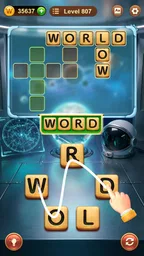
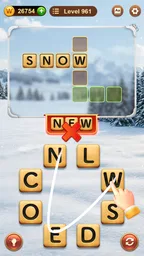

Word Connect review
 Analysis by Appsdrops
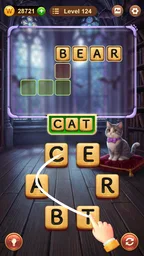
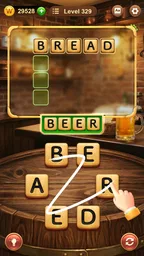
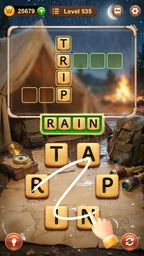
I would recommend Word Connect to someone who enjoys finding words from a small set of letters but wants a quiet, flexible puzzle rather than a story-heavy game. Its appeal is easy to understand: you look at the available letters, try combinations, and build words. The challenge comes less from learning complicated rules than from spotting a word you have overlooked. That makes it a natural choice for a short break, though it is not the right fit if you want a fast-paced game or deep strategy.
When a word puzzle starts to feel stuck
In my experience, the familiar snag in this kind of word game is not forgetting how to play; it is staring at the same letters until every possible answer seems obvious or impossible. A useful habit is to stop treating the letter tray as a single jumble. Look first for short words, then consider whether a letter can begin or end a longer one. If you keep trying the same pattern, put the game down briefly and return with fresh eyes.
That approach suits Word Connect because the central activity rewards vocabulary and rearranging letters, not quick reactions. It is a word game from ZenLife Games Ltd, and its straightforward premise makes it easy to pick up without a long learning period. The trade-off is that a simple format can become repetitive if you prefer puzzles that change their rules or introduce more varied interactions.
When a word you expect to work does not seem to fit, check the spelling and the exact letters available before assuming the game is behaving oddly. A familiar word may need a different arrangement, and a plausible combination is not necessarily the answer the current puzzle expects. Slowing down to inspect the letters is often more helpful than repeatedly swiping the same guess.
Make the first attempt deliberate
I find it useful to scan for common endings and beginnings before testing random combinations. For example, if the letters could form several short words, identify those first; they can reveal which remaining letters might support a longer answer. This is a practical way to make progress without turning every puzzle into a brute-force exercise. It also helps you notice whether you are relying on one familiar word pattern and ignoring alternatives.
There is a small but meaningful distinction between being stuck and being tired of the puzzle. If you are still interested but cannot see a word, try changing your method. If you are no longer enjoying the search, a short session may simply be enough. The game works best as a low-pressure diversion, not as an obligation to clear every challenge in one sitting.
Check the basics before blaming the game
Word Connect is free to install and is rated Everyone, so it is approachable for a broad audience. It requires Android 8.0 or later, a detail worth checking before downloading if you are using an older device. Its current version is 9.1110.527. If installation or an update seems to stall, I would start with ordinary checks: confirm the device meets the minimum system requirement, make sure the app store has finished the download, and restart the store or device before trying again.
Those steps are intentionally simple. They do not assume a particular cause, and they can help distinguish a download problem from a puzzle problem. If the app opens but a specific word does not register, first check that the letters were entered in the intended order and that the gesture completed. If the game itself is unresponsive, closing and reopening it is a reasonable first recovery step before changing anything else.
The game has an average rating of 4.8 from around 1.3 million ratings, and it has passed 50 million installs. Those figures suggest that the basic format has broad appeal, but popularity does not guarantee that every player will enjoy its pace. I would treat them as context, not as a substitute for deciding whether letter-search puzzles are the kind of downtime you want.
Recover your rhythm without turning play into a chore
When I hit a wall, I use a short reset rather than making guesses faster. I look for the simplest words I can make, then revisit the leftover letters and ask what combinations I have not considered. This can expose a blind spot, especially when I have fixated on a longer word and overlooked an ordinary short one. It is also a useful way to keep the puzzle mentally active without relying on hints or outside answers.
A realistic use case is a few minutes while waiting for a ride or taking a break between tasks. You can open the game, work on a letter puzzle, and stop when your break ends. The format is better suited to those small windows than a game that demands a continuous session or a complex sequence of decisions. If you want to protect your attention, decide before opening it whether you have time for one puzzle or a longer stretch; easy-to-start games can make a short break expand.
One trade-off is that word knowledge shapes the experience. A player who enjoys spelling and vocabulary may find the search satisfying, while someone who dislikes being tested on words may find missed answers irritating. The game can encourage you to consider unfamiliar combinations, but it is not a substitute for a structured language course. I would choose a dedicated learning app if the main goal is systematic vocabulary instruction rather than casual practice through puzzles.
Another practical point is spending. The game is free, with in-app purchases ranging from $0.99 to $99.99 per item. That broad range makes it sensible to review any purchase prompt carefully, especially if a child is playing or if you prefer to keep mobile games at no cost. I would not treat an optional purchase as necessary to enjoy the basic word-building premise, and anyone who wants a strictly purchase-free experience should check their device’s purchase controls before handing it over.
Know when the problem is elsewhere
If the puzzle is available but the app seems slow or the screen does not respond, it is worth separating device trouble from a difficult answer. Close other demanding apps, check that the device has not become unusually unresponsive, and reopen Word Connect. If other apps are also misbehaving, the issue may be broader than this game. If only one puzzle is giving you trouble, return to the letters and test your assumptions before concluding that the app has failed.
I would avoid repeatedly reinstalling a game as the first response to a temporary freeze or a single confusing answer. Begin with a restart and check whether the problem happens again. If you do decide to reinstall, remember that progress handling can vary between games and devices; make sure you understand what you might lose before removing an app. This is general caution rather than a claim about a particular save system.
For players comparing alternatives, Word Connect sits on the simple end of the word-game spectrum. A crossword may be better if you prefer clues and a connected grid; a word-search puzzle may suit you if you want to spot terms in a fixed arrangement. Word Connect is the better fit when you want to form words from a given set of letters and enjoy testing possible combinations. Its directness is its strength, but players seeking a narrative, elaborate mechanics, or a sharply different challenge should look elsewhere.
Who will enjoy it, and who should pass
I would suggest it to casual puzzle fans, people who like rearranging letters, and anyone looking for a game that can fit around everyday interruptions. Its Everyone age rating and simple central activity make the premise easy to share across age groups, though younger players may still need help with spelling or purchases. It is also a reasonable choice for someone who wants a gentle mental warm-up rather than a competitive test.
I would skip it if word puzzles regularly feel like homework, if you need a game with substantial tactical depth, or if you want every session to introduce a new kind of interaction. The basic loop is intentionally clear, and that clarity can also limit variety for players who tire of repeating the same kind of search. A richer puzzle format may hold their interest longer.
The game was released on June 5, 2017, and its continuing reach is reflected in roughly 160,000 written reviews. Those details give a sense of an established title, but the important question is still whether its core activity suits you. I would judge it by a brief trial: do you enjoy examining the letters and trying fresh arrangements, or do you quickly feel that the task is repetitive?
My practical verdict
Overall, I see Word Connect as an easy-to-start word puzzle with a clear use: fill a spare moment by looking for words in a set of letters. I like that it asks for attention without demanding a complicated setup, and that a small change in approach can often make a stubborn puzzle feel manageable. Its limitations are just as clear: the repeated search may not satisfy players who want variety, action, or a guided learning path.
If you download it, check Android compatibility first, treat purchase prompts thoughtfully, and use a pause or a fresh scan of the letters when you get stuck. For a free word game with broad popularity and a low barrier to entry, it is an appealing pick for casual play. I would recommend it to a friend who enjoys vocabulary puzzles, while being honest that someone looking for a more varied or strategic game will probably be happier with another genre.
What we like
- Thousands of levels provide plenty of word-finding challenges.
- Daily puzzles offer a reason to return regularly.
- Hints can help when a level feels difficult.
- Offline play makes it convenient without an internet connection.
- Simple controls are easy to learn for new players.
What could be better
- Some word combinations may feel obscure or repetitive.
- Hint use can be limited unless you earn or purchase more.
- Ads may interrupt play between puzzles.
- Later levels can become challenging without hints.
- The basic gameplay may feel repetitive over long sessions.







