
Words of Wonders: Crossword review
 Analysis by Appsdrops
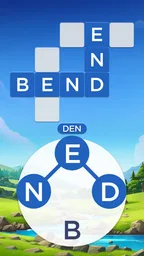
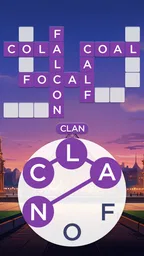
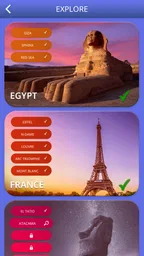
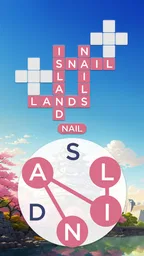
I find Words of Wonders: Crossword easiest to appreciate in short bursts. It gives you a set of letters and asks you to connect them into words that fill a crossword-style board, while its progression evokes visits to famous world wonders. That simple loop makes it approachable when I have a few spare minutes, but it can also leave me stalled when a word refuses to come to mind. The game is a good fit if you enjoy vocabulary puzzles and gradual, low-pressure progress; it is less suited to anyone who wants a fast action game or a crossword built around detailed clues.
Getting past the first sticking points
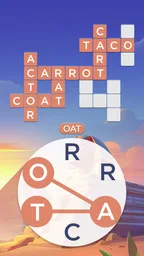
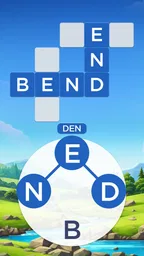
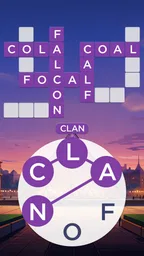
The main challenge is not learning a complicated control scheme. It is seeing a word in a small group of letters when the obvious answers have already been used. I like that the board gives the puzzle a clear shape: instead of guessing words in an open-ended list, I can look at the empty spaces and think about which lengths still need filling. That visual context often gives me a way back in when my first ideas run dry.
My practical approach is to stop trying to solve the whole board at once. I look for the shortest open spaces, make a few likely words from the available letters, and then use the new crossings to reconsider the longer answers. A word that seems implausible on its own can become obvious once its first or last letter is fixed by another entry. This is more useful than repeatedly circling the same letter combinations in my head.
There is a trade-off in the format. A crossword with written clues tells you what kind of answer to seek; here, you have to infer the answer from the letters and the board. That makes the game accessible without requiring specialist knowledge, but it can also make a puzzle feel opaque if you do not recognize a valid word or are unsure which combination the game expects. I would not treat a moment of confusion as proof that I have missed an obvious clue—the puzzle is asking for pattern recognition, not clue interpretation.
When I get stuck, I change the task rather than keep forcing one answer. I try a different arrangement of the letters, check whether another open slot can be completed, and come back to the difficult space after the board has changed. That small reset is especially helpful during a short break: it keeps the game relaxing instead of turning one stubborn word into a test of patience.
Make a small session work for you
A useful everyday scenario is waiting for a coffee or sitting through a brief gap between errands. I can open a puzzle, make progress on a few entries, and stop without needing to remember a complex storyline or a long sequence of controls. The crossword layout also gives me a natural stopping point: once I have filled what I can, I can leave the remaining words for later rather than force a complete solve in one sitting.
For a more focused session, I would work across the board systematically. First, scan for short gaps and try combinations that use the letters in different orders. Next, note which crossing letters those answers provide. Finally, revisit longer spaces with that extra information. This workflow is simple, but it prevents a common time-waster: entering the same familiar word repeatedly while overlooking a less obvious arrangement.
Because the game is word-based, it can suit someone who wants a gentle vocabulary workout, but I would not use it as a formal language-learning course. Recognizing words and building them from letters is not the same as studying definitions, grammar, or pronunciation. If your goal is structured learning, a dedicated study tool is a better match; if your goal is a casual puzzle that happens to engage your word sense, this format is more appropriate.
Setup checks before blaming the puzzle
Words of Wonders is a free word game from Fugo Games. It was released on April 10, 2018, and its current version is 5.10.6. The listed minimum operating system is version 8.0, so I would check that the device meets this requirement before trying to troubleshoot installation or startup problems. The game is rated Everyone, which makes its general audience broad, though parents should still make their own decision about whether a particular game suits their child.
It has an average rating of 4.9 from around 6.6 million ratings, with roughly 44,000 written reviews and over 100 million installs. Those figures suggest that it has reached a large audience, but they cannot guarantee that it will run smoothly on every device or that its puzzle style will suit every player. I would use them as context, not as a substitute for checking compatibility or deciding whether the gameplay itself appeals to me.
If installation or an update seems stuck, I start with ordinary checks: confirm that the device has enough free space, that the operating system meets the minimum, and that the app store is not still processing another download. If the game opens but behaves unexpectedly, closing it and reopening it is a sensible first step. I would also check whether the device itself is having a broader connection or performance issue before assuming the crossword is at fault.
The game is free to download, with in-app purchases ranging from $0.99 to $99.99 per item. I would keep that in mind before handing a device to a child or tapping through a purchase prompt. The presence of optional purchases does not mean I need to buy anything to decide whether the core letter-and-board puzzle is enjoyable, but it does make it worth paying attention to the purchase controls on a shared device.
Recover your rhythm without making the puzzle harder
When progress stalls, I find it helps to distinguish between a difficult answer and a session that has simply lost momentum. If I am tired or distracted, I may keep seeing the same few combinations and miss alternatives. Rather than treating every pause as a problem to fix, I can leave the board and return with fresh eyes. That is a particularly useful habit for a game designed to fit into spare moments rather than demand uninterrupted attention.
If the board appears unresponsive, I would first check whether a tap is landing where I expect and whether the app has finished loading. A brief pause, followed by closing and reopening the game if needed, is a low-risk recovery step. If other apps are also freezing, the issue may be with the device rather than this particular game. Likewise, if the game works but I cannot solve a word, that is a puzzle challenge, not necessarily a technical fault.
I also avoid trying to fix a word problem by changing device settings. A puzzle that does not accept an answer may be asking for a different word, or I may have misread the available letters. I recheck the letters and the empty spaces before taking any more disruptive steps. This keeps troubleshooting proportionate: solve the board with observation, and reserve device-level checks for genuine loading or input trouble.
One non-obvious strength of the crossword layout is that it lets me use progress as a memory aid. I do not need to hold every possible word in mind. Once a crossing entry narrows an open space, I can focus on the remaining letters and test a smaller set of candidates. This makes the game friendlier to casual play than a free-form word scramble, where there is no board to show which discoveries matter.
When a different word game is the better choice
This game will not suit every word-puzzle fan. If you prefer cryptic clues, trivia, definitions, or a newspaper-style grid, the letter-connection format may feel too dependent on trial and recognition. If you want competitive matches, a social word challenge, or a strict timer, you may be happier with a game designed around those priorities. The appeal here is the quieter process of finding words that fit the board, not a detailed clue system or a race against another player.
It can also become repetitive for someone who wants every puzzle to introduce a radically different mechanic. The core activity remains connecting letters to fill spaces, so the variety comes from the changing letter sets and boards rather than a constant change in how the game is played. I see that consistency as a benefit when I want something familiar, but a limitation if I am searching for a puzzle game that keeps reinventing itself.
Compared with a standard word-search puzzle, I have to construct the words rather than simply spot them in a grid. Compared with a conventional crossword, I get fewer hints about meaning and more emphasis on rearranging the letters at hand. That middle ground is what makes the game distinctive: it is more active than scanning for hidden words, while generally less demanding in reference knowledge than clue-heavy crosswords. The right choice depends on which part of word puzzles you enjoy most.
A practical verdict for everyday play
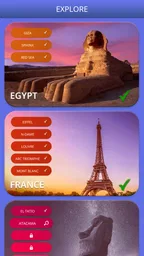
I would recommend this game to someone who likes word puzzles, wants a clear board to work through, and values the freedom to play in short sessions. Its worldwide-wonders framing gives the levels a sense of travel, while the core appeal is the satisfying moment when a set of letters finally resolves into the words the board needs. The game has been widely installed and is rated 4.9 on average, but the important question is whether this particular kind of word search feels enjoyable to you.
I would skip it if you need rich clues, a competitive format, or a puzzle experience with frequent changes in mechanics. I would also be cautious about expecting it to teach vocabulary systematically: it is a casual game first. For someone who enjoys connecting letters, though, it offers a straightforward way to turn a few idle minutes into a small mental challenge. My best advice is to work from easy crossings toward harder spaces, take a break when you start repeating guesses, and check device basics before treating a technical hiccup as a puzzle issue.
What we like
- Clues connect to landmarks and cultures around the world.
- Offline play is useful when traveling without internet access.
- Daily puzzles provide a steady source of fresh challenges.
- The hint system helps when you get stuck on a difficult word.
- Simple controls make it easy to play in short sessions.
What could be better
- Later puzzles can feel repetitive if you play for long stretches.
- Some clues rely on vocabulary that may be unfamiliar to learners.
- Hints are limited unless you earn or purchase more.
- Small letter tiles can be harder to tap on compact screens.
- Progress may feel slow when several answers are difficult.







