


Bus Fever Party! review
 Analysis by Appsdrops
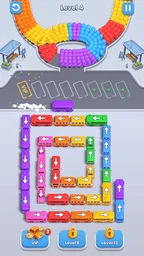
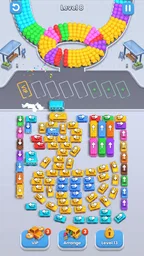
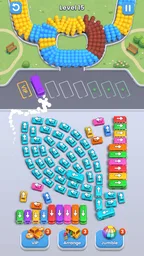
I find Bus Fever Party! easiest to enjoy in short bursts, especially when a phone or tablet gets passed around the household. Its bus-and-traffic theme gives each turn an immediate goal: work out how to clear a jam and get a bus through. That makes it simple for someone else to understand what is happening without a long explanation, while still leaving room to pause and think before moving anything.
Why its traffic puzzles suit a shared screen
As a casual puzzle game from Lumi Games, it is built around a kind of problem most players can grasp at a glance: vehicles are in the way, and the route needs to be cleared. I like that direct premise for shared play. One person can try a move, then hand over the device when they get stuck, turning a solo puzzle into a small group discussion without needing a separate multiplayer mode.
The most useful household scenario is a quiet moment when people are nearby but not all ready to commit to the same activity. During a short wait, one person can make a few moves, while another looks for a better order of operations. It is less suited to a lively group expecting everyone to play simultaneously; the appeal is taking turns thinking through the same traffic knot, not competing in real time.
That distinction matters if you are choosing between this and a typical casual game. Many casual alternatives focus on reflexes, repeated tapping, or quick matching. Here, the central pleasure is reading the arrangement before acting. If you enjoy spatial puzzles and the satisfaction of making a blocked route usable, the theme gives the problem a clear visual purpose. If you want a game that keeps everyone involved at once, a party or trivia game will likely fit better.
Taking turns without turning it into a household contest
On a shared device, I would treat each puzzle as a collaborative challenge rather than a scorekeeping exercise. Let one player explain the move they are considering, then give the next person a chance to suggest a different approach. That makes the game more enjoyable for mixed experience levels: a confident puzzle fan can offer a hint, while a younger player can still make the final choice.
A practical tip is to agree on a simple handoff before starting: one person gets to try a move, then the device goes to the next person if the group wants another perspective. This keeps the screen from becoming a tug-of-war and avoids one fast player taking over every decision. It also makes the game a better fit for a waiting room or a family break, where attention may be divided and turns need to stay informal.
I would not assume that sharing a device automatically means sharing progress or keeping separate records. The sensible approach is to regard the session as whoever currently has the device playing, unless the game itself presents a clear account or save choice. If different household members care about keeping their own activity separate, check what appears in the game before settling into a shared routine, rather than handing over the device and expecting distinct profiles.
Keeping expectations clear on a family device
The game is free to download, but it includes optional in-app purchases priced from $1.99 to $99.99 per item. That wide range is worth discussing before a child plays on a device connected to a payment method. I recommend setting the household’s usual purchase expectations first and supervising any purchase prompts, rather than assuming that a free game cannot lead to spending.
This is not a claim that the game requires purchases to be playable; it is a practical boundary for any shared device where several people may encounter the same screens. If a child is using the phone, make sure they know to ask before confirming a transaction. Adults can also decide whether they want purchase prompts to be part of a casual session at all. That conversation is more useful than relying on the game’s cheerful theme to signal how spending works.
Age context is reassuring but still needs ordinary parental judgement. The game is rated Everyone, so its stated audience is broad, and the traffic-puzzle premise is easy to explain. That does not tell a parent how long a child should play or how the child will respond to a tricky level. I would use the first session to see whether the puzzle pace suits them and whether they can comfortably stop when it is time to put the device away.
What the puzzle style asks of players
The key skill is not speed so much as restraint. With a traffic-jam setup, the tempting move may not be the useful one: shifting a vehicle can open one passage while leaving another obstruction in place. I find that makes it helpful to pause and trace the intended route before moving anything. On a shared screen, asking “what needs to move first?” tends to produce a more satisfying discussion than simply tapping the most obvious vehicle.
A second useful habit is to treat each attempt as information. If a move does not lead to a clear exit, the group can reconsider the order rather than blaming the person who tried it. That is especially helpful with younger players, because it frames mistakes as part of solving the arrangement. The game’s premise naturally supports this kind of reasoning, though players who dislike trial and error may find the process less relaxing than a straightforward matching game.
It also works well as a low-pressure handoff activity because the puzzle goal is visible and concrete. A player arriving midway can usually understand the basic situation from the traffic layout, then contribute an idea. For smoother sharing, I would have the current player explain what they are trying to clear before passing the device; otherwise, the next person may make a move without knowing the intended route.
What to know before installing
Bus Fever Party! is available at no charge, and its current version is 1.2.9. It was released on April 23, 2025, and requires Android 8.0 or later. Those details make it straightforward to judge whether an older household phone is a candidate, while the free starting point makes it easy to try without an upfront purchase.
Its audience is already substantial: the game has more than 10 million installs, an average rating of 4.1 from around 55,000 ratings, and roughly 1,100 written reviews. I would treat that as useful context, not a promise that every player will enjoy it. Ratings cannot tell you whether your household prefers deliberate traffic puzzles or faster, more social games, so a short trial is still the best way to decide.
For coordination, the simplest approach is to agree on who is playing and whether others are advising or taking a turn. That avoids confusion when the device is passed between siblings, partners, or parents and children. If someone wants uninterrupted solo concentration, give them the screen for a short stretch; if the aim is a shared activity, make suggestions welcome but let the current player choose the move.
Because it is a casual puzzle rather than a simultaneous group game, it is also easy to fit around ordinary routines. I would use it for a brief break between tasks, a quiet wait, or a moment when one person wants to play and another is happy to watch. It is not my pick for filling a long social gathering, and it may not suit someone seeking a story-driven game, deep progression, or action that rewards quick reactions.
Who will enjoy it, and who should look elsewhere
I recommend it to people who like untangling visual problems, especially households that want a game they can pass around without needing everyone to learn complicated rules. The traffic theme gives players a shared point of focus, and the turn-taking style can make even a few minutes feel like a small collaborative challenge. It is a better match for patient players than for anyone who finds blocked routes and repeated reconsideration frustrating.
I would skip it if your main goal is a fully coordinated family game with distinct player roles, or if you need firm separation between household members’ accounts and activity. I would also choose a different casual game for a child who becomes upset when a puzzle does not resolve quickly, or for a group that wants constant action. The game’s strengths are its clear premise and deliberate problem-solving, not guaranteed variety for every taste.
My household verdict is that this is a pleasant shared-screen option when people are comfortable taking turns and talking through a puzzle. The Everyone rating makes its age context approachable, while the purchase range means adults should set boundaries before a child plays. With those expectations in place, it offers a focused alternative to reflex-heavy casual games: a little traffic jam to reason through together, rather than another screen activity that depends on speed or simultaneous attention.
What we like
- Easy-to-learn controls make it approachable for new players.
- Short rounds suit quick play sessions.
- Colorful visuals give the game a cheerful look.
- The bus theme offers a lighthearted twist on party play.
- Progress provides a reason to return for another round.
What could be better
- Repeated tasks may make longer sessions feel monotonous.
- Some levels can feel difficult without careful planning.
- The interface may take time to navigate at first.
- Ads can interrupt the flow of play.
- Performance may vary across older devices.







