

Wordscapes Search: Word Games review
 Analysis by Appsdrops
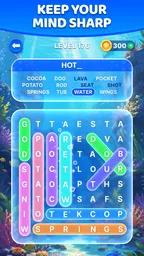
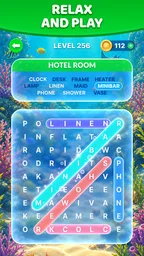
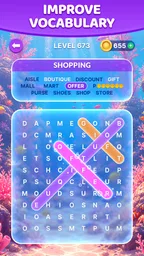
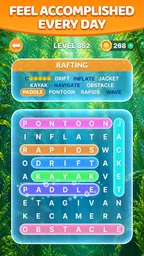
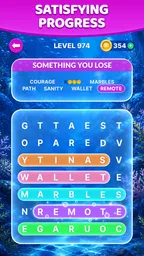
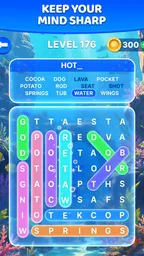
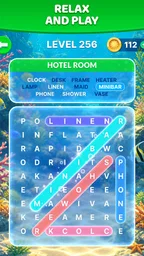
I enjoy word games most when I can pick one up for a few minutes without needing to study a complicated rulebook. Wordscapes Search: Word Games aims for exactly that kind of quick session: find words in a letter grid, take in scenic backgrounds, and move on when you’re ready. It is a free word-search game from PeopleFun, and its focus is narrower than a broad collection of word puzzles. That simplicity is part of its appeal, though it also means it will not suit everyone who likes word games.
What you get without paying
You can install and play the game for free. That makes it easy to try the basic experience before deciding whether it deserves a regular place on your phone. In-app purchases are available, with listed prices ranging from $0.99 to $99.99 per item. Those figures describe the available purchase range, not a requirement to pay to begin.
I’d treat the free access as a chance to judge the game on its actual routine: whether spotting words in a grid feels relaxing, whether the visual presentation keeps you engaged, and whether you want to return for more puzzles. If you are comparing it with paid word-game apps, the key distinction is that you can start here without an upfront purchase. The presence of optional purchases still matters, especially if you prefer games with no paid extras at all.
The purchase range is wide, so I would be deliberate rather than tapping through a payment prompt out of habit. Before buying anything, consider whether it solves a specific frustration for you and whether you are still enjoying the core puzzle loop. I can’t treat the most expensive item as representative of what a typical player needs; the sensible approach is to begin free and decide from your own experience.
A focused kind of word puzzle
This is a word-search game, not a general-purpose word-game hub. Its central task is to locate words in a field of letters, while the scenery gives the activity a calmer, more leisurely feel. That combination makes it an easy choice when I want a small mental challenge without committing to a long session or switching among different puzzle formats.
The game’s public reception is substantial: it has an average rating of 4.7 from around 234,000 ratings, and it has been installed over 10 million times. Those numbers suggest broad interest, but they cannot tell you whether its particular style will click with you. I would use them as context, not as a substitute for trying the free version and seeing how the puzzles feel on your own screen.
Its content rating is Everyone, which makes it broadly suitable from an age-rating standpoint. That is useful if you are choosing a simple puzzle game for a shared device, though an age rating does not say whether a particular player will enjoy word searches. A child who likes scanning for hidden words may find it approachable; someone looking for action, storytelling, or varied game mechanics should look elsewhere.
How I’d fit it into an ordinary day
A practical use case is a short wait when you have your phone out but don’t want to start a game that demands sustained attention. A word-search puzzle can give that pause a little structure: scan the letters, look for a candidate, and stop when you need to put the phone away. The scenic presentation helps distinguish the mood from a bare grid, but the main activity still asks you to concentrate on letters.
One useful habit is to scan systematically instead of darting around the board. I’d check likely starting letters first, then trace in the directions that make sense for the target word, rather than repeatedly rereading the entire grid. That simple approach reduces aimless searching and makes a short session feel more satisfying. It is also a good way to tell whether you enjoy the game’s core challenge or only like the general idea of word puzzles.
Another trade-off is that this format rewards visual scanning more than vocabulary construction. If you like recognizing a word once its letters are visible, that can be pleasantly low-pressure. If you want to build words from a rack, make strategic guesses, or solve clues that test definitions, a crossword, an anagram game, or another word puzzle may offer more variety. I would choose this one for finding, not for composing.
Where it sits beside other word games
Compared with a crossword, the appeal here is directness: you are looking through a grid rather than interpreting a clue and entering an answer into intersecting spaces. Compared with an anagram game, the emphasis is less on rearranging a small set of letters and more on noticing sequences already hidden in a larger field. That makes Wordscapes Search a better fit for relaxed visual attention than for players who want layered deduction or a steady change of puzzle type.
The scenic framing is a meaningful part of its identity, but it does not change the basic nature of the task. If you already know you tire quickly of word searches, attractive surroundings may not be enough to make the format feel fresh over time. On the other hand, if you enjoy the familiar search mechanic and want it presented as a casual mobile activity, the setting can make the experience feel less stark than a plain puzzle grid.
There is also a difference between a game that fills a short break and one built for deep sessions. I would approach this as a compact pastime rather than expecting a narrative journey or a broad set of modes. That expectation matters: judged as a focused word search, it has a clear purpose; judged as an all-in-one word-game collection, it is deliberately limited.
What may frustrate you
The main limitation is repetition inherent in the format. You are repeatedly scanning letter arrangements for words, so the pleasure depends on whether that act itself holds your attention. The scenery can soften the presentation, but it cannot turn a word search into a different kind of challenge. If you need changing rules to stay engaged, you may find the routine too consistent.
It also asks for visual focus. Playing while distracted or in a hurry can make the grid feel more fiddly than relaxing, and a small screen may be less comfortable for someone who has difficulty distinguishing letters. I’d try a few sessions in a comfortable setting before deciding whether the interface and scanning style suit you. That is a more useful test than assuming every casual puzzle will work equally well on every phone.
Purchases are another reason to pay attention to your own preferences. Free access lowers the barrier to trying the game, but optional spending can make the experience less appealing to players who want a strictly no-purchase environment. I would set a personal spending boundary before playing, especially if you tend to make small in-app purchases impulsively. If you never want purchase options in a game, a paid app with a clear one-time price may feel more straightforward, even though it costs money to start.
Who is most likely to enjoy it
I’d recommend giving it a try if you like traditional word searches, want something easy to understand, and appreciate a relaxed visual setting. It can work well for brief breaks, for players who prefer spotting words to solving cryptic clues, and for anyone who wants to test a game before spending. The free starting point makes that decision practical rather than theoretical.
I’d skip it if you are looking for a wide variety of puzzle mechanics, competitive depth, a story-led game, or a challenge built around forming words from limited letters. It may also be the wrong fit if you dislike optional in-app purchases on principle. In those cases, a crossword app, an anagram-focused game, or a paid puzzle with a purchase model you prefer would be a better match.
PeopleFun released the game on November 22, 2019, and the current version is 1.56.0. It requires Android 7.0 or later. Those details are useful when checking device compatibility, but they do not change the main buying question: whether a straightforward word search is the kind of puzzle you will actually open again. Its long-running presence and large audience provide context, while your own first few sessions are the better test of fit.
My verdict on its value
For a free game, the strongest value is the low-risk opportunity to find out whether its particular style of word search suits you. You get a focused puzzle activity, scenic presentation, and an experience that can fit into small gaps in the day. I would not judge its value by the highest listed purchase amount, nor assume that buying something is necessary. Start without spending, notice whether the searching stays enjoyable, and only consider an optional purchase if you can name a clear reason for it.
My recommendation is simple: try it if you want an approachable word-search game and are comfortable ignoring purchases unless they genuinely appeal to you. Choose another option if you need varied puzzle types or a more involved challenge. It earns its place as a casual, focused diversion, not as a complete solution for every kind of word-game fan.
What we like
- Quick rounds make it easy to play in short breaks.
- The simple controls are easy to learn.
- Word searches can help build vocabulary.
- Hints offer help when a puzzle gets difficult.
- The relaxed pace suits casual play.
What could be better
- Later puzzles may feel repetitive.
- Some answers can be hard to spot on a small screen.
- Hints may be limited without extra rewards.
- Progress can feel slow for players seeking a challenge.
- The game may show ads between puzzles.







