
Words With Friends Word Game review
 Analysis by Appsdrops
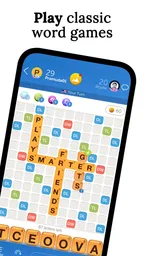
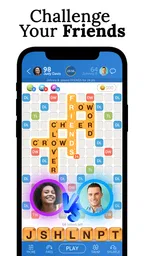
I like word games that leave room for a thoughtful move rather than demanding a quick answer, and Words With Friends suits that slower, social kind of play. A turn begins with a rack of letter tiles and a crossword-style board; I look for a legal word, place it across or down, and try to make the move count. Then the other player gets a chance to respond. That simple exchange is the game’s main appeal: it gives me a small puzzle to solve and a reason to come back later.
Finding a first move that feels worthwhile
Words With Friends is a free word game from Zynga, built around multiplayer crossword play. Its basic action is easy to understand, but the interesting part is weighing a word against the board already in front of me. A move that seems strong on its own may open a useful scoring opportunity for the other player, so I’m not just asking, “Can I play this?” I’m also asking, “What will this leave behind?”
I find that makes it a good fit for people who enjoy vocabulary games but don’t want every session to feel like a timed test. The board stays relevant from turn to turn, and a familiar set of letters can produce several possible plays. That gives the game a satisfying mix of word knowledge and spatial thinking: I scan for a place where my word fits, then judge whether the resulting position is worth giving up.
The most useful habit I’ve developed is to check the board before settling on the first playable word. I look for places where a move could connect to existing letters, then compare the score with the risk of creating an easy reply. When I have several options, I sometimes choose a modest play that keeps the board awkward rather than a larger one that gives away a tempting opening. That is a small strategic decision, but it keeps the game from becoming simply a hunt for the longest word.
It is also a practical game for short breaks. I can make a move, put my phone away, and let the other player take their turn when it suits them. That rhythm works well when I’m waiting for an appointment or winding down at home: the game offers something to think about without insisting that I stay focused for a long stretch. If you want a word puzzle that can be played at a more relaxed pace, that is one of its strongest qualities.
Why the board matters as much as the letters
New players may be tempted to treat each rack like a separate anagram challenge. I think the better approach is to treat the whole board as part of the puzzle. Existing words can create useful connections, while the placement of a new word affects what remains available. A compact move can be strategically better than a flashy one if it limits the opponent’s next choice or preserves a promising part of the board for later.
This is where the game rewards patience. I sometimes spend longer considering the position than finding a word, especially when a high-value space is in reach. The trade-off is that a careful turn can feel less immediately gratifying than dropping a word and seeing a large score. For me, the slower decision-making is a feature; anyone who wants constant action may find it a drag.
Compared with a solo word search or a quick anagram game, this format gives each word consequences beyond its own score. Compared with a traditional board-game session, it is easier to fit around daily interruptions because players can take turns separately. That makes it particularly suited to friends or family members who enjoy a little friendly competition but rarely have the same free hour.
The turn-by-turn feedback keeps the puzzle alive
After I play, the board changes and the opponent’s reply gives me new information. Perhaps they block a spot I was watching, or perhaps their word creates a connection I can exploit. That response is the feedback loop that keeps a familiar board interesting: I make a choice, see how it alters the position, then rethink my plan instead of repeating the same puzzle from scratch.
A realistic everyday use is a game shared with someone I already know. I might take a turn during a coffee break, leave the board alone through the afternoon, and return in the evening to see what they played. The pause becomes part of the appeal rather than a problem. There is no need to coordinate a precise start time, and each turn gives us a small shared activity that can continue alongside ordinary routines.
The same quality has a downside. If I’m in the mood for a complete game with a clear beginning and end in one sitting, a turn-based exchange may feel drawn out. The pace depends on the other person’s availability, so I wouldn’t choose it when I want guaranteed, uninterrupted play. It is better as a recurring social puzzle than as a dependable quick match against a clock.
With a 4.1 average from around 527,000 ratings, it has drawn a large audience, and its 10 million-plus installs suggest that the basic idea has broad reach. Those figures don’t tell me whether a particular opponent will suit my pace, though. I’d choose a playing partner who enjoys taking their time and thinking about the board; the experience is less appealing if I expect fast replies or a highly competitive match every time.
Small rewards, without needing to chase every score
The immediate reward is seeing a word fit and watching the board shift in response. A well-judged play feels satisfying even when it isn’t the biggest-scoring option, because I can see how it serves a larger plan. That kind of payoff is quieter than a streak of rapid wins, but it suits the measured pace. I’m often pleased when I’ve protected a useful area or found a clever connection, not only when I’ve made a high-scoring move.
For a more useful way to approach a turn, I recommend separating two questions: what word can I make, and what position do I want to leave? This prevents me from overvaluing the points in front of me and forgetting the next move. It also makes losses easier to learn from. If the opponent finds a strong reply, I can look back at the space I opened and make a different kind of decision next time.
Words With Friends is rated for Everyone, so it can suit a broad range of ages, particularly people who like playing with friends or relatives across different schedules. Still, the best match depends on taste. Someone who prefers a completely solitary puzzle, a fixed set of levels, or a quick round with a clean finish may be happier with a solo word game. This one gets much of its character from the other person’s response, and that is also its main dependency.
The game is free to download, with optional in-app purchases listed from $0.99 to $149.99 per item. I’d go in expecting the core appeal to be the turns and the board rather than assuming that spending is necessary to enjoy the word puzzle. If you prefer to keep mobile games free of purchase prompts or optional spending altogether, it is worth considering that before installing. The listed price range is broad, so I would check any purchase carefully rather than treating the game’s free entry point as a promise that every option costs nothing.
When the next session begins
The reset is simple: once the other player has changed the board, I have a fresh position to assess. I’m no longer solving the same arrangement, and a plan that looked sensible before may now need to change. That natural reset is why I’m willing to return for another turn. The game doesn’t need to introduce a new puzzle each time; the interaction itself keeps reshaping the one I already have.
There’s also a useful limit to that loop. If I find myself opening the game only to wait for someone who rarely plays, the social advantage disappears. I’d recommend choosing an active friend or relative rather than expecting the game alone to provide a steady stream of quick entertainment. For a casual, ongoing challenge with a person you enjoy playing against, the waiting can feel relaxed. For a player who wants immediate opponents and constant action, it may be the wrong fit.
The current version is 63.00.04, and the game was released on November 7, 2017. It supports a minimum operating system of 7.1. Those details make it easier to judge basic compatibility, but the more important question is whether you like its kind of pacing: deliberate turns, an evolving crossword board, and a social back-and-forth rather than a one-and-done puzzle.
Who I’d recommend it to
I’d recommend Words With Friends to someone who likes wordplay, enjoys testing a friend’s choices, and wants a game that can sit between other parts of the day. Its strongest moments come from noticing a better placement, anticipating a reply, and returning to a board that has changed while I was away. Zynga’s game makes those small decisions feel meaningful without requiring a long uninterrupted session.
I would skip it if I wanted a solitary campaign, a reliably fast match, or a puzzle that ends as soon as I solve it. I’d also be cautious if waiting for another player tends to frustrate me. For everyone else, it offers a clear, repeatable loop: find a word, place it thoughtfully, see what the opponent does, and decide whether the new position deserves another turn. Its best reward is not simply scoring a word, but having a reason to rethink the board when you return.
In short, I see Words With Friends as a relaxed multiplayer word game with more tactical depth than its simple turn-taking suggests. It is free to start, easy to fit around a busy day, and most enjoyable when both players like taking their time. If that sounds like the kind of small, ongoing contest you’d share with a friend, it is an easy one to try; if you need immediate action or a complete solo puzzle, another style of word game will serve you better.
What we like
- Turn-based matches let you play at your own pace.
- A built-in dictionary helps settle word challenges.
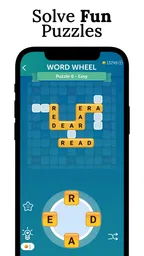
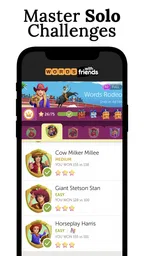
- Solo play offers practice without waiting for an opponent.
- The game supports matches with friends and random players.
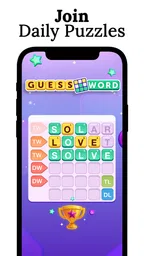
- Daily puzzles provide a change from standard matches.
What could be better
- Ads can interrupt the flow between matches.
- Some features and extras require in-app purchases.
- A steady internet connection is needed for online play.
- Waiting for opponents can make matches feel slow.
- The interface may feel busy for new players.







