



Words of Wonders: Zen review
 Analysis by Appsdrops
Words of Wonders: Zen is best understood as a calm word puzzle for small gaps in the day, not as a demanding vocabulary course or a race against other players. I like the simple pleasure of turning a handful of letters into words and watching a puzzle take shape. Its relaxed presentation gives that familiar activity a sense of place, while the word-finding itself provides enough resistance to keep me thinking. The trade-off is that anyone seeking a deep story, elaborate strategy, or a brisk competitive challenge may find it too gentle.
A quiet twist on familiar word puzzles
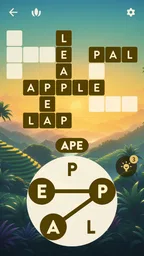
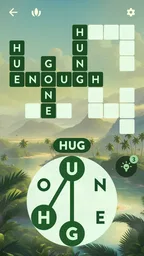
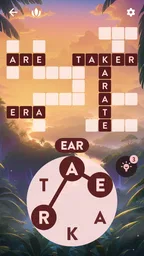
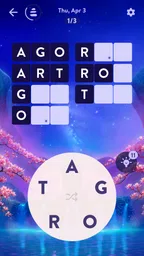
Made by Fugo Games, this free word game belongs to the word-puzzle side of mobile gaming. Its central task is easy to grasp: connect available letters to form words that fit the puzzle. That makes it approachable even if you have never played this particular title, and it is simple to return to after putting your phone down.
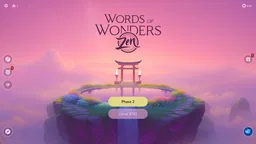
The distinction from a plain anagram list is the way the puzzle gives word-finding a visual destination. Rather than treating each answer as an isolated test, the game links progress to a sequence of serene places. That framing is a modest touch, but it suits the pace: solving a word feels like a small step forward rather than a score-chasing feat.
In my view, the strongest quality is how little effort it takes to begin. You do not need to learn a complicated control scheme before the letters make sense. The challenge comes from spotting possible words, checking whether they belong in the puzzle, and reconsidering the letters when an obvious answer does not fit. That creates a satisfying loop without asking for a long, uninterrupted session.
What makes the letter puzzles satisfying
The main pleasure is often not finding the longest or most impressive word. It is noticing a short answer you overlooked because your mind had locked onto another arrangement. I find that small shift in perspective more rewarding than simply tapping through a list of obvious combinations. When I am stuck, briefly switching attention to another possible word can be more useful than staring at the same pattern.
A practical way to play is to sweep through the letters for short, familiar words first, then look for longer arrangements. This narrows the possibilities and helps reveal which letters may be doing more work than they initially appear to. It also makes a quick session feel purposeful: even if I do not clear a whole puzzle in one sitting, I can make progress by identifying a few plausible answers.
There is a useful distinction between solving the puzzle and exercising your vocabulary. A word game can encourage you to test combinations you might not use in ordinary conversation, but that does not automatically make it a structured learning tool. I would play this for light language practice and pattern recognition, not as a substitute for lessons, reading, or a dictionary-led study routine.
Where the relaxed design has limits
The same calmness that makes the game inviting can also make it feel repetitive. The core activity remains letter combination and word recognition, so players who tire quickly of that loop may not find enough variety to hold their attention over long sessions. The scenic framing changes the mood more than the underlying puzzle format, and it is worth knowing that before choosing it as a main game.
There is also a fine line between a satisfying hint of difficulty and a frustrating stall. If a familiar word refuses to come to mind, the puzzle can stop feeling restful. I recommend stepping away for a minute rather than forcing guesses; returning with fresh attention often makes a hidden combination easier to see. If you prefer games that always offer a clear next move or explain why an answer works, this sort of word search may feel less guided than you want.
Its low-pressure style is not ideal for every mood. Someone looking for timed rounds, head-to-head competition, or a demanding test of spelling may be better served by a word game built around those specific goals. By contrast, the slower pace is an advantage when I want a puzzle that can sit alongside a quiet break without requiring constant focus.
Good moments to play, and who should choose it
A realistic use case is a short wait before an appointment. I can open a puzzle, try a few combinations, and stop when my name is called without needing to remember a complicated plan. It also works as a wind-down activity when I want to engage my mind without taking on a plot-heavy game. The best fit is someone who enjoys rearranging letters and is content with gradual progress.
It is especially suitable for casual players who want a straightforward word challenge, including people who are new to mobile puzzle games. The age classification is Everyone, which makes the general content suitable for a broad audience; that does not mean every puzzle will be equally easy for every player. A child still building vocabulary may need patience, while an experienced word-game fan may want more variation than the core format offers.
I would skip it if you dislike anagram-style puzzles, want a clear educational curriculum, or mainly play to compete with friends. It is also not the strongest choice for someone who needs a game to deliver a different mechanic every few minutes. Its appeal rests on the repeated pleasure of finding words, so enjoying that basic action matters more than any scenic presentation.
How it compares with other word games
Compared with a crossword, this asks less of you in terms of clues and outside knowledge: the letters themselves are the starting point. Compared with a word-search grid, it puts more emphasis on forming words from a limited set rather than scanning a field of letters. And compared with a competitive word battle, it feels more personal and unhurried. Those differences make it a useful alternative when you want a small solo puzzle rather than a score race.
That comparison also explains its main compromise. Crosswords can offer richer clue variety, while competitive word games provide social pressure and a clear opponent. This title instead prioritizes an easy-to-enter loop and a soothing atmosphere. I would choose it for a few calm minutes, but reach for another format when I want detailed clues, a multiplayer contest, or a broader range of puzzle mechanics.
For a more deliberate session, I find it helpful to resist tapping every possible combination immediately. First scan for likely short words, then try less obvious letter orders, and only use any available assistance when I have genuinely exhausted my own ideas. That approach keeps the puzzle feeling like my own discovery. It also prevents a quick solve from becoming a string of random attempts, which can drain the pleasure from a game built around noticing patterns.
Practical details and value
The game is free to download, though optional in-app purchases are listed from $0.59 to $11.99 per item. I would treat that as a reason to check purchase prompts carefully, especially on a device shared with children, rather than assuming every element is paid or that a purchase is necessary to enjoy the basic puzzle. The catalog rating is 4.9 from around 143,000 ratings, and it has over a million installs. Those figures suggest broad interest, but the right question is still whether you enjoy its particular style of word play.
It was released on May 24, 2024, and version 2.7.1 is the current version. The minimum operating-system requirement is version 8.0, so it is worth checking compatibility before installing on an older device. These practical points matter most if you are deciding whether it will run on a family tablet or a phone you do not update often.
One useful expectation to set is that a high average rating does not tell you whether its pace matches your tastes. Ratings can help establish that many players have tried it, but they cannot answer whether you prefer a crossword’s clues or a head-to-head word contest. I would judge it by the core activity: if searching for words from a fixed set sounds satisfying, the low barrier to entry is a genuine advantage; if that sounds repetitive, popularity is unlikely to change your mind.
My verdict
Words of Wonders: Zen succeeds as a relaxed, focused word puzzle with a pleasant sense of progression. I would recommend it to anyone who likes finding patterns in letters and wants something easy to pick up during a break. Its scenic framing complements the puzzles rather than transforming them, so the main reason to stay is the word-finding itself.
For me, the honest verdict is positive but specific: this is a good choice for quiet, bite-sized play, not an all-purpose language app or a high-energy game. The gentle rhythm is its strength, and the repeated letter-solving loop is its clear limitation. If that balance sounds appealing, it is an easy title to try; if you need competition, rich clues, or constant mechanical variety, another word game will suit you better.
What we like
- Quick word puzzles make it easy to play in short sessions.
- The calm presentation suits players looking for a relaxed word game.
- Clues help you recover when a puzzle becomes difficult.
- Progressive challenges offer a steady sense of advancement.
- Word discovery can provide a light vocabulary workout.
What could be better
- Some answers may feel obscure or depend on a specific word form.
- Repeated puzzle mechanics may become predictable over time.
- Hints can make later levels feel less challenging.
- Small letter tiles may be uncomfortable on compact screens.
- The game may not appeal to players seeking a fast-paced experience.







