



Words of Wonders: Guru review
 Analysis by Appsdrops
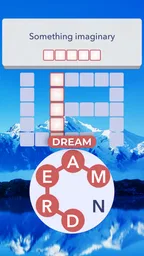
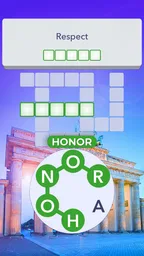
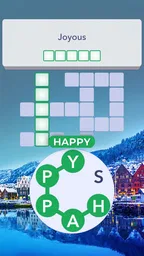
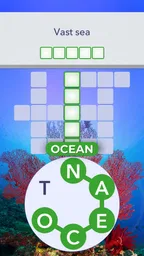
I like word games best when they give me a clear little problem to solve without demanding a long session. Words of Wonders: Guru is built around that kind of play: I look for words from a set of letters, fill the available spaces, and move through a journey themed around places around the world. It is a focused, approachable format, and it works especially well when I have a few spare minutes and want something more engaging than a quick scroll.
This is a free word game from Fugo Games, rated for Everyone. Its broad appeal is easy to understand: the basic task is familiar, but each puzzle asks me to test combinations rather than simply recognize a word on a list. The game has a 4.9 average from around 364,000 ratings and more than 10 million installs. Those figures point to a large audience, though they do not guarantee that every puzzle or pacing choice will suit every player.
Small early goals make it easy to settle in
The opening appeal is the immediate objective. I do not need to learn a complicated rule set before I can start thinking about the letters in front of me. Finding one valid word gives me a quick foothold; finding the remaining words completes the puzzle and carries the journey forward. That makes the first sessions easy to fit between errands, during a commute, or while waiting for someone.
The travel theme gives those small wins a sense of direction. Instead of treating each board as an isolated word exercise, I can connect solving puzzles with gradually moving through a broader journey. That framing is more motivating than a plain succession of grids, particularly if I like seeing a task lead into another one. It does not turn the game into a detailed travel experience, though: the satisfying part is still the vocabulary challenge.
I find it helpful to treat each puzzle as a sequence of modest goals, not as a test I must finish in one sitting. I first look for short, obvious words, then use the letters left over to spot less familiar combinations. This is a practical way to get unstuck because completing easy entries narrows the possibilities. It also keeps the game relaxed: a few words found can feel like progress even when the board is not finished yet.
That approach suits players who enjoy language and pattern recognition more than fast reactions. There is no need to race through a level just to prove quick reflexes. The trade-off is that a person looking for action, a story-heavy adventure, or competitive play may find the core loop too quiet. The game’s appeal depends on enjoying the small mental click when a jumble of letters becomes a word.
Progress feels clearest when I focus on the puzzle
The most useful progress signal is direct: words fit into the board, the board fills, and the journey continues. That tight connection between effort and completion makes the game easy to understand without requiring me to track a complicated set of goals. I can tell what I am working toward at a glance, which helps when I return after a break and want to resume without remembering a plot or a long chain of instructions.
One small but effective habit is to switch between searching for familiar word endings and checking the letter mix for short alternatives. If I keep staring at the same arrangement as though there is only one obvious answer, I tend to miss options. Changing the way I scan the letters gives me a fresh angle without needing a hint straight away. It is a useful distinction from word searches, where the answers are already laid out in a grid: here, I have to assemble possibilities myself.
The journey structure is also a good fit for brief sessions. I can complete a puzzle and stop at a natural point rather than feel that I have left a long mission unfinished. For a daily routine, that makes the game easier to pick up than a word title built around extended rounds or a timed contest. If I prefer a measurable personal best, a head-to-head challenge, or an open-ended word sandbox, the progression here may feel less compelling.
I would not read every completed board as evidence that my vocabulary is improving in a formal way. The game gives practice in noticing letter patterns and recalling words, but its main reward is solving the puzzle in front of me. I enjoy that distinction: it is an entertaining language workout, not a substitute for a structured course or a dictionary-led study plan.
The challenge works best when I change tactics
At first, the format can feel forgiving because the task is so clear. As the available combinations become less immediate, the same board-filling routine asks for more patience. I have to consider less obvious words and resist settling on the first plausible answer. That gradual shift is a good way to keep a familiar mechanic interesting, although anyone who finds word recall frustrating may experience the harder moments as a wall rather than a satisfying step up.
When I get stuck, I recommend stepping away from a single guessed word and looking across the whole set of letters. A word that seems unlikely in one position may become easier to see once another entry has used some of the letters. I also try saying possible combinations quietly or mentally rearranging the letters in groups. These are simple techniques, but they make the puzzle feel less like random guessing and more like a process I can control.
There is a limit to that strategy. If I do not know a word, rearranging letters may not help, and repeated attempts can turn a pleasant pause into a chore. This is where the game’s balance depends on the player: people who enjoy wrestling with vocabulary can take that as the point, while players who want every level to remain breezy may lose momentum. I would choose it for thoughtful, low-pressure solving, not for a guaranteed stream of effortless wins.
Compared with a crossword, the game gives me a more compact, letter-combination puzzle rather than a web of clues to interpret. Compared with a word-search game, it asks me to create the answers instead of spotting them in a field of letters. And compared with competitive word games, it is a quieter option because the central pleasure is personal progress through puzzles. Those differences make it easy to recommend to someone who likes wordplay but does not want timers or opponents driving the session.
Helpful nudges and spending change the feel of play
There is an important practical point for anyone deciding whether to install it: the game is free to download, but it includes in-app purchases ranging from $0.39 to $49.99 per item. I would treat the purchase options as something to review deliberately rather than as part of the puzzle itself. If I am comfortable working through a difficult board at my own pace, I can focus on the word challenge; if I tend to spend when I get stuck, I would be more cautious and check purchase settings before handing over the device to a child.
Hints can be useful in word games, but I get more value from trying a deliberate scan first. I would use help only after testing short words, checking likely endings, and returning to the puzzle with a fresh look. That makes a hint feel like a way past a genuine block rather than a reflex. It also preserves the satisfaction of solving most of the board through my own effort. The best choice will vary: a casual player may prefer to keep the session moving, while a vocabulary enthusiast may enjoy sitting with the harder combinations.
The game is listed for ages Everyone, which makes its simple word-focused premise approachable for a wide range of players. Still, I would not assume that every child will find it equally easy: familiarity with the language and patience with word puzzles matter. For a family setting, I can see it working as a shared “what word can we make?” activity, with adults and children suggesting possibilities together. That turns a solitary puzzle into a low-key conversation without changing the game’s basic rhythm.
On Android, the listed minimum operating-system requirement is version 8.0. The current version is 3.6.0, so it is worth checking device compatibility in the app store before downloading. These practical details matter most if I am installing it on an older phone or tablet, or choosing a game for someone else’s device. The main choice remains simpler: do I want a calm word puzzle with a journey between boards, or do I want a faster, more social style of word play?
Who will enjoy the journey, and who may prefer another game
I would recommend it to people who like forming words from letters, appreciate clear goals, and want to play in short bursts. It is especially suitable for someone who enjoys being able to pause after a puzzle rather than committing to a long session. The world-travel framing adds a sense of forward motion, while the straightforward board objective keeps the focus on solving rather than managing a pile of systems.
I would steer away from it if you need a constant increase in novelty, a rich narrative, direct competition, or puzzles that reward specialist knowledge in a different way. A crossword app is a better fit if interpreting clues is the part you enjoy most; a word-search title is better if scanning for hidden answers feels more satisfying than building words. Those alternatives are not necessarily better overall—they simply emphasize different kinds of thinking.
For my own everyday use, I would reach for this during a short break when I want to give my attention a small, contained task. I would not start it expecting a deep strategic game or a dramatic destination to explore. Its strength is the loop of spotting a word, using that discovery to make the next one easier, and seeing the puzzle complete. That clarity is why it is easy to return to, but it also explains why the game can feel repetitive if the core word mechanic is not enough on its own.
My verdict on its pace and staying power
Words of Wonders: Guru keeps me playing through a sensible chain of goals: solve the current arrangement, complete the board, and continue the journey. Progress is visible without being complicated, and the challenge comes from finding words that do not immediately spring to mind. That structure gives the game a steady pace, though it relies on the puzzles themselves to hold attention rather than on a large range of competing activities.
Fugo Games has made a word game that is easy to understand and rewarding in small doses. I like it most when I approach a difficult board patiently, use a few different ways of scanning the letters, and stop at a natural break instead of turning every pause into a reason to spend. The free entry point makes it simple to try, while the in-app purchase range is worth keeping in mind for anyone who prefers to avoid optional spending altogether.
My recommendation is straightforward: choose it if you want a calm, travel-themed word puzzle that fits into spare moments and gives each session a clear finish. Skip it if you need lively competition, a strong story, or a radically changing challenge from one moment to the next. For the right player, its modest goals and gradual difficulty are enough to make returning feel natural; for everyone else, a different style of word game may be a better match.
What we like
- Quick puzzles make it easy to enjoy a short play session.
- Increasing difficulty gives word-game fans a steady challenge.
- Clues help when a puzzle leaves you stuck.
- The compact interface keeps attention on the letter puzzle.
- Offline play can be useful when an internet connection is unavailable.
What could be better
- Later levels may require repeated attempts to find less common words.
- Hints are limited unless you earn or purchase more.
- Some answers can feel obscure rather than intuitive.
- Progress may take time to recover after changing devices.
- Frequent puzzle play can become repetitive for some players.







