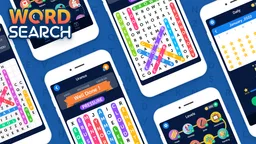
Word Search review
 Analysis by Appsdrops
I like word-search games best when they give me a simple task I can settle into without a tutorial or a long commitment. Word Search fits that mood: it turns a familiar pencil-and-paper pastime into a quick phone game, and its appeal is the steady pleasure of spotting words among similar-looking letters. I’d recommend it to anyone who wants a light mental break, though it is less suited to players looking for a story, elaborate puzzles, or a major sense of progression.
A familiar puzzle that works in short sessions
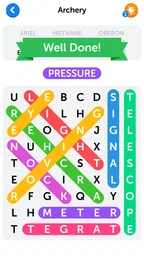
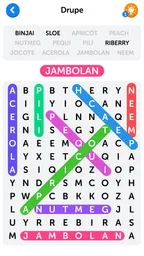
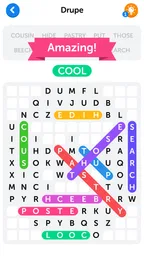
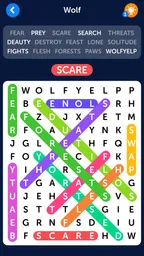
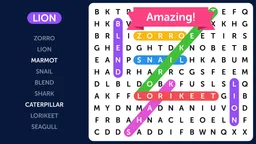
The basic routine is easy to understand: scan a letter grid, find the words you are looking for, and mark them as you go. That simplicity is the point. I can pick it up while waiting for a ride or during a quiet few minutes, make progress without needing to remember where I left off, and put it down when I’m done.
As a word game from Italic Games, it leans on recognition and concentration rather than vocabulary drills or competitive play. That makes it approachable even if you are not interested in testing yourself against other people. The enjoyment comes from shifting your attention across the grid: first scanning for a distinctive letter, then checking whether nearby letters form a target word.
One useful habit is to avoid reading every row as though it were a sentence. I get better results by choosing a word with an unusual opening or ending, locating that letter in the grid, and checking the surrounding directions. Once I find one answer, I briefly inspect the nearby area for another word before moving across the whole board. It reduces aimless scanning without requiring any special feature.
The game has been available since August 19, 2019, and its current version is 2.2.9. It is free to download, has an Everyone age rating, and requires Android 6.0 or later on Android devices. Those details make it easy to assess whether it fits an older Android phone or a family device. I would still check the relevant app store for device-specific compatibility before installing.
Make the first session comfortable
My first practical suggestion is to play at a pace that suits your screen and your eyes, not at the pace you think a word-search game demands. On a small phone, a quick swipe can pass over letters before I have clearly checked them. Slowing down slightly makes the puzzle feel more controlled and helps avoid the frustration of repeatedly tracing the same area.
If the game offers settings that affect how it feels to play, it is worth checking them before settling into a routine. I would look for options that make the board or interaction easier to follow, rather than changing things just to make the game feel faster. I’m not assuming a particular control, theme, or accessibility option is available in every version; the practical point is to use whatever the game actually presents to make reading and selecting letters comfortable.
That comfort check matters most for longer sessions. A bright screen, a cramped view, or an awkward touch gesture can turn a relaxing puzzle into work. I prefer to make one adjustment at a time and play a board before changing anything else, so I can tell whether the change genuinely helps. If the controls already feel natural, there is no need to tune them.
Build a repeatable search pattern
Experienced players can make the search more systematic without relying on shortcuts the game may not provide. I start with the target list and choose a word that should be easy to recognize, such as one with a less common letter sequence. Then I scan the grid for the first letter, check possible continuations in the directions the board allows, and move on if the pattern does not match quickly.
The key is to avoid treating every candidate as equally promising. A letter that appears frequently can create too many false starts, while a distinctive pair narrows the search. Once I spot that pair, I check only the neighboring cells that could continue the word. This is a small change in approach, but it keeps my attention focused and makes the board feel less cluttered.
I also try not to sweep the same rows repeatedly. I divide the grid mentally into a few areas and give each a deliberate pass, looking in more than one direction rather than assuming words run only left to right. If I find a word near the edge, I check the surrounding boundary before leaving that area; edge positions can be easy to overlook when my eyes naturally settle in the middle of the screen.
A realistic everyday use is a short wait with no reliable internet connection or a quiet pause between tasks. A word-search puzzle suits that moment because the activity is self-contained and does not demand a long block of attention. Still, I would not assume every feature works offline simply because the core puzzle looks simple; if offline use matters to you, test it on your own device before depending on it during travel.
What it does well, and where the format runs out
Compared with a crossword, this is a more visual and less clue-driven kind of challenge. I don’t need to interpret a definition or recall a fact before making progress; the words are found by looking for letter patterns. Compared with a word-guessing game, there is less pressure to invent an answer from a limited set of letters. That makes this a good choice when I want concentration without the feeling of being tested on what I know.
The trade-off is that the central activity can become repetitive. If you enjoy a puzzle because it introduces new mechanics, builds a narrative, or offers layered strategic decisions, a straightforward word search may not hold your attention for long. It is also not the best pick if your main goal is to expand vocabulary through explanations or definitions; spotting a word in a grid is a different skill from learning what it means.
Touch interaction can be another point of friction. Selecting a word on a phone requires enough precision to follow its letters, and an accidental swipe can interrupt the flow. When that happens, I find it better to pause and reorient than to rush through the same line again. A larger screen may be more comfortable for someone who often mis-selects letters, while a small phone remains convenient for brief sessions.
There is also a difference between a satisfying quick puzzle and an endlessly varied game. I would choose this when I want a familiar format I can understand immediately, but I would pick a more varied word-puzzle app if I needed fresh rules or a stronger sense of challenge. That is not a flaw so much as a clear boundary: this game’s strength is the uncomplicated search itself.
Who should give it a try
The game is an easy fit for casual players, word-search fans, and anyone who prefers a puzzle that can be paused mentally between other activities. It can also suit households where different ages want a simple shared pastime, especially since its content rating is Everyone. The broad appeal is reflected in its 10M+ installs, a 4.8 average rating, and 471K ratings, but those numbers are only context; whether the format suits you matters more than its popularity.
It has 38K reviews, and it is developed by Italic Games. I mention that because the game is a focused word-search experience rather than a sprawling collection of unrelated activities. If you want one clear kind of puzzle, that focus is welcome. If you expect a broad suite of word games in the same app, you may be happier with an alternative built around several different formats.
For a family member who is new to mobile games, I would introduce it by showing the basic selection gesture and letting them work at their own speed. For someone already comfortable with word searches, I would suggest using the scanning pattern above rather than trying to move as quickly as possible. Either way, the best session is one that stays relaxing; there is little benefit in turning a casual puzzle into a race unless the game itself gives you a reason to do so.
A measured recommendation
My verdict is that this is a good, uncomplicated word-search game for small breaks. Its strength is how little it asks of you: recognize a target, search carefully, and enjoy the moment when the letters line up. I would install it for familiar puzzles and an easy routine, not for deep progression or a steady stream of new mechanics.
With more than 10 million installs, it has reached a substantial audience, but the right choice still depends on what you want from a game. If you like visual scanning and brief, low-pressure challenges, Word Search is worth trying. If you need richer variety, detailed word explanations, or a more demanding puzzle system, I’d look elsewhere. For everyone in between, a deliberate search rhythm and a comfortable setup are enough to get the most from it.
What we like
- Simple rules make it easy to start playing.
- Adjustable difficulty suits both beginners and experienced players.
- Short puzzles fit neatly into spare moments.
- Finding words can help reinforce spelling and vocabulary.
- Offline play is useful when an internet connection is unavailable.
What could be better
- Large word lists can make some puzzles feel repetitive.
- Small letters may be difficult to read on compact screens.
- Timed modes can feel stressful for casual players.
- Hints may reduce the challenge of solving puzzles unaided.
- Some versions include ads that interrupt play.







