Word Pizza: Crossword Games review
 Analysis by Appsdrops
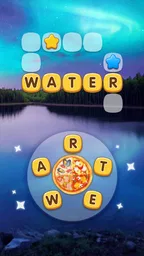
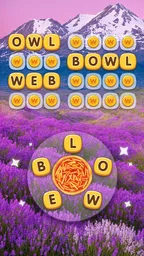
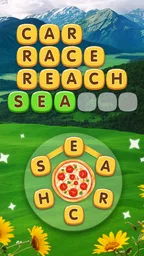
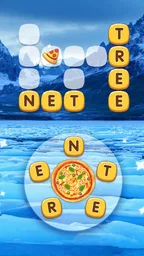
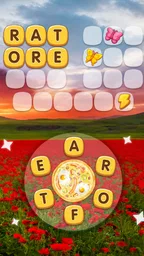
I like word games that make a short break feel satisfying without asking me to learn a complicated rule set. Word Pizza: Crossword Games has a simple premise: work from a group of letters, connect them, and uncover words that fit a puzzle. That makes it easy to understand at a glance, though the experience still depends on whether its visual presentation and interaction style suit you.
How the puzzles read and navigate
This is a word puzzle game from Malpa Games, built around finding words rather than answering trivia or filling a conventional newspaper-style grid. I find that distinction useful: the central task is easy to explain, so a new player can start experimenting without first studying a tutorial or learning a vocabulary of game terms.
The appeal is in the small act of testing letter combinations. When I spot a likely word, I can focus on whether the available letters support it and whether it belongs in the puzzle. That makes the game a good fit for a quick mental reset: it offers a clear problem to work on, but it does not require the long setup that some crossword apps demand.
Its overall reception is strong, with an average rating of 4.8 from around 532,000 ratings, and it has passed 10 million installs. Those figures suggest that the basic format has broad appeal, but they do not tell me whether the game will feel comfortable on every screen or for every player. The practical test is whether you can read the puzzle and make the intended gestures without strain.
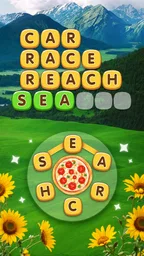
For navigation, I would approach it as a game to try in a calm moment first rather than assuming it will work equally well in every setting. Word puzzles often ask for repeated attention to letters and small visual details. If you tend to lose your place when a screen is busy, pause between puzzles and check that you can clearly distinguish the letter group from the puzzle area before settling into a longer session.
Making the letter search easier to manage
A useful way to play is to avoid swiping randomly through every possible combination. I first look for short words, then use those discoveries to reconsider the remaining letters. This gives the task a little structure and can reduce the feeling of scanning the same options over and over. It is also a practical approach if you are playing while tired or have trouble holding several letter combinations in mind at once.
Another habit that helps is treating a pause as part of the puzzle, not a failure to solve it. If a word does not appear, I look away briefly and return with fresh eyes, rather than repeatedly trying the same sequence. This is especially useful when letters resemble one another on your display or when you are playing in poor light. It does not change the game’s rules; it simply makes the search less tiring.
Compared with a traditional crossword, this format puts more emphasis on recognizing and forming words from a supplied set of letters than on following clues across a large grid. Compared with a word-search game, it asks for more active construction than simply spotting a word already laid out among many letters. That middle ground suits me when I want a compact language challenge, though players who enjoy cryptic clues, rich context, or a large shared grid may prefer a conventional crossword instead.
Touch, attention, and sensory comfort
The core interaction involves connecting letters, so touch control is central rather than an optional extra. That can feel natural if you are comfortable making deliberate gestures on a phone. It may be less convenient if you have limited hand movement, tremors, difficulty controlling a finger precisely, or pain from repeated motions. I would test a short session before committing to extended play, paying attention to whether the gesture remains comfortable after several puzzles.
A small but useful trade-off is that a letter-connection game asks for both visual attention and fine motor control at the same time. If either is tiring, try holding the phone in a stable position and playing with one hand only if that feels secure; otherwise, use both hands to support the device and make the letter motion. These are ordinary handling adjustments, not special modes, and they cannot remove barriers built into the interaction itself.
For sensory comfort, the main question is whether you can follow the changing letters and puzzle feedback without visual or audio cues becoming distracting. I would keep the surroundings as calm as possible when first assessing that. If you prefer games with a text-first interface, explicit adjustable contrast, or clearly documented options for visual and motor needs, check the current app controls before relying on it. I would not assume that a particular accessibility setting is available without seeing it on the device.
The game is rated Everyone, which makes its audience broad in age terms, but that does not automatically mean every child or adult will find the interface accessible. A younger player may enjoy the simple word-finding goal, while a reader still building spelling confidence may find some puzzles more frustrating than entertaining. Playing together can make it easier to talk through possible words, but the game remains most rewarding when the player can comfortably read and manipulate the letters themselves.
Where it fits into an ordinary day
I can picture using it while waiting for an appointment or taking a short break between chores: open a puzzle, try a few combinations, and stop when attention is needed elsewhere. That kind of use works better than playing while walking, riding over a bumpy route, or trying to listen closely to a conversation. The repeated visual search and finger movement make it a poor match for divided attention, even though the word-puzzle format feels casual.
If you are deciding whether it suits a commute, consider how steady your hands and viewing conditions are. A seated wait gives you more control over the phone and lets you pause naturally. A crowded train or bright outdoor setting can make reading and touching less comfortable. I would choose a different activity for moments when I cannot keep my eyes on the screen or need to respond quickly to people around me.
It is free to download, with in-app purchases ranging from $0.49 to $99.99 per item. For me, that means it is sensible to try the basic experience before spending anything and to be deliberate around purchase prompts, especially if a child is playing. The existence of optional purchases does not tell me what each one does or how often it becomes relevant, so I would review the on-screen details carefully rather than treating any purchase as necessary for enjoying the word challenge.
The game was released on October 31, 2017, and its current version is 5.4.12. It requires Android 8.0 or later. Those details matter if you are installing it on an older device, but compatibility alone cannot predict how comfortable the screen will be to use. On a smaller display, I would pay particular attention to whether the letters remain easy to distinguish and whether the gesture area feels forgiving enough for your hands.
Who may want another kind of word game
I would recommend this style to someone who enjoys spelling and pattern-finding but does not want to interpret elaborate clues. It is also a reasonable choice for players who like to solve one focused word challenge at a time. Malpa Games has kept the central idea approachable, and the large audience reflected in its ratings and installs makes it easy to see why the format has found an audience.
On the other hand, I would steer away from it if your favorite part of word games is a rich clue, a broad vocabulary lesson, or a social competition with visible opponents. A conventional crossword gives more context for each answer; a word-search game can be easier if you prefer recognition over forming combinations; and a turn-based word game may be a better fit if you want the social side to matter as much as the words. These are not flaws in Word Pizza so much as different expectations.
It may also be a poor choice if repeated touch gestures are uncomfortable, if you need clearly specified accessibility controls before installing, or if you mainly play by listening rather than looking at a screen. In those cases, I would first check the controls on your device or choose a game whose interaction and access options are a better match. A familiar genre label should not be mistaken for a guarantee of easy use.
My inclusive verdict
Word Pizza: Crossword Games is an appealing, straightforward word game when I want to turn a few spare minutes into a focused search for words. Its letter-based puzzle format avoids the clue-heavy demands of a classic crossword, and its free entry point makes it easy to judge the experience for yourself. I especially like the practical option of starting with short words and stepping away when repeated searching becomes tiring.
My recommendation comes with a clear condition: comfort depends on being able to read the letters and make repeated touch gestures. The Everyone age rating and wide popularity do not remove that limitation, and they should not be treated as evidence of specific accessibility features. If the basic screen and interaction work for you, it can be a pleasant everyday puzzle; if they do not, a clue-led, word-search, or less gesture-dependent alternative may be a better choice.
What we like
- Helpful hints make difficult puzzles easier to tackle.
- Daily challenges offer a reason to return regularly.
- A built-in dictionary can help explain unfamiliar words.
- Offline play is useful when you have no internet access.
- Short levels fit neatly into brief breaks.
What could be better
- Some levels may feel repetitive over time.
- Hints can run out and may require extra effort to earn.
- Ads can interrupt the flow between puzzles.
- Later puzzles may depend on obscure vocabulary.
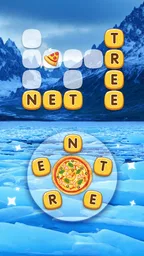
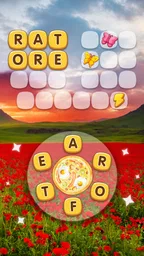
- The small letter wheel can be tricky to use on compact screens.







