
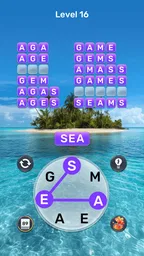
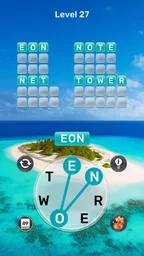




Word Oasis: Calm Puzzle Game review
 Analysis by Appsdrops
I can see Word Oasis: Calm Puzzle Game fitting naturally into a shared household routine: one person might play a few rounds while waiting for dinner, then leave the phone on the table for someone else to try. It is a word game from Oasis Games, Ltd., and its appeal is easy to understand from that simple use case. The mood is meant to be relaxed, and the word-puzzle format gives players something to focus on without turning a spare moment into a demanding commitment. My main reservation is that a shared device changes the experience: whoever picks it up may be continuing the same game or making choices that affect the next person’s session.
How it works as a shared-device game
On a phone passed between adults or older children, a short word puzzle can be a pleasant alternative to scrolling through unrelated feeds. I like this kind of game best when everyone treats it as a casual turn-taking activity rather than a competition. A player can take a moment to look for a word, hand over the device, and let someone else approach the puzzle with fresh eyes. That change in perspective is useful: one person may spot a word another has been overlooking.
There is a small but important trade-off in that arrangement. A shared screen does not automatically mean shared progress is organized. If several people use the same device, agree on whether each person is taking turns in one ongoing session or simply playing whenever the phone is free. That avoids the familiar household disagreement over who advanced, changed, or finished something. I would not assume the game provides separate household profiles or a handoff system; the practical solution is to decide how you will share the device before making it part of a routine.
For a parent sharing a phone with a child, I would also keep the device nearby and make the rules clear. The game is rated Everyone, which makes its intended age context broad, but that label is not a substitute for an adult deciding whether a particular child is ready to use a shared device independently. The phone itself may contain other apps, purchases, or personal information, so the household’s device habits matter as much as the game.
Set expectations before handing over the phone
The game is free to start, with in-app purchases priced from $0.99 to $49.99 per item. That range is worth discussing in a family setting, especially if a child can use the device without supervision. I recommend making purchases a deliberate adult decision rather than something handled casually during play. That is sensible for any shared phone, and it prevents a relaxed puzzle break from becoming an unexpected spending conversation.
On a common device, people may also have different ideas about what counts as a good session. One player may want to think carefully; another may prefer to make quick guesses and move on. I would agree on a simple norm: let the current player finish the puzzle they are working on, and ask before changing anything. This is not a special feature of the game, just a practical way to preserve a pleasant shared experience when everyone is using one screen.
The game is listed as version 1.14.5 and requires Android 7.0 or later. That makes the minimum software requirement useful to check before installing it on an older household phone or tablet. A compatible operating system does not tell you whether a particular device will feel comfortable to use, though. If the screen is small, someone has difficulty reading it, or the device is already slow, try a short session first rather than assuming a word puzzle will suit everyone equally well.
Coordinate turns without making play feel like a chore
Word puzzles can invite helpful collaboration, but there is a fine line between offering a clue and taking over. When I play alongside someone, I prefer to ask whether they want a hint before suggesting a word. That keeps the puzzle satisfying for the person holding the phone. It also works well across ages: a younger player can try first, while an adult can offer a gentle prompt if asked, instead of immediately supplying an answer.
For an ordinary evening, I can imagine the device resting on a kitchen counter while one person waits for a meal to finish and another joins in after a few minutes. The best version of that scene is informal: nobody has to schedule a session, and people can participate for a short spell. The less successful version is when players expect a structured multiplayer activity. This is a word game, not something I would choose for coordinated team play, a household tournament with built-in scoring, or a group that wants everyone to participate at once.
A useful shared-device habit is to keep turns short and say when you are done. That helps someone else know whether the phone is available without relying on assumptions about saved progress or separate accounts. If your household needs individual histories, protected profiles, or firm boundaries between players, choose a game or device setup that explicitly supports those needs. I would not select this title on the expectation that it will manage account boundaries for you.
A calm option, with limits for different players
The game’s word-puzzle focus makes it a better fit for people who enjoy noticing letter patterns and trying possibilities than for players seeking action, elaborate storytelling, or a social game. Its calm premise is appealing when I want to give my attention one small task instead of switching between several noisy activities. That does not mean every player will find it relaxing. Someone who dislikes word challenges may experience the same puzzle as a test, and a player looking for fast reactions or constant variety should consider another kind of game.
Compared with a paper word puzzle, a phone game is easier to keep at hand and can make a spare moment feel occupied. Paper is still the better choice if you want everyone to work independently, avoid screen time, or keep children away from a device with other apps. Compared with a broad word-game collection, a focused puzzle title may feel more straightforward, but it is not necessarily the right pick for someone who wants a range of formats in one place. I would choose according to the kind of break you want, rather than treating every word game as interchangeable.
One practical tip is to use it as a transition activity: a brief puzzle while waiting for a ride, between household tasks, or during a quiet break. It is less suitable when someone needs to stay fully attentive to a conversation or a task that cannot be interrupted. A calm presentation does not make phone use invisible; the player still has to look at the screen and think about the words. For shared family time, I would keep it as an optional side activity, not the center of a gathering where people want to talk.
Age context, trust, and household comfort
The Everyone rating is reassuring as a basic age classification, and the game’s word-focused format is an approachable choice for a broad audience. Still, age suitability is more than a label. Parents should consider reading ability, frustration tolerance, and whether a child understands the household rules for using a device. If a child is likely to tap through unfamiliar screens or ask to buy something, an adult should supervise rather than relying on the game’s category alone.
It also helps to separate trust in the puzzle from trust in the shared device. A child may be perfectly comfortable with the game while a parent remains cautious about handing over a phone that contains messages, accounts, or payment options. If that describes your household, use whatever device-level boundaries you already trust and keep the session supervised. I would not treat the game itself as a substitute for those safeguards.
The audience response is positive: it has a 5.0 average from around 3.9 thousand ratings, alongside 251 written reviews, and it has passed 50 thousand installs. Those figures suggest that people who have found it are responding well, but they are not a guarantee that it will suit every family member. Word knowledge, preferred pace, screen comfort, and a person’s appetite for puzzles will shape the experience much more than a rating can.
Who I would recommend it to
I would suggest giving it a try if you want a free word game for quiet, occasional play and enjoy solving puzzles without needing a group to be online at the same time. It can also work as a low-pressure shared-device activity when people are comfortable taking turns informally. Oasis Games, Ltd. has made a title whose central idea is easy to explain, and that simplicity is an advantage when a family member wants to join without learning a complicated set of rules.
I would look elsewhere if you need clearly separated player accounts, a dependable group mode, a collection of different word challenges, or a screen-free activity. I would also skip it if word puzzles tend to make you impatient rather than relaxed. The app is free, but the in-app purchase range means a household should set expectations before children use it. Those are not reasons to dismiss the game; they are the practical conditions that determine whether it fits your phone and your routine.
Overall, Word Oasis: Calm Puzzle Game seems most at home as a modest, easy-to-share puzzle break, not as the main attraction for a game night. Its strength is the simple pleasure of pausing to find a word, and its main limitation in a household is that the device-sharing arrangement is up to you. If you are happy to coordinate turns yourself, want a word-focused activity, and can set sensible purchase boundaries, I think it is worth trying. If your family needs built-in separation or coordinated multiplayer, a different option will be a better match.
What we like
- Gentle word challenges offer a relaxing break.
- No timer keeps puzzles pressure-free.
- Clean visuals make letters easy to read.
- Short levels suit quick play sessions.
- Gradual difficulty provides a steady challenge.
What could be better
- Some clues may feel vague without context.
- Repeated puzzle patterns can become predictable.
- Hints may be limited during difficult levels.
- Progress can feel slow for experienced word fans.
- The calm pace may not suit players seeking action.







