
Word City: Connect Word Game review
 Analysis by Appsdrops
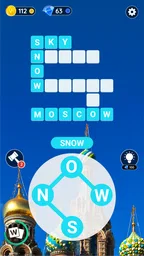
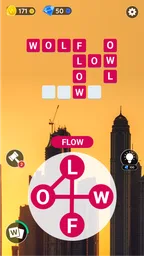
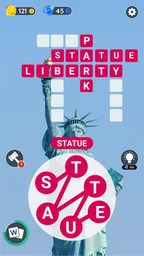
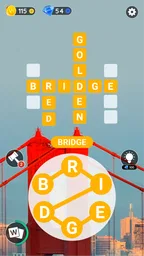
When a word puzzle stalls, the cause is often less dramatic than it feels: a missed letter connection, an answer you have not spotted yet, or a moment when you simply need a fresh look. Word City: Connect Word Game is built for that kind of small, low-pressure challenge. I see it as a casual word game for short breaks, especially for people who enjoy finding words from a set of letters and working through crossword-style puzzles at their own pace.
Made by Unico Games Studio, this free word game has a 4.8 average from around 239,000 ratings, and it has passed 5 million installs. Those figures suggest a broad audience, but the more useful question is whether its particular mix of letter connections and crossword solving suits how you like to play. It is rated for Everyone, so its basic appeal is easy to understand: look at the letters, try combinations, and use what you find to complete the puzzle.
Getting unstuck without turning a puzzle into a chore
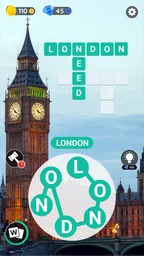
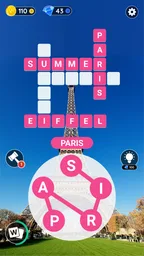
The main friction in a connection-based word puzzle is that the answer can feel obvious only after you see it. I would approach each board methodically rather than repeatedly swiping through random combinations. First, scan for short words, then look again for longer ones that reuse the same letters. Changing your focus from one letter to another can reveal a pattern that a quick first pass missed.
That small change in routine matters because a crossword layout gives the letter search a purpose: answers are not just isolated discoveries, but pieces that help complete a board. If you are stuck, pause for a few seconds and inspect the empty spaces rather than assuming you need a more complicated word. In my view, the game’s strongest everyday appeal is this back-and-forth between spotting a word and seeing how it fits into the puzzle.
A useful way to keep the session pleasant is to set a modest stopping point. Finish one puzzle or play until your attention starts wandering, then put the phone down. Word games are easy to stretch into a longer session when a board is nearly complete, but there is little value in forcing guesses after your eyes have stopped noticing new combinations. Coming back later can be more effective than tapping through the same possibilities in frustration.
Another practical tip is to separate deliberate searching from experimentation. On a first pass, try combinations that look like familiar words. On a second pass, vary the order and check whether a different beginning or ending makes sense. This is a simple habit rather than a special game feature, but it helps reduce aimless input and makes the puzzle feel more like a word exercise than a guessing loop.
Small checks before blaming the puzzle
If the game does not seem to respond as expected, start with the basic checks that apply to any mobile game: make sure the device has enough battery, close and reopen the app if it has become unresponsive, and check that the installed version is current. The current version is 4.2.49, and the stated minimum operating-system requirement is 8.1. If your device is older or running an earlier system, compatibility is worth checking before spending time troubleshooting the puzzle itself.
It is also sensible to distinguish a wrong answer from a control problem. If a letter connection does not register, try a slower, more deliberate gesture and watch whether the letters are being selected in the order you intend. Avoid making several rapid attempts at once; that makes it harder to tell whether the issue is your input, your interpretation of the word, or a temporary app hiccup.
For a fresh start after a temporary freeze, closing and reopening the game is a reasonable first step. If the same issue persists, restarting the device and checking for an app update are ordinary next steps. I would avoid deleting the game as an early fix unless you are comfortable with the possibility that local progress could be affected; it is better to look for a less disruptive solution first.
People also often wonder whether they need to pay before they can enjoy the main activity. The game is free to install, with optional in-app purchases priced from $0.99 to $49.99 per item. That range is worth knowing before tapping any purchase prompt. If you prefer not to spend, check the purchase confirmation carefully and use the device’s purchase controls if you want to prevent accidental transactions.
Recovering your rhythm after a missed answer
When a board feels stuck, I would resist treating every empty space as proof that the game has failed. A word may be hiding in an uncommon combination, or you may have overlooked a short answer while focusing on a longer one. Reset your attention: look at the available letters from a different starting point, then compare possible words with the gaps in the crossword. This workflow is more reliable than repeatedly trying the same sequence.
It can also help to take a quick mental inventory of what you have already found. That keeps you from cycling through the same guesses and makes remaining gaps easier to examine. If you are playing while tired or distracted, a short break is often the most useful recovery tool. The game is suited to casual sessions, so there is no need to turn a difficult board into a test of endurance.
One trade-off of this kind of puzzle is that vocabulary and spelling familiarity shape the experience. Players who enjoy searching for everyday words may find the challenge satisfying; anyone who dislikes being asked to recall words under even mild pressure may find the same task repetitive. A hint or assistance system should not be assumed from the game’s basic description, so I would choose it for the letter-and-crossword loop itself, not on the expectation of a particular rescue tool.
For a shared household device, the safest practical habit is to check who is playing before continuing a puzzle or making a purchase. The Everyone age rating makes the game broadly accessible, but that does not mean every player will have the same vocabulary or patience. Younger players may enjoy experimenting with letter combinations, while adults looking for a deep strategy game may want something with more layered decisions.
When the problem may be outside the game
Not every interruption points to a fault in Word City. A weak connection, a busy device, low storage, or an operating-system issue can affect mobile apps generally. If the game behaves oddly alongside other apps, check the device first: close unused apps, make some storage space if needed, and restart the phone. These are general troubleshooting steps, not a guarantee, but they can help identify whether the problem is broader than one puzzle.
Likewise, if a purchase prompt or app-store process does not complete, the store account and device settings may be involved rather than the word game. Review the purchase confirmation and account status before repeating a payment attempt. This is especially worthwhile when optional items span a broad price range; patience is safer than tapping again and risking an unintended duplicate purchase.
For players deciding between this and a standard word-search game, the difference is the connection-and-crossword emphasis. A conventional word search is mainly about locating visible words in a grid, while this game asks you to form words from letters and use them to fill puzzle spaces. If you want a quieter visual scan with a fixed grid, another word-search title may suit you better. If you like the satisfaction of making one answer help reveal the shape of the next, Word City is the closer fit.
Who will enjoy it—and who should pass
I would recommend Word City to someone who wants a straightforward word challenge for a commute, a waiting room, or a short pause between tasks. A realistic routine is to open it while waiting for an appointment, solve a board or make a little progress, and stop when your turn is called. The puzzle format gives that spare time a focus without requiring a long session or a complicated plan.
It is less suitable if you are looking for a competitive multiplayer experience, a story-driven game, or a vocabulary course with structured lessons. The appeal here is the repeated act of finding words and completing crossword-style boards. Players who want extensive strategy or a very different kind of word challenge should compare alternatives rather than expecting this one to become something it is not.
The game has been available since December 13, 2017, and its current version is 4.2.49. That history gives it the feel of an established casual title rather than a brand-new experiment, though the deciding factor for me is still the simple puzzle loop. I would judge it by whether you enjoy connecting letters and filling crossword spaces, not by its install count alone.
My practical verdict is that this is a good fit for relaxed, bite-sized word play, with a clear activity and little need to prepare before starting. Keep your guesses deliberate, try a fresh scan when you stall, and use ordinary device checks if the app itself stops responding. Word City: Connect Word Game is worth trying if you like word puzzles that reward patience and pattern recognition; skip it if you want richer mechanics, a more guided learning experience, or a different style of word search.
What we like
- Easy-to-learn rules make it accessible to new word-game players.
- Short rounds fit well into brief breaks.
- Unscrambling letters can help build vocabulary.
- Progressive puzzles provide a steady challenge.
- Offline play is useful when an internet connection is unavailable.
What could be better
- Some answers may rely on less common vocabulary.
- Later levels can feel repetitive.
- Hints may be limited without watching ads or spending resources.
- Ads can interrupt the flow between puzzles.
- The game offers little variety beyond word-linking puzzles.







