

Sprunki All Phases Beat Maker review
 Analysis by Appsdrops
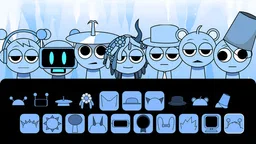
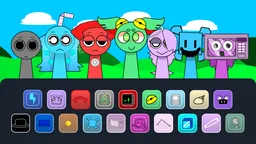
I’d approach Sprunki All Phases Beat Maker as a casual music-making game rather than a full recording studio. Its appeal is the chance to put beats, vocals, and effects together in playful combinations, then explore how the sound changes across phases. I can see it fitting a short break or a relaxed creative session, especially if you enjoy experimenting without needing music-production experience.
Finding your way into a first song
The first hurdle with a music-mixing game is often not musical skill but knowing what to try first. Sprunki All Phases Beat Maker can feel open-ended: if you start by changing several sounds at once, it may be hard to tell which choice improved the result. My practical advice is to build one layer at a time. Begin with a beat, add a vocal part, and then test effects after you have a basic combination you like.
That simple order makes experimenting more rewarding. When a mix suddenly sounds crowded or distracting, you have a clearer idea of what changed and can back out of the latest choice rather than rebuilding everything from scratch. Treat each small adjustment as a listening test, not as a race to fill every possible slot. The most useful skill here is careful comparison, not musical theory.
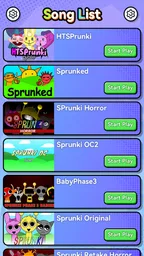
The game is listed as Sprunki All Phases Beat Maker, and its focus on phases gives the experience a distinctive frame: you are not only assembling a sound, but also exploring different musical moods within the game’s format. That makes it better suited to playful discovery than to a task such as producing a polished track for a video or a serious recording project.
If you are introducing it to a child or someone who has never used a music app, keep the first session short and give them one goal: find a beat they enjoy, then see what a vocal or effect does to it. The Everyone age rating makes it broadly accessible, but the best first impression still comes from exploring at a comfortable pace instead of expecting an obvious “right” answer.
When a mix feels confusing
A common frustration in any layered sound toy is losing track of why a combination works. I’d listen to a promising version for a few seconds before making another change. If the new result is worse, undo or reverse just that last choice if the controls allow it; if not, recreate the earlier combination deliberately. Avoid changing several elements in one go, because that makes it difficult to identify the source of a problem.
It also helps to think in roles. A beat can provide a steady base, vocals can bring a more noticeable character, and effects can alter the feel. If all three compete for attention, remove or change one layer at a time. This is a useful workflow even if you are only playing casually: it turns random tapping into a small creative experiment and makes the result easier to judge.
Simple checks before you give up
When the game does not respond as expected, I would start with ordinary checks rather than assume the sound tools are broken. Confirm that the app has finished loading, tap a control once and give it a moment, and check the device’s sound level and silent settings. If audio is routed through headphones or a connected speaker, verify that the device is using the output you expect.
If a session becomes unresponsive, close and reopen the game, then try a small change in a fresh session before rebuilding a complicated mix. That helps distinguish a temporary app hiccup from confusion about a particular combination. Keep the game updated when a newer version is available through the app store; the current version is 0.4.8. I would also avoid repeatedly tapping controls while waiting, since rapid input can make it harder to tell what the game registered.
Compatibility is worth checking before downloading. The minimum operating-system requirement is 7.1, so compare that with your device’s software version rather than relying on the device’s age or appearance. If you are installing it for someone else, check that the device has enough free space and that the app store account can complete the download. Those are basic setup checks, not special music settings, but they prevent an avoidable first-session snag.
Recovering a session without making it messier
For a mix that has gone in an unwanted direction, resist the urge to keep adding sounds in the hope that one will cover the problem. Remove or change the most recent element, listen again, and then decide whether the issue is the beat, vocal, or effect. A useful habit is to pause after every change and remember which version you preferred. That gives you a mental checkpoint even when you are not working with a formal project timeline.
If you are sharing the phone with someone, take turns making one change at a time. It sounds simple, but it prevents two people from making conflicting edits and then blaming the app for a result neither intended. For a child, you can set a light challenge—make the beat calmer, stranger, or more energetic—without prescribing the exact combination. That keeps the play creative while giving the session a clear direction.
Think of the phases as a reason to compare moods, not as a promise that every phase will suit every listener. If one arrangement feels too busy, try another direction or simplify the layers you have chosen. A phase-based format can make repeated experimentation fun, but it may also feel less satisfying to someone who wants full control over detailed editing, precise timing, or a conventional song-building timeline.
When the problem may be outside the game
Not every silent or interrupted session points to a fault in the app. A muted device, disconnected audio accessory, low battery, or an operating system struggling with several open apps can affect the experience. I would test sound in another app, disconnect and reconnect an audio device if you use one, and close background apps before concluding that a particular mix is broken.
Network or store-account trouble can also affect installation or purchases, even though it is separate from making music in the game. If the download stalls, check the app store and your connection first. If a purchase does not appear as expected, avoid buying repeatedly; check the store account and purchase status before trying again. In-app purchases are listed at $3.99 per item, so it is sensible to understand the purchase prompt before confirming anything.
For everyday play, I would use it in short sessions when I want a low-pressure distraction: during a quiet break, while waiting for an appointment, or when a child wants to explore sound without opening a complicated production tool. The game is free to download, and optional purchases mean you can start without paying, while still taking care around any purchase screen. It is not my pick for composing a finished track that needs export controls or detailed arrangement tools; a dedicated music-making app would be a better fit for that job.
How it compares with other casual music apps
Compared with a general beat-making app, this game’s appeal is its playful phase-based identity and accessible mix of beats, vocals, and effects. A more conventional music tool is usually the stronger choice when you need to record your own voice, arrange a long composition, or make precise edits. On the other hand, those tools can be intimidating if all you want is to hear how a few sound layers work together.
Compared with a simple rhythm game, this is more about shaping a combination than following a fixed sequence of taps. That distinction matters: choose it if you enjoy listening, testing, and changing a mix; choose a rhythm-focused game if you mainly want score-driven challenges or tightly timed play. I would not treat it as a replacement for either a full studio app or a traditional rhythm game. Its value is in occupying the lighter, exploratory space between them.
Who I’d recommend it to
Gotstar Studio’s casual game has attracted over 10 million installs and holds a 4.7 average from around 25,000 ratings, which suggests a broad audience has found something to enjoy in its approachable premise. Those figures are useful context, but they do not guarantee that its style will suit you. I’d recommend trying it if you like making quick sound combinations, enjoy playful experimentation, or want a creative activity that does not demand prior music knowledge.
I would skip it if you need professional controls, a clear lesson path, or a reliably structured challenge with a defined score and finish. It may also be a poor match if you dislike trial and error or prefer listening to complete songs rather than building a sound yourself. The best results come from patience: make one change, listen, and decide whether it improved the mood you were aiming for.
My practical verdict
Sprunki All Phases Beat Maker works best when I treat it as a casual sound playground. Starting with a beat, adding one vocal layer, and saving effects for later makes the experimentation easier to follow. If something goes wrong, check device audio and app responsiveness before rebuilding a mix, and separate purchase or download issues from the actual music session.
Gotstar Studio has made a free, broadly accessible option for people who want to play with musical layers without taking on a full production workflow. Its phase-based approach gives casual sessions a reason to keep exploring, while the lack of a conventional studio focus limits its usefulness for serious composition. If you want a quick creative break and are happy to discover combinations by ear, I think it is worth a try; if you need precision and a finished-track workflow, choose a dedicated music app instead.
What we like
- Offers many Sprunki phases for varied music-making sessions.
- Lets players experiment with character sounds and beat combinations.
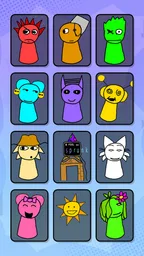
- Its playful visuals give the music-making a distinctive style.
- Short sessions make it easy to try new sound arrangements.
- Creative mixing encourages experimentation without strict goals.
What could be better
- The many phases can make it hard to find a preferred sound set.
- Some combinations may sound less polished than others.
- The interface may take time to learn for first-time users.
- Limited guidance can leave new players unsure where to start.
- The experience may feel repetitive after extended play.







