





My Talking Angela 2 review
 Analysis by Appsdrops
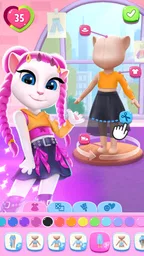
I see My Talking Angela 2 as a small, flexible play space rather than a game with a finish line. You spend time with Angela through activities such as dancing, playing, creating, and cooking, choosing what to do in the moment instead of following a demanding campaign. That makes it easy to dip into between other things, but it also means the fun depends on enjoying short, varied interactions. If you want a deep story or a competitive challenge, this probably is not the cat game I would recommend first.
What the day-to-day play feels like
Outfit7 Limited has built a casual game around a familiar talking-pet idea, but the appeal here is the range of things to do with Angela. I like that a session can feel different depending on whether I want to focus on cooking, try a creative activity, or simply spend a little time playing. The activities give the game its rhythm: there is no need to treat every visit as a long session or to arrive with a specific goal.
That looseness is useful in ordinary moments. If I have a few minutes while waiting for someone, I can open the game, choose an activity, and stop when the moment is over. It also suits children who enjoy imaginative play and familiar characters, as well as adults looking for something gentle rather than mentally demanding. The Everyone age rating reflects its broad audience, though parents should still decide whether the game’s optional purchases fit their household rules.
The main trade-off is that a collection of activities is not the same as a structured progression. Players who like clear objectives, difficult levels, or a strong sense of achievement may find the experience lightweight. I would approach it as a playful digital companion, not as a substitute for a puzzle game or a story-driven adventure. That distinction matters: it is easier to enjoy the game when you expect variety and low-pressure interaction, rather than a steadily escalating challenge.
It is free to download, which makes trying it straightforward, but in-app purchases range from $0.99 to $99.99 per item. I would check purchase controls before handing a device to a child, and agree on a simple rule about spending before play begins. The presence of optional purchases does not mean anyone needs to buy something to decide whether the basic experience suits them; it does mean that a shared device deserves a little preparation.
Where people can get stuck
The first point of friction is often expectation. Someone arriving from a traditional mobile game may look for a campaign, a map of levels, or a final objective and conclude that there is not enough to do. I find it more helpful to ask a different question: does the player enjoy choosing an activity and making their own short session? If yes, the open-ended format is a strength. If not, a game with missions and visible milestones will likely feel more satisfying.
A second source of confusion is treating every activity as something that must be completed in one sitting. The game is better suited to casual visits, so I would let a child choose one thing to try rather than turning play into a checklist. This also helps when attention is short: a brief visit can still feel complete without needing to explore every part of the game. For adults, the same approach makes it easier to fit play into a break without expecting a major payoff.
It is also worth distinguishing a game question from a device or store question. If the app cannot be installed, will not open, or behaves differently after an update, first check the basic setup rather than assuming the gameplay itself is broken. The minimum operating system is Android 7.0, so an older Android device may not be compatible. On iOS, check the app store’s compatibility details for the particular device before planning around it.
Small setup checks that prevent hassle
Before installing, I would confirm that the device has a supported operating system and enough free space for the download and normal app use. I would also make sure the person who manages purchases on the device has set the appropriate restrictions. These are simple steps, but they can prevent two common disappointments: discovering compatibility trouble at the point of installation and finding that a child can reach a purchase prompt without an adult’s awareness.
On a family tablet, I recommend opening the game once yourself before giving it to a younger player. That lets you check that it launches properly, see how the activity choices are presented, and decide whether the screen and controls are comfortable on that device. It is also a sensible chance to explain that the game is for play, while purchases require permission. I would not make a child responsible for troubleshooting an app-store or account issue.
If the game is being installed on a device with limited storage, leave some breathing room rather than filling the device completely. An app that struggles to install or update can look like a game problem even when the immediate issue is simply the device’s available space. The same goes for a weak or interrupted connection during installation: retrying when the connection is stable is a more useful first move than repeatedly tapping the app icon.
My Talking Angela 2 has been available since July 13, 2021, and its scale suggests it has reached a very broad audience: it has more than 500 million installs. Its average rating is 4.4 from around 3.8 million ratings, alongside roughly 21,000 written reviews. Those figures offer context, not a guarantee that every player will enjoy its particular style. I would use them as a sign that the game is well established, then decide based on whether its relaxed, activity-led play matches the person who will use it.
Recovering a session without making things worse
If a session freezes or an activity does not respond, I would start with the low-risk basics: close the app, reopen it, and check whether the device is responding normally elsewhere. If the problem continues, restart the device and make sure the game is current through the app store. Changing several settings at once makes it harder to tell what helped, so I prefer trying one step and then checking the result.
If installation or an update stalls, check the connection and available storage before attempting the process again. For a child’s device, involve the account holder if the store requests account approval or payment confirmation; do not assume that a prompt inside the game means a purchase is required to keep playing. If the app opens but an individual interaction feels unresponsive, leave that activity and return to it after restarting the game. This is a practical recovery sequence, not a promise that every issue has the same cause.
I would be cautious about deleting and reinstalling as an early fix. Reinstallation can be disruptive in many apps, so first try restarting the game and device and checking the store for an update. If you do consider reinstalling, make sure you understand what may happen to locally stored progress and account data before removing anything. That precaution is especially worthwhile on a child’s device, where a quick fix can otherwise turn into a confusing loss of progress.
When the game may not be the cause
Not every failure to launch points to a defect in the game. An unsupported operating system, a nearly full device, a disrupted download, or a problem with the app store can all interrupt installation or use. If other apps are also slow or failing, I would look at the device or connection first. If only this game is affected after the basic checks, the app store’s support route is a better next step than repeatedly changing unrelated device settings.
Likewise, a purchase prompt is a store or account decision as much as a gameplay matter. If a child sees one, the safest response is to pause and ask the adult who manages the device, rather than treating it as an obstacle that must be cleared. Because the available in-app items cover a wide price range, family purchase settings are worth reviewing in advance. That small bit of planning makes the game easier to share without turning a casual activity into an argument about spending.
Compared with many casual games built around matching, timed rounds, or score chasing, Angela’s appeal is more personal and varied: the player shifts among activities with a character at the center. That can be a welcome change for someone who finds repetitive levels tiring. On the other hand, if you want a game that rewards precise strategy or lets you measure improvement through tougher stages, a conventional puzzle or arcade title will be a better fit. The choice is less about which style is objectively better and more about what kind of break you want.
Who I would recommend it to
I would recommend it to players who enjoy talking-pet games, light creative play, and the freedom to decide what to do without a demanding objective. It is particularly easy to imagine as a shared family-tablet game: a child can choose an activity during a short quiet stretch, while an adult can step in if installation, account settings, or purchases need attention. It can also work for someone who wants a cheerful game to open briefly rather than a hobby that asks for a long commitment.
I would steer away from it if you dislike optional purchase prompts, want a tightly designed progression, or need a game that remains engaging through complex challenges. I would also think twice before installing it on an older Android device without checking compatibility, since the minimum requirement is Android 7.0. For players who simply want occasional, low-pressure interaction with Angela, though, the format is easy to understand and flexible enough for different moods.
My practical verdict is that My Talking Angela 2 works best when you treat it as a casual visit with a character, not as a game you must master or complete. The different activities offer enough variety to make a short session feel personal, while the lack of a demanding structure is both its main comfort and its main limitation. I would try it for a child or anyone who likes gentle, open-ended play, set purchase boundaries beforehand, and choose a more goal-driven alternative if challenge and progression matter most.
What we like
- Players can change Angela’s outfits and hairstyles.
- Daily activities offer variety beyond basic pet care.
- Mini-games provide short bursts of extra gameplay.
- Travel destinations add new scenes and activities.
- The game is free to download and play.
What could be better
- Optional purchases can unlock items and speed up progress.
- Frequent prompts may encourage spending.
- Some activities rely on timers or waiting.
- The game contains ads that may interrupt play.
- Progress and features may require an internet connection.







