


Candy Crush Saga review
 Analysis by Appsdrops
Some games are easy to pass around a household: one person plays a quick round, someone else takes a turn later, and the conversation continues away from the screen. Candy Crush Saga fits that kind of casual routine well. Its candy-matching puzzles are approachable at a glance, while the changing challenges give players a reason to return. I find it especially suited to short, informal sessions rather than a long, uninterrupted gaming evening.
A casual puzzle that can fit shared routines
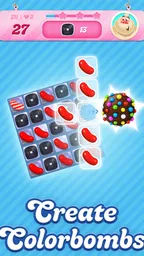
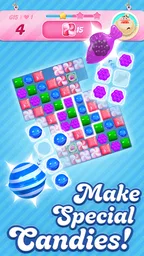
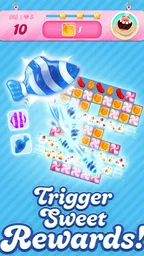
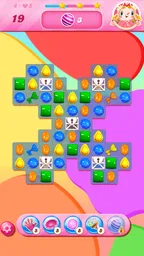
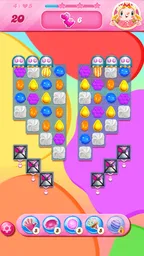
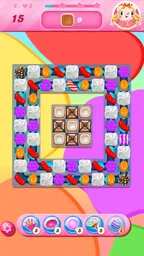
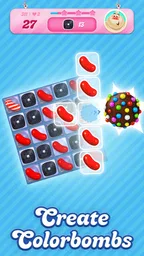
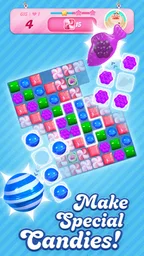
The basic appeal is easy to understand: match candies to work through puzzles, with fresh challenges and adventures along the way. That simple premise makes the game recognizable even to someone who has not played it before. A family member can watch a round, offer an idea, or pick up the game later without needing a lengthy explanation of its theme.
That accessibility is a big part of why Candy Crush Saga has become such a familiar name. It is a free casual game from King, and its long-running presence means many players already know what kind of experience to expect. The game has been available since November 15, 2012, and it has reached over a billion installs. Those figures speak to its reach, but the practical household benefit is simpler: it is an easy game to recognize and discuss.
When I think about shared-device use, I see the appeal in the low-pressure format. A quick puzzle can be a small break between other tasks, and the candy theme keeps the presentation light. It does not ask a household to organize a session or make a big commitment before playing. Someone can enjoy it alone, while another person nearby can follow along and join the conversation.
Taking turns without turning play into a chore
Casual puzzle games can work well as a shared pastime, but sharing a screen is not the same as sharing an account. If several people use one device, it is worth agreeing on who is playing and when, particularly if each person wants to keep their progress or preferences separate. I would treat that as a household arrangement rather than assume the game will automatically manage everyone’s boundaries for them.
A simple routine can help: one player takes a turn, then hands the device over when they are finished. That keeps casual play friendly and makes it easier for others to enjoy the game without feeling that they need to compete for screen time. It also avoids confusion about who made a particular move or changed something during a session. The best arrangement depends on the household and how the device is normally used.
With children and adults sharing a phone or tablet, it is sensible to set expectations before play starts. A parent or caregiver can decide whether the game is for a child’s own sessions, supervised play, or occasional turns on a shared device. These are ordinary household choices, not a substitute for checking the device settings and app-store account arrangements that apply to the family.
Keeping accounts and purchases in mind
The game is free to download, but it includes optional in-app purchases. Items are listed across a range from $0.99 to $149.99 each, so I would pay attention to purchase settings on any device used by more than one person. A child may be focused on the puzzles, while an adult is responsible for managing the account and deciding whether purchases are appropriate. Clear boundaries help prevent an unexpected charge and make shared play less stressful.
Before handing over a device, I would check which app-store account is active and whether purchase approvals or other relevant device safeguards are configured in a way that suits the household. I would also make sure everyone knows that “free” does not mean every optional item is free. That distinction is particularly useful for younger players, who may not naturally separate a game’s free entry point from its paid extras.
It is also helpful to agree on whose progress is being used. If several people play under the same device or account arrangement, one person’s actions may affect the experience another person expects to find later. I would avoid making assumptions about how progress is handled and instead keep the device’s account setup consistent with the household’s preferences. A little coordination up front can prevent small disagreements later.
Easy to understand, with room for conversation
The match-and-clear puzzle format gives players a natural way to talk through a turn. Someone can point out a possible match, explain what they would try, or simply watch and cheer on the person playing. That makes the game a pleasant option for a relaxed shared moment, especially when the goal is light entertainment rather than a serious competition.
At the same time, I would not assume that every player wants to collaborate. One person may prefer to solve puzzles quietly, while another enjoys having an audience. A good household approach is to ask before offering hints and to let the player make the decisions. That keeps the shared aspect enjoyable without making a casual game feel like a group assignment.
The game’s popularity also gives it an easy conversation starter. It has an average rating of 4.6 from around 39 million ratings, and players have written about it in roughly 2.1 million reviews. Those numbers reflect a very broad audience, though individual tastes still vary. Some people love the familiar puzzle rhythm; others may prefer a different kind of game or simply not want another app competing for their attention.
Age suitability and a thoughtful approach
Candy Crush Saga is rated for Everyone, which makes its candy-themed presentation broadly approachable. That rating can be a useful starting point for adults choosing a casual game, but it does not replace parental judgment. The right fit still depends on a child’s age, maturity, screen-time habits, and the family’s approach to optional purchases and shared devices.
For younger players, I would explain the difference between playing a puzzle and buying an optional item before they start. It can also help to agree on when the device is available and whether the child may play independently or only with an adult nearby. Those simple conversations make expectations clear without taking the fun out of the game.
For adults, the main consideration may be how the game fits into everyday routines. A casual puzzle can be a pleasant short break, but households often have different preferences around screen time. I like that the premise is easy to pick up, yet I would still encourage players to keep the game in balance with other activities and to make shared-device rules explicit.
What to expect from the app
The store description captures the central idea: match your way through candy puzzles filled with challenges and adventures. That is a straightforward promise, and it makes the game easy to understand before installing it. Its current version is 1.340.0.1, and the minimum operating-system requirement is Android 7.0. The app is free, with optional in-app purchases available.
Because it is a well-established title, it may be familiar to someone in the household already. That can make it easier to introduce to a new player: there is no need to explain an elaborate setting before the first puzzle. Still, familiarity should not be confused with a guarantee that everyone will enjoy the same pace or presentation. I would let each person try it and decide whether it suits their tastes.
When considering an install, I would also think about the device itself. A shared phone or tablet is often used for many purposes, so it is worth checking that the person installing the game has permission and understands which account is in use. This is particularly important where children and adults share one device, since the person who plays and the person who manages purchases may not be the same.
A household verdict
As a shared casual game, Candy Crush Saga works best when the household keeps things simple: agree on turns, clarify whose account and progress are involved, and set sensible purchase boundaries. The familiar candy-puzzle concept makes it easy for people to watch or take part, while the short-session feel suits relaxed moments. I see it as a friendly option for informal play, not a game that needs to become a household project.
Its free entry point and broad age rating make it approachable, while optional purchases are a reason for adults to stay aware of the device’s account settings. If children will play, I would establish expectations first and keep the adult responsible for purchase decisions. If several people use one device, a quick agreement about turns and progress can make the experience smoother for everyone.
Overall, I’d recommend it to players who enjoy accessible matching puzzles and want something easy to pick up for a short break. The game’s enduring popularity shows how widely that simple idea resonates, but the best recommendation is still personal: try it, see whether the puzzle style clicks, and decide how it fits into your routine. For a household looking for light, recognizable puzzle play, it can be an enjoyable choice when shared-device and purchase boundaries are clear.
What we like
- Easy-to-learn matching rules make it accessible to new players.
- Hundreds of levels offer plenty of content to explore.
- Short stages work well for quick play sessions.
- Colorful effects make matches satisfying to watch.
- Regular events add fresh goals and rewards.
What could be better
- Lives limit how many stages you can attempt in a row.
- Some later levels can feel difficult without boosters.
- Waiting for lives to refill may interrupt play.
- In-app purchases can add up for frequent players.
- Progress may require an internet connection to sync.







