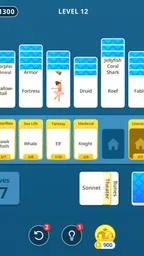
Solitaria: Word Puzzle Game review
 Analysis by Appsdrops
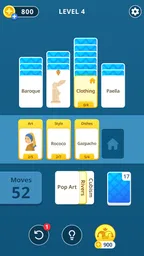
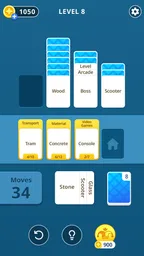
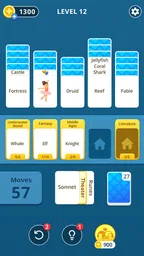
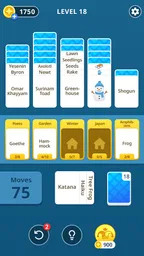
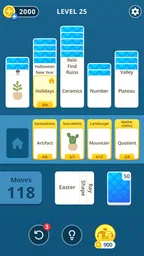
I’d recommend Solitaria to someone who likes word puzzles but wants a slower, more orderly kind of challenge than a timed anagram race. It is a word game built around a solitaire-style idea: sorting and word-making share the stage, so the appeal is as much in deciding what to tackle next as in spotting a possible word. That gives it a distinct place between conventional card solitaire and familiar letter puzzles.
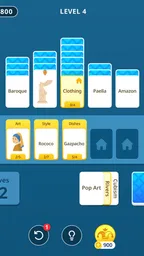
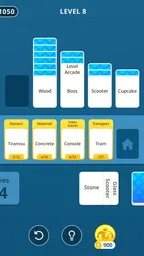
The basic promise is easy to understand, but the combination may take a moment to click. If you arrive expecting a standard deck of cards, this is not that experience; if you expect a grid of letters with one obvious answer, it is not quite that either. I found it most useful to approach each round patiently, look for the available word opportunities, and treat the sorting element as part of the puzzle rather than decoration.
What the word-and-solitaire mix feels like
Malpa Games has made a word game for adults that draws on two familiar habits: arranging things into a clearer order and building words from what is available. The result is a calmer alternative to puzzle games that pressure you to react quickly. It suits a short break when you want to focus on one small problem, though the sorting layer means it asks for more planning than a simple word search.
The most important adjustment is to resist searching for a word before considering the arrangement around it. In a conventional anagram game, I usually scan the letters and test combinations. Here, the solitaire influence encourages me to think about how the current layout affects what I can do next. That shift makes the game feel less like a vocabulary quiz and more like a sequence of choices.
That distinction also explains who is likely to enjoy it. If you enjoy wordplay and the quiet satisfaction of bringing a messy arrangement under control, the blend should feel inviting. If you mainly want a fast stream of crossword clues, a large open word grid, or traditional card solitaire with its familiar rules, another game may suit you better.
Start with a small, deliberate scan
When I begin a new puzzle, I recommend taking a brief look over the whole arrangement instead of immediately committing to the first word that comes to mind. Notice which letters seem promising, but also consider whether using them could leave the remaining layout awkward. The useful question is not only “Can I make a word?” but “Is this a sensible word to make now?”
This is a practical habit rather than a trick or hidden mechanic. In a hybrid puzzle, local progress can sometimes make the broader task harder, so a moment of planning is worthwhile. I would first identify a clear, low-risk move, then reassess the board after making it. That gives you a simple route from opening the game to a meaningful first success without needing to understand every nuance upfront.
What to expect on your first visit
Solitaria is free to download, and it is rated for Everyone. The game is listed at version 0.5.0 and requires Android 12 or later, so checking that requirement before installing can save time if you use an older device. It has an average rating of 4.8 from around 23,000 ratings, with more than 500,000 installs; those figures suggest it has found an audience, though they cannot tell you whether its particular puzzle style will fit your tastes.
There are in-app purchases, with items ranging from $1.99 to $99.99. I’d treat that as a reason to check purchase details before confirming anything, especially if a child might use the device. The game itself is free, but that does not mean every optional item is. For a first-time player, the sensible approach is simply to start with the free experience and decide later whether any purchase would genuinely improve your own play.
The game was released on February 26, 2026, and its developer is Malpa Games. The combination of a recent release and a developing version number is worth keeping in mind: I would approach it as a game that may continue to change, rather than assume every part of the experience is already fixed. That is not a reason to avoid it, but it does make a measured first impression more useful than expecting a fully familiar, long-established puzzle format.
Make the first win a learning moment
For your first meaningful success, aim to complete a move you understand, not to solve everything at once. Scan the available letters, choose a word that seems straightforward, and then look at how the remaining arrangement changes. The payoff is twofold: you make progress, and you learn how the word choice and sorting challenge interact. That is more reassuring than tapping quickly and hoping a move works.
After that first move, pause again. Try to see whether another obvious word is now easier to access, or whether you should spend a little more time surveying the layout. This deliberate rhythm is one of the game’s strengths for casual sessions: you can play thoughtfully without needing to summon the reflexes a timed game demands. It also helps you notice when a choice is opening possibilities rather than merely removing letters.
A useful everyday scenario is a short wait before an appointment. I would open the game, work through a small stretch of the puzzle, and stop when I need to return to what I was doing. The sorting-and-word combination gives that spare moment a clear focus, while its unhurried style makes it less demanding than a game that punishes interruptions with a timer. If you want a puzzle that occupies your full attention for a longer session, however, this may feel too measured.
Where new players can get confused
The main source of uncertainty is the relationship between the two halves of the idea. A player may focus on forming words and overlook the importance of the arrangement, or concentrate on sorting and forget that the aim is still word-based. When progress seems less obvious than expected, I would step back and inspect both: what word can I make, and what does making it leave me with?
It is also easy to judge a move only by how quickly it clears something. I recommend thinking one move ahead whenever the layout gives you a choice. A word that looks attractive in isolation may not be the best next step if it leaves fewer useful options. This is the central trade-off that makes the game more thoughtful than a basic word finder, and it is also why players seeking an instantly obvious answer may find the first few puzzles less intuitive.
Vocabulary can matter, but I would not treat every hesitation as evidence that you need an extensive word list. The layout and sequence are part of the challenge, so first inspect what is available and consider a different order of action. If you enjoy testing possibilities, that uncertainty can be satisfying. If you dislike puzzles where a good choice depends on looking ahead, a straightforward word-search game will probably feel more comfortable.
One practical way to avoid frustration is to separate observation from action. First scan the board without moving anything; then select a likely word or move; after that, check the new arrangement before continuing. This simple workflow makes it easier to understand why a choice helped or hindered you. It also turns a mistaken move into useful feedback, rather than a reason to rush through the rest of the puzzle.
How it compares with familiar alternatives
Compared with classic solitaire, Solitaria shifts the focus away from managing a conventional card layout and toward words. If you enjoy the orderly, step-by-step feeling of card play but want language to be central, that change is the reason to try it. If your enjoyment comes specifically from card suits, familiar solitaire rules, or the ritual of clearing a traditional tableau, this is not a replacement for that experience.
Compared with a standard anagram game, it asks for more than rapid letter rearrangement. The solitaire-inspired sorting gives decisions a sense of sequence, so it can reward planning rather than simply vocabulary speed. On the other hand, a classic anagram puzzle may be a better fit when you want a direct prompt and an immediate answer. Likewise, a crossword is preferable if you want clues and general-knowledge deductions, while a word search is better when you want to scan a field of letters without managing a sequence of choices.
That comparison helps set expectations: Solitaria is best for someone who likes the crossover itself. It is not automatically better than familiar word puzzles; it offers a different kind of attention. I would choose it for a quiet, considered session, not as my first pick for competition, a quick burst of obvious answers, or a puzzle that depends on clue-solving.
Who should try it, and who may prefer another game
I’d suggest giving it a try if you enjoy casual word games, like arranging a puzzle into a more manageable state, and are happy to learn a format through a few deliberate moves. It can also suit someone who has grown tired of word games built around speed and wants to slow down. The game’s Everyone rating makes its stated age suitability broad, while the in-app purchase range is a separate reason for adults to keep an eye on spending controls when sharing a device.
I would skip it if you want a highly familiar rule set from the first tap, dislike thinking about the consequences of a move, or prefer puzzles where every step is driven by a clue. It may also be the wrong choice when you have only a few seconds and want a nearly automatic distraction. The distinctive blend is the attraction, but it is also the barrier: players who like only one side of the idea may find that the other side interrupts the flow.
For a first-time player, my advice is to install it, take a moment to inspect the first arrangement, and make one considered word move before deciding whether the format clicks. Don’t measure the game by how quickly you finish; notice whether the next decision makes you curious. That is the clearest test of whether its mix of wordplay and sorting suits you.
My recommendation after weighing the trade-offs
Solitaria is a promising choice when you want a word puzzle that feels calmer and more strategic than a quick anagram challenge. Its strongest idea is the need to balance making a word with thinking about the arrangement that follows. That gives each move a little more weight, and a first successful action can feel satisfying precisely because it comes from observation rather than speed.
My reservation is that the blend may not explain itself instantly to every player. You need to give the sorting side as much attention as the words, and that can feel like friction if you came for a conventional crossword, word search, or card game. The free entry point makes it easy to find out whether the format works for you, but I would keep optional purchases in mind and avoid expecting the game to match a puzzle style it is not trying to be.
Overall, I’d recommend Solitaria to a friend who likes language puzzles, prefers a thoughtful pace, and is curious about a solitaire-like structure without requiring traditional cards. I’d point a speed-focused player toward an anagram game, and a clue-lover toward crosswords instead. If you enjoy weighing a word against what it leaves behind, Malpa Games’ word puzzler has a clear reason to earn a place in your casual rotation.
What we like
- Easy-to-learn rules make it approachable for casual players.
- Short rounds fit neatly into a spare moment.
- Word clues add a satisfying vocabulary challenge.
- No opponent is needed to enjoy a solo puzzle.
- A calm pace lets players think through each move.
What could be better
- Some puzzles may feel repetitive after extended play.
- A wrong move can leave a round difficult to recover.
- Players seeking fast action may find the pace too slow.
- Later puzzles may be challenging for casual word-game fans.
- The experience depends heavily on the quality of each puzzle.







