
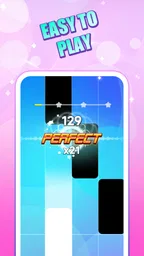
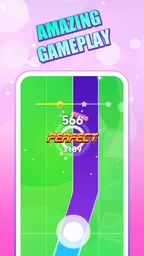
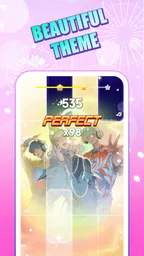



Rhythm Tiles: Pop Songs review
 Analysis by Appsdrops
I like rhythm games that ask for attention without demanding a long commitment, and Rhythm Tiles: Pop Songs has an appealing premise: follow a track by tapping in time. It is a casual game from Agile Lion Games, presented as a way to enjoy music-led play in short bursts. The idea is easy to understand, but whether it suits you depends on what you want from a rhythm game: a quick timing challenge, a way to engage with K-pop, or a deeper music experience.
What the tapping asks of you
The basic appeal is the direct link between listening and reacting. Rather than treating music as background decoration, the game asks you to keep your attention on its beat and respond with taps. That makes it easy to pick up when you have a few spare minutes and easy to put down when you need to get back to something else.
I find this kind of format most enjoyable when I treat it as a small concentration exercise, not as a test of musical skill. You do not need to know how to play an instrument to understand the goal. But a familiar song can make the rhythm easier to anticipate, while an unfamiliar one may take a little time to read. If you tend to tap along to music already, that natural habit is a good starting point.
The short description calls it Rhythm Tiles, while the full title is Rhythm Tiles: Pop Songs. The emphasis on pop and K-pop gives the game a more specific identity than a plain metronome-style tapping exercise. Still, the experience is best judged by how much you enjoy keeping time and repeating a track, rather than by the genre label alone.
A useful way to fit it into the day
A realistic use case is a brief break between tasks: put on headphones if that is comfortable, choose a song, and focus on its timing for a few minutes. The activity has a clear beginning and end, so it can work better than opening a sprawling game when you have limited time. I would also consider it for a relaxed commute as long as you are seated and able to look at the screen; tapping while walking or navigating a busy space is a poor trade-off for safety and concentration.
Another practical approach is to play when you are alert rather than when you are already tired. Rhythm games can feel unforgiving if your attention slips, and a missed beat may be more frustrating at the end of a long day than it is during a quiet break. If you notice yourself reacting late, pause and return later instead of turning a casual session into a chore.
The game is free, which makes it easy to try without committing money up front. It is rated for Everyone, so its age classification is broad, though parents should still decide whether a music-and-screen game fits their household’s routines. For people who want an inexpensive first step into casual rhythm games, that combination lowers the barrier to giving it a go.
Progress without turning every session into a test
Rhythm play naturally encourages repetition: you hear a track, try to follow it, and may want another attempt if your timing felt off. That loop can be satisfying because improvement is something you can feel in the moment. A useful personal rule is to replay a song only when you can name what you want to do differently—listen more closely, relax your tapping, or pay attention to a particular part of the beat. Repeating without a focus can quickly make the music feel like work.
There is a pressure trade-off here. A game built around timing can make a small mistake feel more noticeable than it would in a slower casual game. If you prefer progress that comes from exploring, decorating, or solving puzzles at your own pace, this may not be your ideal way to unwind. On the other hand, if you like a clear challenge that asks for concentration without a complicated rulebook, the format has an immediate appeal.
I would avoid assuming that a higher score is the only worthwhile outcome. The stronger reason to return is whether the track and tapping feel enjoyable together. When they do, a short session can be rewarding even if you are not chasing a perfect run. When they do not, pushing through repeated attempts is unlikely to improve the experience.
The current version is 0.3.8. That is a useful detail when deciding what to expect: the game is identified by a specific version, but a version number by itself does not tell me how its content or features will develop. I would approach it as a focused casual game rather than count on a particular long-term progression path.
How it compares with other rhythm games
Compared with rhythm games that ask you to learn elaborate controls or manage a large collection of modes, a tap-to-the-beat concept is easier to understand at a glance. That simplicity is a strength for quick sessions and for someone who has never played the genre. It is also a limitation: players who want detailed instrument-style inputs, demanding chart-reading, or a long campaign should look for a game built around those priorities instead.
It also differs from simply streaming a playlist. Listening alone lets you relax without watching a screen; this game adds an active task, which can make familiar music feel more engaging but also divides your attention. If your main goal is to discover songs or enjoy music while doing something else, a regular music app is likely the better fit. If you want to interact with a beat, tapping gives you a reason to focus.
Offline rhythm play is part of the game’s positioning, which may appeal when a connection is inconvenient. I would still treat offline use as a practical point to check on your own device before relying on it for a trip: the experience can depend on what is available after installation and how the game behaves in your circumstances. The key distinction is that offline play is relevant to the game’s appeal, but it should not be confused with a promise about every situation or every piece of content.
Spending, fairness, and what I would check
Because the game is free, trying it does not require an upfront purchase. That is the clearest confirmed point about spending. I would not infer from that alone whether optional purchases, advertisements, or other monetized elements are present, and I would not plan a budget around assumptions. If you are careful about spending, check the app’s current store information and any purchase prompts on your device before letting a child play or starting a long session.
The same caution applies to competitive fairness. The game’s rhythm format makes personal timing an obvious part of the challenge, but I would not claim that it has leaderboards, rankings, or particular competitive rules without confirmation. If comparison with other players is what motivates you, verify that the current version offers the kind of competition you want. If you are happy playing for your own enjoyment, you can judge it on the tapping experience instead.
That distinction matters because a free game can still involve choices about attention and spending. I recommend deciding in advance whether you want a quick music break or a longer session, and stopping when the activity stops feeling fun. This is not a special trick; it is a sensible way to keep a casual game from taking more time than you intended.
Who is likely to enjoy it—and who may not
I would point casual players toward Rhythm Tiles: Pop Songs if they like pop or K-pop, enjoy tapping along to music, and want a simple challenge they can understand quickly. It may also suit someone looking for a low-commitment game to try between other activities. Agile Lion Games is the developer, and the game has an average rating of 4.6 from around 20,000 ratings, alongside more than 10 million installs. Those figures suggest broad interest, though they cannot tell you whether its particular songs or timing style will match your taste.
I would steer away from it if you need a deep musical tool, prefer games that can be played without watching the screen, or dislike repeating a section to improve your timing. It may also be a poor choice for anyone who wants a clearly documented competitive system or firm details about spending before trying a game; those are the kinds of points to check directly in the app store rather than guess from its free price.
Compatibility is worth checking before you install. The minimum operating-system requirement is version 7.0, so confirm that your device meets it and has enough room for the app. Its release date is May 6, 2026, and the Everyone age rating gives a broad indication of its intended audience, not a substitute for a parent’s own judgement about screen time or music content.
My verdict on trust and fit
My overall view is that this is an approachable option for people who want to turn a few minutes of listening into a timing challenge. Its clearest strengths are a simple premise, a casual focus, and the possibility of playing around music rather than treating the game as a complicated system. The main trade-off is equally clear: the appeal depends on enjoying screen-based tapping and being willing to concentrate on rhythm, so it will not replace a relaxed playlist or a more substantial rhythm game for everyone.
I would try it with modest expectations: see whether the songs and tapping feel good on your device, pay attention to any purchase prompts, and decide after a few short sessions whether you want to return. The free entry point makes that trial straightforward, while checking current store details is the sensible way to resolve questions about purchases or competition. If you want a quick, music-focused casual game and are comfortable with those limits, it is worth considering; if you need more depth or less screen attention, another option will serve you better.
What we like
- Quick tap-based levels are easy to pick up.
- Short rounds suit casual play sessions.
- A wide range of songs keeps the soundtrack varied.
- Increasing difficulty gives experienced players a challenge.
- Simple controls work well on touchscreens.
What could be better
- Fast sections can feel unforgiving for new players.
- Some songs may be unavailable in certain regions.
- Ads may interrupt the flow between levels.
- The game can become repetitive over longer sessions.
- Accidental taps may cause a missed note.







