




Offline Games - No Wifi Games review
 Analysis by Appsdrops
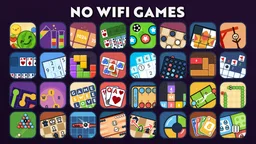
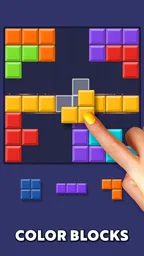
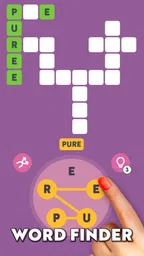
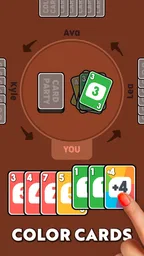
I like having a game ready for the small gaps in a day, but I don’t always want to commit to one deep puzzle or a long match. Offline Games - No Wifi Games takes a broad, pick-up-and-play approach: it gathers different kinds of puzzles and minigames in one casual collection, including chess and word games. The appeal is variety rather than a single signature experience. When I want a quick change of pace without relying on a connection, that makes it an easy app to consider.
A grab bag for short breaks
The game is developed by JindoBlu and sits in the casual-games space. Its collection is meant to cover more than one mood: a word challenge can suit a quiet moment, while chess offers a more deliberate choice. That breadth is useful when I’m not sure what kind of game I want until I open the app. Instead of switching between several single-purpose downloads, I can browse a shared collection and pick something that fits the time I have.
That convenience comes with a trade-off. A collection of minigames is not automatically as deep as a dedicated chess app or a specialist word puzzle. If I want structured lessons, a competitive community, or a carefully tuned progression system for one particular game, a focused alternative is likely to serve me better. This app makes more sense as a flexible casual companion than as a replacement for every standalone game.
Its offline focus is especially practical when a connection is unreliable or unwanted. I’d keep it in mind for a commute, a waiting room, or a trip where I would rather not depend on mobile data. The useful question is not simply whether it has many games, but whether having several different options in one place makes it easier to find a suitable distraction. For casual play, I think that is the collection’s strongest reason to exist.
How the variety works in everyday use
I would approach the app by matching a game to the moment, rather than trying to work through the collection in order. If I have only a few minutes, a lightweight puzzle is a more sensible choice than settling into a longer chess game. If I want to pay closer attention, chess or a word game can make the break feel more engaging than tapping through a purely reflex-based diversion. That simple choice of pace is a real benefit of having different formats together.
A useful habit is to decide what I want before browsing: something calm, something that tests recall, or something that asks for more planning. That keeps a large menu from turning into its own distraction. It also helps me notice whether I’m actually returning to a particular kind of game or just browsing because there are lots of options. For someone who tends to install a new game whenever they’re bored, a shared collection can reduce that app-hopping, though it won’t remove the temptation to keep sampling.
The offline angle also changes how I’d use it compared with a typical online casual game. I wouldn’t expect social competition or a live event to be the reason to open it; I’d choose it when I want a self-contained activity. That makes it suitable for places where connectivity is patchy, and for anyone trying to spend a short break away from social feeds. It is a practical fit for solo downtime, not a substitute for a multiplayer game night.
What the current version tells me
The current version is 3.16.1, and the game was released on August 4, 2023. Those details provide a useful snapshot of its present state, but they don’t, on their own, establish exactly how the collection has changed over time. I would treat the version number as a sign that the app has an identifiable ongoing release history, not as proof of a particular new mode, interface improvement, or performance fix.
That distinction matters to existing users. If you already have the game, the sensible way to judge a newer release is by what you can actually see in your installed copy: whether your preferred games remain easy to reach, whether play feels smooth on your device, and whether any changes suit your habits. I wouldn’t update expecting a specific addition just because the version has advanced. For a prospective player, the present appeal is the mix of casual options and offline use, rather than a promised future feature.
There is a broader product trade-off here: collections can grow and evolve, but a larger selection is only helpful if it remains easy to navigate. I would pay attention to whether the games I enjoy are quick to find and whether the variety feels genuinely useful after the first session. If I repeatedly open the same one or two choices, the collection may still be convenient, but its breadth matters less to me than the quality of those favorites.
Who is likely to get the most from it
I’d recommend trying it if you enjoy sampling different casual puzzles, want a few kinds of solo entertainment in one place, or need something that can work away from a steady connection. It is also a reasonable fit for households where different people prefer different simple game styles, provided everyone is comfortable sharing one app and choosing their own activity. The age rating is Everyone, which makes the stated content rating broadly accessible, though a parent should still decide what suits a particular child and how in-app spending is handled.
It may be less suitable if you care most about mastery in one game. A dedicated chess app is usually a better bet for someone seeking a focused study or competition environment. A specialist word-game app may be preferable for a player who wants a consistent challenge format and a clear long-term routine. I’d also skip this collection if I need a narrative, a carefully paced campaign, or a social layer to make a game compelling; its casual variety is not the same thing as depth in those areas.
For an everyday example, imagine waiting for an appointment with a few minutes to spare. I might choose a word game for a small mental warm-up, then switch to another kind of puzzle if I’m still waiting. On a longer journey, I’d choose a game that can hold my attention without requiring a connection, while keeping expectations realistic about how much depth a quick minigame can offer. That flexibility is more useful than a promise that every option will become a long-term favorite.
Cost, audience, and practical trade-offs
The game is free to download, with in-app purchases priced from $1.99 to $10.99 per item. I’d start with the free experience and decide whether the collection earns a regular place on my phone before spending anything. A purchase is easier to justify if it directly improves the way I use the app, but I wouldn’t assume that paying is necessary to enjoy the basic idea. If you’re setting it up for a child, it is worth checking purchase controls on the device so an accidental tap does not become an unwanted expense.
Its popularity is substantial: it has an average rating of 4.6 from around 507,000 ratings, with about 15,000 written reviews and over 100 million installs. Those figures suggest that the broad, casual format has reached a large audience, but they cannot tell me whether a specific minigame will suit my taste or run comfortably on my phone. I’d use them as context, then judge the experience by trying the kinds of games I’m most likely to revisit.
The minimum operating system is Android 6.0, so Android users should check their device software before installing. The app is also available as a casual-game concept for people looking for offline entertainment, but I would compare the available version on my own platform before assuming every release behaves identically. In particular, if offline access is the main reason for downloading, I’d test the games I care about while disconnected rather than relying on a general expectation about how every part of an app works offline.
Where it still asks for patience
The main limitation of a broad collection is that choice can become clutter. When I want one specific kind of game, scrolling or deciding among a range of options can feel like an extra step compared with opening a specialist app directly. A collection is most valuable when its variety helps me find a fitting distraction; it is less valuable when I already know exactly what I want and have a dedicated game that does it better.
There is also a difference between having chess and word games available and having a deep experience built around either one. Players who want to track improvement, learn advanced strategy, or compare their performance with others should look for tools designed around those goals. I see this app as a way to fill spare moments, not as a serious training setup. That is not a flaw if casual variety is what you want, but it is an important expectation to set before downloading.
Finally, the free entry point should not be confused with a guarantee that every optional item will be free. The listed purchase range is worth keeping in mind, especially for anyone who prefers to avoid spending inside games altogether. If that is a firm preference, check the purchase prompts carefully and stick to the parts you can enjoy without buying anything.
My take on whether to install it
For me, Offline Games - No Wifi Games is best understood as a handy drawer of casual activities: useful when I want a quick solo game and don’t want to depend on a network, but not the strongest choice for someone seeking one polished, long-term specialty. Its free download lowers the barrier to trying it, while its broad audience and established popularity make it an understandable option to explore. I’d install it for variety and convenience, then keep it only if I find a few games I actually return to.
What I’d watch next is the practical evolution of the experience: whether new versions make the collection easier to use, whether existing favorites remain easy to find, and whether the offline-friendly role continues to feel dependable in ordinary situations. Those are more meaningful signs for a player than a bigger version number by itself. If you want a mix of casual puzzles for travel or brief breaks, I think it is worth a try; if you want depth, competition, or a single game to master, a dedicated alternative is the better choice.
What we like
- Works without an internet connection once installed
- Offers several game styles in one app
- Useful for passing time during travel
- Simple controls are easy to learn
- Can help reduce mobile data use
What could be better
- Some games may feel repetitive after a while
- Ads may interrupt play
- The app may take up noticeable storage space
- Game quality can vary across the collection
- Some features may still require an internet connection







