





Music Piano 7: Rush Song Games review
 Analysis by Appsdrops
Music Piano 7: Rush Song Games is a free rhythm game built around tapping piano-style tiles in time with music. I’d recommend it to someone who wants a quick musical challenge on a phone, especially if they enjoy K-pop or electronic tracks and don’t need a full instrument-learning app. Its premise is easy to grasp, but the appeal depends on whether you like testing your timing under pressure rather than simply listening to songs.
What the game is like to pick up and play
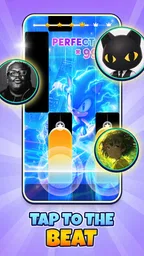
The basic idea is familiar to anyone who has tried a piano-tile game: follow the moving pattern, tap accurately, and keep pace as the song carries you forward. That makes Music Piano 7 approachable without a long tutorial or music theory knowledge. You can start with the simple goal of keeping your taps on beat, then decide whether you want to chase a cleaner run or move on to another track.
In everyday use, I can see it working well in short gaps: a few rounds while waiting for a ride, a quick break between tasks, or a quiet moment when I want something more active than scrolling. The controls suit brief sessions because they focus on the screen and the rhythm. Still, this is not a hands-free music app; playing well requires your attention, and a distraction at the wrong moment can break your flow.
The music-game category is crowded with rhythm titles that emphasize different things. Some center on matching a track’s original arrangement, while others turn play into a more elaborate arcade challenge. This one is aimed at the immediate satisfaction of tapping tiles along with a song. That makes it easier to approach than a game built around complex controls, though players seeking instrument practice, deep customization, or a long-form music campaign may prefer a different kind of app.
Who is likely to enjoy it
I think the strongest fit is someone who already likes rhythm games and wants a lightweight way to play along with music. It can also suit a casual player who is curious about tile games but isn’t ready to learn a more demanding control scheme. The Everyone age rating makes it broadly accessible, although younger players may still benefit from an adult helping them make sensible choices around any in-app spending or device use.
It is less suitable if your main goal is to learn piano. Tapping tiles in time can sharpen attention and rhythm, but it is not the same as learning notes, hand position, scales, or how to play a piece on a keyboard. Nor would I choose it as a substitute for a music player: the game asks you to respond to what is happening on screen, rather than simply settle back and listen.
Why the rhythm can feel rewarding—and demanding
The enjoyable part is the close connection between what you hear and what you do. When my taps line up with the beat, the game feels immediate: I’m not waiting for a complicated setup to pay off. That quick feedback is one reason these games are easy to return to. A brief attempt can feel satisfying even when I have no time for a longer session.
The same design also creates pressure. As the music moves on, attention has to stay on the tile pattern; it is easy to lose the beat if I glance away or let my mind drift. If you find fast visual tasks stressful, the escalating concentration expected of rhythm games may feel more frustrating than relaxing. I’d treat it as a focused arcade challenge, not a calming background activity.
A useful way to approach a new track is to listen for its pulse before trying to tap aggressively. I’d start with relaxed hands and aim for consistent timing rather than chasing speed immediately. If a run goes badly, restarting with that goal in mind is more useful than repeatedly tapping harder. This is a practical rhythm-game habit, not a special feature claim: the game’s core challenge is coordination, so tension can make accuracy worse.
Progress without turning every session into a test
Music games can make progress feel personal because you hear the same musical phrases while trying to respond more accurately. I find it helpful to treat a difficult attempt as practice in attention rather than as a verdict on musical ability. If you are playing casually, there is no need to make every session about beating a previous result; choosing a track you enjoy can keep the experience from becoming a chore.
There is a trade-off between replaying a familiar song and moving on. Repeating a track can help you settle into its rhythm, but it can also become monotonous if you only care about improvement. Switching to another song can refresh the experience, though a new rhythm may demand a fresh adjustment. For a short commute or break, I’d pick one track and give it a few focused attempts rather than opening the game without a plan and getting stuck in an endless retry loop.
The app’s offline play is a practical advantage for moments when a connection is unreliable, such as travelling or waiting somewhere with weak service. I would still make sure the game is ready before relying on it away from home, because offline play is most useful when you have already confirmed what works on your own device. It is a good fit for keeping a rhythm game available in more situations, but it does not turn the game into a replacement for a downloaded music library.
Spending, fairness, and what a free label tells you
The game is free to install, which lowers the barrier to trying it. That fact alone does not tell me whether every song, option, or part of the experience is available without spending, so I would not assume that “free” means there are no purchases or restrictions. Before paying for anything in a game, I recommend checking the purchase screen carefully and making sure the amount and what it unlocks are clear.
On fairness, I can assess the basic promise of a timing game more confidently than any particular competitive system: success should come from responding accurately to the rhythm. I would not claim that purchases do or do not affect competition without clear details about how those purchases work. If you care about a level playing field, enjoy the core challenge first and avoid spending until you understand exactly what a purchase changes.
That caution is especially useful for families. The age rating is Everyone, but an age label does not answer every question a parent may have about payments or play habits. I’d keep purchase approval under adult control and agree on a sensible session limit if a child is tempted to retry songs for a long time. Those are practical safeguards for mobile games generally, not a claim that this title uses a particular monetization system.
How it compares with other music games
Compared with a piano-learning app, Music Piano 7 is about timing and quick reactions, not structured lessons. Compared with a rhythm game that uses a larger set of controls or asks you to follow multiple lanes, a tile-based format is easier to understand at a glance. That simplicity is a strength when you want to start quickly, but it may feel limited to players who want deeper technique or more varied ways to interact with music.
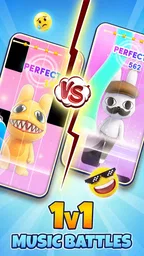
It also differs from simply playing songs through a streaming service. A music player is better when you want to focus on an album or let music accompany another activity; this game makes listening active by asking you to keep pace. If you want a competitive music experience, check what the game actually offers before choosing it for that reason. I would pick it primarily for solo, short-session rhythm play rather than assume it provides a particular multiplayer or ranking experience.
Popularity, development, and practical fit
Melodya Muses develops the game, which is currently at version 3.10.0 and requires Android 7.0 or later. It has a 4.8 average from around 472,000 ratings, with roughly 50 million installs. That level of popularity suggests that many players have been willing to try it, but it cannot tell you whether its song selection, pacing, or challenge will suit your taste. I’d use the free entry point as a reason to test the feel for yourself, not as proof that it will be everyone’s favorite.
The game was released on October 12, 2023. For a prospective player, the practical check is compatibility: confirm that your Android device meets the minimum operating-system requirement before installing. If you use iOS, check availability and requirements in the relevant app store rather than assuming the Android version details apply to your device.
What I would check before committing
Some important buying decisions depend on details that should be visible in the app store or on the relevant purchase screen, such as exactly what optional purchases provide. I would check those screens rather than guess. The same applies if you need a specific accessibility option, a particular song, or a certain competitive mode: make sure the feature you care about is actually present before making the game your main rhythm app.
For a first session, I’d focus on three things: whether the music appeals to you, whether the tile timing feels comfortable on your screen, and whether the challenge stays fun after a few attempts. If all three work, the game has a good chance of becoming a handy break-time option. If the visual pace feels uncomfortable or you want music instruction rather than reaction-based play, it is better to choose a different kind of app than to force a fit.
My verdict for a quick rhythm-game pick
My honest recommendation is to try it if you want an accessible, music-led tapping challenge you can play in short bursts. Its free installation, familiar tile-game idea, offline play, and broad age rating make it easy to consider, while the music-focused format gives each round a clear purpose. I’d keep expectations centered on arcade timing rather than piano education, and I’d check any purchase terms before spending.
For me, the best use case is a focused few minutes with a song, not a long session where I expect a deep progression system or a full musical toolkit. Players who enjoy chasing rhythm and improving their reactions should find a straightforward reason to come back. Those who want to learn an instrument, listen passively, or know exactly how purchases affect every competitive feature should compare alternatives and verify those specifics first. If the core tapping feels good in your hands, this is a sensible free game to keep around.
What we like
- Quick rhythm challenges make short play sessions easy.
- Bright visuals give songs a lively arcade feel.
- Tap controls are simple for beginners to pick up.
- Progressive difficulty can keep experienced players engaged.
- A wide song selection offers variety between runs.
What could be better
- Fast note patterns may feel unforgiving to new players.
- Some songs or features may require in-app purchases.
- Advertisements can interrupt the flow between rounds.
- Touch timing may feel imprecise on smaller screens.
- A stable internet connection may be needed for some content.







