



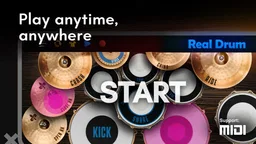
Real Drum electronic drums set review
 Analysis by Appsdrops
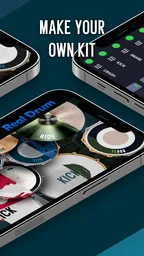
Making a beat on a touchscreen sounds simple: tap a drum, hear a hit, and keep the rhythm going. In practice, the feel of a music game depends on more than the sound itself. Screen layout, timing, and getting comfortable with the controls can all affect whether a session feels satisfying or frustrating. Real Drum brings a virtual drum set to mobile, with lessons intended to help players learn to play. I’d approach it as an accessible way to explore drumming and practise basic coordination, rather than expecting a phone or tablet to feel exactly like a physical kit.
Getting comfortable with the virtual kit
The first hurdle is usually not understanding what a drum set is; it’s learning where each part of the kit sits on the screen and how accurately your taps need to land. A touchscreen has no raised drumheads or sticks to guide your hands, so it can take a little experimentation to build a comfortable pattern. If a hit feels late or a rhythm falls apart, I wouldn’t immediately assume the game is at fault. A brief adjustment to how you hold the device and where you place your fingers can make a noticeable difference to your control.
That learning curve is familiar in mobile rhythm games. On a real kit, muscle memory helps you find each drum without looking. On a screen, your eyes and hands have to coordinate around visible controls, which can make faster patterns feel awkward at first. I’d begin slowly, focus on a simple rhythm, and let accuracy matter more than speed. Once the taps feel consistent, adding complexity becomes less of a guessing game.
The game’s appeal is that it puts a drum set within reach without asking you to bring physical equipment into the room. That makes it convenient for casual play, musical curiosity, and short practice sessions. At the same time, a touchscreen is a different instrument in its own right. Treating it as a compact way to experiment with rhythm, rather than a perfect substitute for an acoustic or electronic kit, sets more realistic expectations.
Why a session can feel harder than expected
Small screens can make hand placement feel crowded, especially if you are trying to play with both hands or keep your eyes on a lesson. A tablet may offer more room than a phone, while a phone is easier to pick up for a quick session. Neither choice guarantees a better performance; comfort and visibility matter most. I’d position the device so the full playing area is easy to see and avoid holding it in a way that shifts the screen every time you tap.
Another common snag is expecting every tap to land with the same force and timing as a stick strike. Fingers touch a flat surface differently, and repeated tapping can feel less natural than striking a drumhead. Give yourself a moment to find a steady touch. If you are practising a lesson, focus on following its rhythm rather than trying to play quickly just because the interface responds immediately.
The most useful first step is to make the setup comfortable before judging the rhythm. A stable device, clear view of the playing area, and relaxed hands help separate genuine timing mistakes from simple control awkwardness. That’s especially helpful when learning a new pattern: changing several things at once makes it harder to tell what improved.
A calmer setup check
Before starting a longer session, I’d check the basics. Make sure the device is steady, the screen is clean enough for reliable touch input, and your hands can reach the on-screen kit without straining. If the game seems unresponsive, try a few deliberate taps in different areas rather than rapidly tapping everywhere. This gives you a clearer sense of whether the issue is your touch placement, the device’s response, or simply an unfamiliar layout.
It can also help to close distractions and give the game your attention. Notifications, accidental touches, or a screen that keeps changing orientation can interrupt a rhythm and make the controls seem less dependable. These are ordinary mobile-use problems, not necessarily faults with a music game. A quiet moment and a stable device make it easier to focus on the beat.
For a beginner, the lessons are a sensible place to start. The game is described as including various lessons to help players learn to play drums, so I’d use them as a guide rather than jumping straight into ambitious patterns. A lesson gives your practice some direction and can help you build familiarity with the kit. Work through it at a pace that feels manageable, then repeat the parts that still require attention.
It’s also worth keeping practice sessions focused. Instead of trying to master everything at once, pick one rhythm or one area of coordination to work on. Short, deliberate attempts are easier to assess than a long session of random tapping. If a section feels difficult, slow down mentally, watch the pattern, and try again with relaxed hands. Progress on a touchscreen often comes from consistency more than force.
Recovering when the rhythm breaks
When a pattern goes wrong, the instinct is to tap faster and catch up. That often makes things messier. I’d pause, reset my hands, and return to a simpler beat before attempting the troublesome section again. This gives you a clean reference point and reduces the chance of carrying one missed tap into the rest of the rhythm.
If the game appears to stop responding, first check whether your finger is landing where you intend. Try a few controlled taps, then give the screen a moment before repeating them. Rapid input can make it difficult to distinguish a missed touch from a timing error. If the interface still behaves oddly, closing and reopening the game is a standard troubleshooting step for mobile apps. It is not a guarantee, but it can clear a temporary hiccup.
Keeping the device’s operating system and the game current can also be a reasonable general maintenance habit. Real Drum’s listed current version is 11.18.7, and it supports devices running version 7.0 or later of its minimum operating system. Those details are useful when checking basic compatibility, but they don’t mean every performance issue is caused by software. A device under heavy load, a crowded screen, or an unstable touch surface can also interfere with a smooth session.
Sound problems deserve a similarly practical check. Confirm that the device’s media volume is audible and that sound is not being routed somewhere unexpected. If other apps also have audio trouble, the issue may be with the device or its audio setup rather than the game. If sound works elsewhere but not here, restarting the app is a sensible next step before changing broader device settings.
When the cause may be outside the game
A rhythm game depends on the phone or tablet as much as on its own controls. A screen protector that affects touch, a device that is moving on a soft surface, or a hand position that blocks part of the display can all make taps feel inconsistent. I’d test the game on a stable surface and adjust my posture before deciding that the controls are unreliable. That simple comparison can reveal whether the trouble follows the device setup or the particular lesson.
Performance can also vary with what else is happening on the device. If several demanding apps are open, closing ones you are not using may help keep the session responsive. This is general mobile troubleshooting, not a claim that the game requires any special configuration. The goal is simply to remove obvious distractions before drawing conclusions from a brief glitch.
It helps to distinguish three different frustrations: a missed tap, a timing mistake, and a technical interruption. A missed tap often improves with better finger placement. A timing mistake usually calls for slower practice. A technical interruption may call for restarting the app or checking the device. Treating all three as the same problem can lead to unnecessary changes and make learning less enjoyable.
Expectations matter, too. A phone screen cannot reproduce the spacing, rebound, and physical feedback of a drum kit. If your goal is to learn the basics of rhythm or enjoy tapping out a beat, that limitation may not matter much. If you want the sensations of playing actual drums, a virtual kit will naturally feel different. I see that distinction as a way to choose the right use for the game, not as a flaw that makes it pointless.
What the game offers to different players
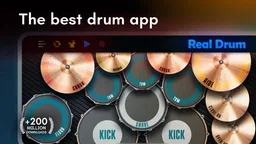
Real Drum is a music game developed by Kolb Apps. It is free to download, with in-app purchases listed from $0.99 to $29.99 per item. Its content rating is Everyone, so it is positioned for a broad audience. The game has been available since April 4, 2012, and its long presence is reflected in its broad reach: it has passed 100 million installs.
Its public reception is also substantial, with an average rating of 4.5 from around 1.7 million ratings and roughly 21,000 written reviews. Those figures suggest that many people have tried it, but they don’t tell you whether its touchscreen style will suit your own hands or practice habits. I’d treat them as context, then judge the experience by whether the controls feel comfortable and the lessons give you a useful starting point.
For someone curious about drumming, the strongest case is convenience. You can explore rhythms on a mobile device without setting up a physical kit, and the lessons provide a route into learning. For a casual player, it can be a quick music-focused diversion. For someone already accustomed to drums, it may be more useful as a lightweight way to tap out ideas than as a replacement for full-size equipment.
The best experience is likely to come from approaching it with patience. Get comfortable with the screen, practise at a manageable pace, and use the lessons to build familiarity before pushing for speed. When something goes wrong, check touch placement and device stability first; then consider ordinary app or device troubleshooting. This method keeps small setup frustrations from overshadowing what the game is meant to offer.
My practical verdict
I’d recommend Real Drum to people who want an approachable mobile way to explore drum rhythms and practise coordination. Its free entry point and built-in lessons make it easy to try, while the large player base shows that it has found an audience over time. The key is to remember that touchscreen drumming has its own feel. A little setup and patience go a long way, especially for beginners who are still learning where and when to tap.
It may not satisfy players looking for the physical response of a real drum kit, and that is a fair distinction rather than a reason to dismiss it. As a portable music game, it has a clear purpose: let you play with rhythms and work through lessons on a phone or tablet. If that sounds like what you want, start with a simple pattern, keep your device steady, and give your hands time to adapt. That’s the approach I’d take before deciding whether it belongs in my regular rotation.
What we like
- Responsive touch controls make rhythms easy to play.
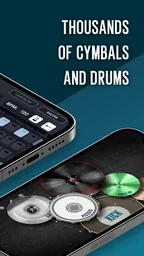
- Multiple drum kits offer varied sounds.
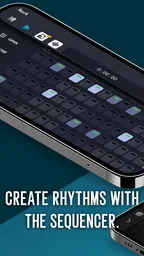
- Recording tools let you replay your performances.
- MIDI support expands options for external music gear.
- Practice feels accessible for beginners.
What could be better
- Small screens can make precise tapping difficult.
- Ads may interrupt the playing experience.
- Some kits and features require payment.
- Realistic drumming takes time to learn on a touchscreen.
- Sound quality depends on your device speakers or headphones.







