Real Piano review
 Analysis by Appsdrops
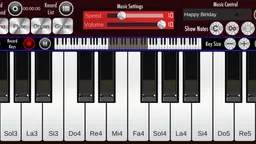
I find Real Piano most useful when I want to sit down and play a few notes without turning the moment into a full music lesson. It is a piano game for Android from Bilkon, and its appeal is straightforward: open it, use the on-screen keys, and focus on the sound and the movement of your fingers. That simplicity makes it approachable, but it also sets a clear boundary. This is best treated as a convenient touch-piano experience, not a replacement for a keyboard, a structured course, or a serious music-production tool.
Getting a useful baseline from the keyboard
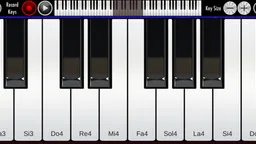
My first recommendation is to spend a moment getting comfortable with the screen before trying to play a tune quickly. Touching piano keys on a phone is a different physical experience from pressing full-sized keys: your fingers have less room, and a small change in hand position can lead to a neighboring note. Start slowly, use one finger at a time, and pay attention to how the keyboard responds. That brief warm-up is more valuable than immediately attempting a complicated melody.
The practical baseline is simple: hold the device in a steady position, choose a comfortable way to reach the keys, and play a short phrase repeatedly. A familiar tune works well because you can concentrate on the touch layout rather than trying to remember every note. If the phone is on a table, keep it from shifting as you tap; if you hold it, make sure your grip does not force your thumb or fingers into an awkward angle. These small adjustments reduce accidental notes and make short practice sessions feel less fussy.
For a beginner, the most helpful early goal is not speed. Try to make the same small sequence sound consistent several times in a row. That reveals whether the challenge is remembering the notes, aiming accurately, or coordinating both hands. A touchscreen can make it easy to begin, but it does not automatically teach note reading, posture, or finger independence. I would use it as a low-pressure place to explore melodies and develop familiarity with piano notes, while seeking a more guided learning option if lessons and progressive exercises are the main goal.
Real Piano is free, which makes it easy to try for casual play or an informal practice break. Its broad reach is reflected in more than 100 million installs, while its average rating is 3.7 from around 261,000 ratings. Those figures suggest that many people have tried it, but they do not tell you whether its touch layout will suit your device or playing style. I would judge that for yourself with a short session before relying on it for regular practice.
Make short sessions repeatable
A useful everyday scenario is filling a few quiet minutes while waiting for someone or taking a break at home. Instead of opening the app and tapping randomly, pick a tiny task: replay a melody, find a few notes by ear, or alternate between two short patterns. Keep the same task for several sessions. Because the screen is compact, a narrow goal helps you notice improvement without expecting the app to provide the structure of a teacher.
Another good routine is to begin and end with the same phrase. At the start, it gives your fingers a gentle warm-up; at the end, it lets you compare how steady the notes feel after playing. This is a practical habit rather than a special app feature, and it works precisely because the game is easy to return to. If your hands feel cramped, stop and reposition the device instead of trying to compensate by stretching across the display.
Check the setup before settling into a routine
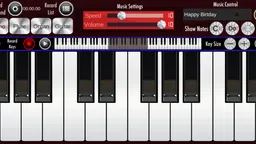
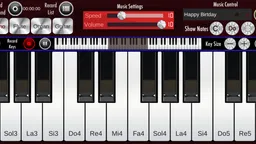
Before forming an opinion about the sound or responsiveness, look through the options the game actually presents on your device. Settings can affect comfort and the way a session feels, so it is worth checking available controls rather than assuming the initial setup is ideal. I would change one option at a time, play the same short passage, and keep the change only if it makes the experience easier to follow. That simple comparison avoids confusing a different setup with improved playing.
There is a useful distinction between tuning an interface and improving a performance. A setting may make play more comfortable, but it cannot create the spacing of a physical piano or teach reliable fingering. If you are using the app to learn a melody, keep your chosen setup stable while practicing it; frequent adjustments make it harder to tell whether you are improving. If you are only exploring sounds, experimenting is more reasonable, since there is no single practice routine to preserve.
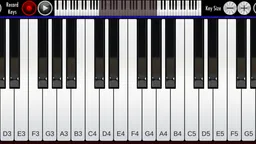
I also suggest checking the game on the device and screen orientation you plan to use most. Touch accuracy depends on where your fingers naturally land, and a layout that feels manageable in one position may be awkward in another. Try a few notes near the edges as well as in the middle, since reaching across the screen can change your hand posture. If the controls feel cramped, that is a real limitation of playing piano on a small touchscreen, not necessarily a problem you can solve by tapping faster.
The game is listed for Android 7.1 and later, and its current version is 1.31. It is rated for Everyone, so it can suit a broad range of ages as a casual music activity. Those details make it easy to understand the basic compatibility and audience, but the best way to decide whether it works for your particular phone is still to test the keyboard directly and see whether the display gives your fingers enough room.
Build faster patterns without rushing
Once the basic layout feels familiar, speed comes from reducing hesitation, not from striking the keys as quickly as possible. I would divide a melody into short groups, repeat each group at a comfortable pace, and connect them only after the transitions feel predictable. When a phrase repeatedly goes wrong at the same point, isolate that transition instead of restarting the whole tune. This is a small but effective practice method for a touchscreen because it limits unnecessary movement and makes aiming easier to assess.
Another practical approach is to use consistent finger roles. Even if you are playing a simple line with one hand, decide which finger will handle each part of the phrase and stick with that plan for a few repetitions. On a phone, changing fingers unpredictably can make the same note harder to reach each time. A repeatable movement pattern is often more helpful than trying to imitate the hand position used on a full-size piano.
For informal ear practice, play a short sequence and then try to reproduce it without looking away from the keys for every note. Keep the exercise modest: a few notes are enough to test whether you remember the sound and order. This will not turn the app into a formal ear-training course, but it can make casual play more purposeful. It also gives experienced players a reason to return beyond simply tapping familiar songs.
There is a trade-off here. Short, repeated patterns work well on a touch display because they reduce the need to travel far across the keys. Long passages and fast runs are less forgiving: your fingers can cover neighboring areas, and an imprecise tap may interrupt the phrase. If your goal is to perform detailed music accurately, a physical keyboard or a more specialized piano-learning app is likely a better fit. Real Piano is more comfortable as a quick-access instrument for experimenting and rehearsing simple ideas.
Where the experience reaches its limits
The biggest limitation is inherent to the format. A phone screen is not a piano keyboard, and touch controls cannot provide the same spacing or physical feedback as real keys. That matters most when you want to develop technique, practice wide hand positions, or play with confidence at higher speeds. For a child exploring notes or an adult revisiting a familiar tune, the compromise may be perfectly acceptable; for someone preparing pieces on an acoustic or digital piano, it can teach habits that do not transfer cleanly.
It is also important to be clear about what kind of help you expect. The store summary calls it a piano app, but I would not choose it on the assumption that it offers a complete curriculum. If you need guided lessons, structured progression, or detailed feedback on technique, compare it with dedicated teaching apps and a keyboard-based setup. If you want a quick place to tap out an idea without arranging equipment, the lighter approach is the point rather than a flaw.
Compared with a physical piano, Real Piano wins on convenience and loses on scale and touch. Compared with a music-learning app, it is better approached as a direct playing surface than as a teacher. Compared with a general music game, its piano focus makes it more suitable for exploring notes and melodies than for chasing a broad collection of rhythm challenges. These are different uses, so the right choice depends on whether you want access, instruction, realistic technique, or game-like variety.
The developer is Bilkon, and the game has accumulated around 2,400 written reviews alongside its large audience. I would treat public feedback as context, not a promise that the same experience will suit every phone. The important decision is whether a compact keyboard is comfortable for your hands and whether casual playing is enough for what you want. If either answer is no, a larger screen, an external keyboard, or a dedicated learning tool is a more sensible next step.
Who should keep it installed
I would recommend Real Piano to someone who wants an uncomplicated way to explore piano notes, revisit simple melodies, or occupy a short break with a music-focused activity. It is also a reasonable starting point for a curious beginner who understands that tapping keys is only one part of learning an instrument. Its free price lowers the commitment, and the Everyone age rating makes its general audience clear. The strongest use case is casual access: a piano-like surface in your pocket when setting up an instrument would be inconvenient.
I would steer away from it if you need a dependable substitute for piano lessons, realistic keyboard technique, or precise practice for a performance. It is also not the best match if you find small touch targets tiring or frustrating. In those cases, a larger tablet might make the interface easier to handle, but a physical keyboard remains the better choice for developing spacing and finger control. A dedicated teaching app is preferable when instruction is the priority.
My verdict is that Real Piano works best when you give it a modest, repeatable purpose: warm up with a short phrase, explore a melody, or practice a small pattern during spare minutes. I would check the available settings once, settle on a comfortable setup, and then focus on steady repetition rather than chasing speed. It is an accessible music game, not a full piano education system, and being honest about that distinction makes it easier to enjoy what it does well.
What we like
- Realistic piano sounds make practice feel more engaging.
- The keyboard layout is easy to understand for beginners.
- Playing works without needing a physical piano.
- A range of notes supports simple melodies and chords.
- Touch controls make it quick to try out musical ideas.
What could be better
- Small screens can make keys difficult to play accurately.
- Touch input lacks the feel of weighted piano keys.
- Accidental taps may interrupt a performance.
- Long practice sessions can drain your device battery.
- Advanced players may find the keyboard options limited.







