



Real Guitar - Music Band Game review
 Analysis by Appsdrops
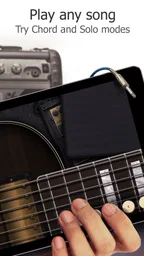
Picking up a virtual guitar sounds simple: tap the strings, find a chord, and enjoy the music. Real Guitar turns that familiar idea into a mobile music game, offering electric and acoustic sounds alongside chords and tabs. I found its appeal in the low barrier to getting started: you can explore guitar-style playing on a phone without needing an instrument beside you. The more interesting question is how long that easy first step can keep you engaged.
Getting started with guitar-style play
Real Guitar is a free music game from Gismart, built around a digital guitar experience. It is intended for players who want to experiment with guitar sounds, practise chord shapes, or simply spend a few minutes making music. The app is rated for Everyone, so its broad, approachable premise suits casual players as well as people curious about guitar basics.
The first goal is straightforward: get comfortable with the instrument on screen. That simplicity is a real advantage on a small display, where a complicated interface could make playing feel like work. Instead, the central appeal is immediate interaction with guitar-style sounds. You can begin by trying notes and chords, then decide whether you want a relaxed musical diversion or a more focused practice session.
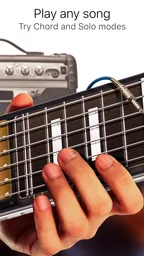
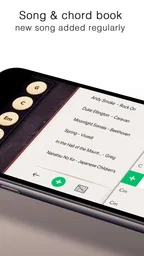
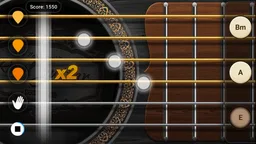
The app’s store summary highlights electric and acoustic sounds, plus chords and tabs. Those elements give the experience more direction than a basic sound toy. Switching between the idea of strumming for fun and learning how chords fit together can make a short session feel purposeful. I like that the concept leaves room for both: you do not have to approach it as a serious lesson to enjoy the musical side.
Small goals make the first sessions approachable
Early goals in a game like this work best when they are personal and manageable. You might want to reproduce a chord, get a feel for the on-screen strings, or see how an electric sound differs from an acoustic one. These are satisfying first steps because they do not require a long commitment or a steep learning curve before you can start enjoying the app.
That open-ended quality is also a trade-off. Players who expect a clearly signposted campaign, a sequence of missions, or a strong narrative may not find the same kind of direction here. The core motivation comes from interacting with the guitar concept itself. For me, that makes the game easy to dip into, though it places more responsibility on the player to decide what counts as progress.
There is a useful distinction between picking up a virtual guitar to explore and using one to practise. Casual play is forgiving: you can try sounds and see what feels enjoyable. Practice takes more intention, since you will get the most from focusing on chords and tabs rather than tapping without a goal. The app’s broad premise accommodates both styles, but the experience depends on which one you bring to it.
Progress you can hear and recognize
Progress in a music game does not always need a score or a long list of unlocks. A more personal signal can be recognizing a chord, moving from experimentation to a deliberate sequence, or simply feeling more at home with the virtual instrument. The focus on chords and tabs gives players a reason to revisit the app with a specific musical aim instead of treating every session as random tapping.
That kind of progress is rewarding because it connects directly to what you are doing. If a chord begins to feel familiar, or you can make a sound you enjoy more reliably, the improvement is easy to appreciate. It also gives the game a gentler rhythm than a typical level-based challenge: you can stop when you have had enough, then return later without needing to remember a complicated plot or strategy.
Still, this approach will not motivate everyone equally. Some players thrive on self-directed practice, while others prefer visible milestones and clear rewards. If you fall into the latter group, the open musical focus may feel less compelling over time. I see the greatest value for people who enjoy experimenting or learning in small, informal steps, rather than those looking for a tightly structured progression system.
Challenge and the pace of play
The difficulty curve is shaped less by a dramatic rise in game pressure and more by what you choose to do with the instrument. Getting started is accessible, while becoming more deliberate with chords and tabs naturally asks for more attention. That gives the experience a flexible pace: newcomers can keep things simple, and curious players can set themselves a more demanding goal.
This flexibility suits a mobile music game. A brief session can be enough to explore a sound, while a longer one can center on practising a musical idea. There is no need to treat every visit as a test. In my view, the strongest pacing comes from alternating between relaxed exploration and a modest challenge, so the app stays enjoyable rather than turning practice into a chore.
The flip side is that self-set challenge can be hard to sustain if you want the game to push you. Players looking for increasingly difficult stages or a steady stream of externally defined objectives may find the experience less motivating. The guitar concept gives you material to work with, but your own curiosity does much of the work of keeping sessions fresh.
That makes the game’s challenge feel personal rather than competitive. You can focus on getting a chord right or simply enjoy the sounds without measuring yourself against anyone else. It is a comfortable fit for a casual audience, although players who need frequent, unmistakable signs of advancement may want a more structured music game.
When returning feels worthwhile
Retention depends on whether the central activity continues to feel rewarding after the novelty of trying a virtual guitar wears off. Electric and acoustic sounds offer a simple reason to explore different moods, while chords and tabs can encourage a more purposeful return. Those ingredients give the app more staying power than a one-note novelty, especially for users who like music and enjoy practising at their own pace.
At the same time, the experience can ask for patience. A player who expects a new reward at every turn may find a self-guided musical activity less immediately compelling. I think the best way to approach it is to bring a small goal into each session: experiment with a sound, revisit a chord, or spend a few minutes exploring a tab. That keeps the play focused without demanding a major time commitment.
The free-to-play entry point makes trying the game easy, while optional in-app purchases range from $1.99 to $89.99 per item. That broad spread is worth keeping in mind if you are deciding whether to spend. You can first judge whether the core guitar experience suits you, then make any purchase decision based on your own interest and comfort. The app has reached over 100 million installs, and its average rating is 3.1 from around 682,000 ratings, which suggests a large audience alongside mixed reactions.
Who is likely to enjoy it?
I would recommend the game to people who want a casual way to explore guitar sounds, or who like the idea of practising chords and tabs in short sessions. It can also appeal to curious beginners who want a low-pressure introduction to guitar-style interaction. The age rating is Everyone, and the basic premise is easy to understand, making it approachable for a wide range of players.
It is less suited to anyone who wants a tightly guided course or a high-pressure rhythm challenge. Its strongest draw is the opportunity to make and explore music, not a promise of a particular competitive format. If you bring your own goals, the experience can feel flexible and personal. If you want the app to provide a constant stream of objectives, that same openness may seem like a lack of momentum.
Gismart’s game first appeared on May 17, 2013, and its current version is 3.41. It requires iOS 9 or later. Those details place it among long-running mobile music experiences, but the practical decision remains simple: consider whether you want a guitar-themed game to explore casually or a more structured learning tool. The former is the clearer fit for what the app sets out to offer.
My progression verdict
Real Guitar works best when you treat progression as something you shape yourself. The early goals are easy to grasp, the sounds provide an inviting starting point, and chords and tabs offer a reason to become more deliberate. Challenge grows according to your own interest, which keeps the pace flexible but means the game may not supply enough direction for everyone.
For me, that balance makes it a pleasant option for informal musical exploration rather than a deeply guided progression game. It is easy to try, and there is enough of a guitar-focused idea to support repeated short sessions if you enjoy experimenting or practising. The main limitation is that motivation rests heavily on your own curiosity. Bring a small goal each time, and the experience has a better chance of staying rewarding.
Overall, this is a straightforward choice for players who want electric and acoustic guitar sounds, chords, and tabs in a casual mobile format. Its broad reach and accessible concept are appealing, while its average rating points to a divided audience. If self-directed play sounds good to you, it is worth exploring; if you need a guided climb of goals and rewards, you may find its progression too open-ended.
What we like
- Touch-responsive strings make notes feel direct and easy to play.
- Chord diagrams help beginners learn common guitar shapes.
- Multiple guitar sounds add variety to practice sessions.
- The interface suits quick play sessions on a phone.
- It offers a low-pressure way to explore guitar patterns.
What could be better
- Accurate timing can be difficult on small screens.
- Ads may interrupt the playing experience.
- Some sounds and features may require in-app purchases.
- It does not replace the feel of a physical guitar.
- Complex songs can be challenging without music-reading skills.







