


Piano Fire: Edm Music & Piano review
 Analysis by Appsdrops
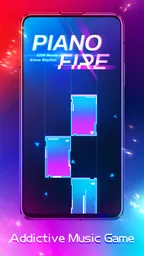
I think Piano Fire: Edm Music & Piano is easiest to judge as a quick rhythm game, not as a substitute for piano lessons or a full music-making app. Its central appeal is the immediate link between a song’s beat and your taps: you follow the changing pattern, try to stay in time, and chase a cleaner run. That makes it approachable when I want a brief, focused break, while the need to react accurately gives each attempt a little more purpose than simply listening to music.
What you get without paying
The game is free to install and play, which is the most useful starting point for deciding whether it suits you. You can try its basic rhythm challenge without making a purchase first. Optional in-app purchases range from $0.99 to $9.99 per item, so spending is possible, but I would treat it as a choice rather than a requirement for finding out whether the game clicks with you.
That distinction matters because free access and paid value are not the same thing. The price to begin is clear; the value of any optional purchase depends on what you personally want from the game and whether the available options are worthwhile to you. I wouldn’t budget for extras before playing. Start without paying, see whether the tapping feels satisfying, and only consider a purchase if you understand what it adds and genuinely want it.
Adaric Music is the developer, and the game has a 4.6 average from around 733,000 ratings. It has passed 100 million installs, which suggests that this style of music game has broad appeal, though popularity alone cannot tell you whether its pace or presentation will suit your taste. I’d take those figures as useful context, not a promise that every player will enjoy it.
Why the rhythm loop works
The useful design idea is that you are not just selecting music and letting it play in the background. You have to pay attention and respond to what you hear and see. That active listening can make a familiar kind of phone game feel more involving: a song becomes something to follow, rather than just a soundtrack for waiting in line or sitting through a short break.
I also like the low commitment of this format. You can approach it as a short concentration exercise instead of setting aside a long session. If you have a few spare minutes between tasks, a rhythm run gives that time a clear beginning and end. It is particularly suited to players who enjoy testing their timing and repeating a challenge to improve, rather than those who want a large world, a story, or a long progression to explore.
One practical tip is to treat the first attempts as a way to learn the rhythm, not as a verdict on your ability. When a sequence feels difficult, listen for the beat and watch how the visual cues relate to it instead of tapping harder or faster. Rhythm games often reward steadiness more than frantic reactions. That simple adjustment can make the experience feel fairer and helps you tell the difference between a pattern you have not learned yet and a game whose timing style simply does not suit you.
Playing well in ordinary situations
A realistic use case is a short wait where you want something more engaging than scrolling, but don’t want to commit to a lengthy game. I would play with my attention on the screen and the sound, rather than treating it as a hands-free background activity: the point is to respond to the music. If you are in a shared space, consider whether audio is appropriate before starting, and use a quieter setting when you need to stay aware of people around you.
Another helpful approach is to separate practice from score-chasing. On an early run, focus on recognizing the beat and keeping a controlled pace. Once the pattern feels more familiar, try for a cleaner performance. This gives each session a small goal and avoids the common frustration of repeatedly tapping at random in the hope that one attempt will work. It also makes the game a better fit for someone who enjoys gradual improvement rather than instant mastery.
As a music game, it is best understood as a test of coordination and timing. It can encourage you to listen more closely, but that is not the same as learning to play a real piano. If your goal is to read notation, build hand independence, or practice an instrument, a structured lesson or piano-learning app is a more suitable choice. The appeal here is musical interaction in a game format, not a replacement for instruction.
Where the tradeoffs show up
The same focus that makes the game easy to pick up can also limit its appeal. If you dislike tapping to a fixed rhythm, repeating attempts, or concentrating on timing, the core loop may feel more like a test than a relaxing music experience. Someone looking for a passive playlist, open-ended creation tools, or the freedom to play songs on a keyboard should choose a different kind of app.
There is also a difference between enjoying music and enjoying a music game. A song you like does not automatically make a tapping challenge satisfying, because the interaction asks you to follow cues and maintain control. I’d recommend judging the game by whether the rhythm play itself is fun, not by expecting it to provide the listening experience of a music player. That is a small but important distinction for anyone deciding whether to keep it installed.
Because optional purchases are available, I would also avoid treating an urge to progress as a reason to spend automatically. The sensible order is to try the free experience, decide whether you return to it voluntarily, then check the exact purchase option before paying. The listed item range is $0.99 to $9.99, but that range by itself does not establish which purchase is useful for your play style. A cautious player can enjoy the game without assuming that spending is necessary.
The game is rated Teen, so it is worth checking that age guidance when choosing it for a younger player. It is also a title that asks for attention, which makes it a poor choice when you need to watch your surroundings or concentrate on another task. I would save it for a moment when you can focus on the screen and rhythm, rather than trying to play while walking, working, or having a conversation that needs your full attention.
How it compares with other music apps
Compared with a conventional music player, this is much more interactive and much less suited to uninterrupted listening. Compared with a piano-learning app, it is more game-like and less appropriate for building formal technique. And compared with music creation software, it offers a challenge to respond to rather than a workspace for composing. Those differences are not flaws; they simply define what kind of value you should expect.
If you already enjoy rhythm games, this is the category of experience to compare against your usual timing-based picks: do you like the way it connects taps to a musical beat, and does that feel engaging enough to revisit? If your usual alternative is a calm puzzle game, the attention and timing demands may feel sharper. If your usual alternative is a lesson app, you may find the lack of structured musical instruction limiting. Choosing by your preferred activity is more useful than choosing by the word “piano” in the title.
Who is likely to get good value
I’d suggest trying it if you want a free way to sample a music-focused game, enjoy improving through repetition, and are happy to give a screen your attention for a short session. It can also suit someone who wants a light coordination challenge rather than a deep strategy game. The current version is 10.0.258, and Android support begins at version 6.0, which helps prospective Android players check basic compatibility before installing.
I would steer away from it if your main goal is genuine piano practice, if you prefer to make your own music, or if repetitive timing challenges quickly annoy you. It may also be a poor match when you want a game that can be played without listening or watching closely. Those are not minor preferences: they affect whether the central activity feels rewarding or like work.
For families, the Teen content rating is a useful part of the decision, but it should not replace a parent’s own judgment about whether a rhythm game and its optional purchases fit their household. If a child is interested, I would first try the free experience together and talk through purchases before allowing any spending. That approach keeps the decision grounded in what the game actually feels like to play, rather than assuming that a free download means every later choice is cost-free.
My verdict on installing it
I would download Piano Fire: Edm Music & Piano if I wanted a compact, active music game and was willing to learn its rhythm through practice. Free access makes it easy to test, and the large audience and strong average rating give some reassurance that the format has found many fans. Neither fact guarantees that its particular style will be your favorite, so I’d let a few honest attempts decide.
My recommendation is to try it without spending, focus first on keeping a steady rhythm, and then ask whether you want to return for another run. If the tapping feels rewarding, the game can offer a useful little challenge during spare moments. If you are hoping for piano lessons, a music player, or creative composition tools, skip it and choose an app built for that purpose. For the right player, its value is in turning a few minutes of listening into a focused game; for everyone else, free access is a low-risk way to find that out.
What we like
- Rhythm-based play offers a quick and accessible music game.
- The EDM theme gives the soundtrack a lively feel.
- Short levels work well for brief play sessions.
- Touch controls are easy to learn.
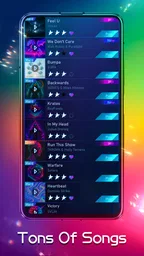
- A range of songs helps keep play varied.
What could be better
- Song selection may not suit players outside the EDM genre.
- Some tracks may require watching ads or unlocking them.
- Frequent visual effects can feel distracting.
- Timing can feel less precise on smaller screens.
- Progress may depend on replaying levels to earn rewards.







