Piano - Music Keyboard & Tiles review
 Analysis by Appsdrops
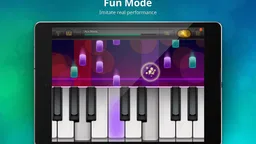
I like a music game best when I can pick it up for a few minutes without needing to tune an instrument or remember a lesson. Piano - Music Keyboard & Tiles is aimed at that quick, casual kind of play: it gives you a piano-themed way to tap along and enjoy music, rather than asking you to approach the keyboard like a formal practice tool. That distinction matters. I found it easier to recommend as a light game for curious fingers than as a route to learning piano technique.
Getting started without turning it into a project
The first thing I would check is whether your device can run the current release. The game’s current version is 1.75, and its minimum operating system is 10. If the app will not install or open, checking the device’s software version is a sensible first step; repeatedly tapping the icon is unlikely to solve an operating-system mismatch.
Once it opens, give yourself a moment to see how the controls respond before trying to chase a high score or play at speed. A touchscreen is not the same as a piano keyboard: your fingers cover part of the display, and a tap that feels obvious to you may land differently when you are rushing. I recommend starting with relaxed hands and a comfortable grip, then adjusting the way you hold the device if your fingers keep blocking the part of the screen you need to watch.
This is a music game from Gismart, and its appeal is the immediate connection between seeing a musical prompt and responding with a tap. It is free to download, so trying it does not require an upfront purchase. In-app purchases range from $1.49 to $89.99 per item, though, so I would look carefully at any purchase screen and make sure you understand what you are choosing before confirming it.
When a tap does not seem to register
If a note appears to be missed, I would first slow down and distinguish between a timing mistake and a touch problem. Watch one prompt at a time rather than trying to anticipate several at once. If accuracy improves when you concentrate on a single action, the issue may simply be that you were moving too quickly for the screen and your current grip.
Next, try playing with the device resting on a stable surface. That small change can make your taps more consistent and keeps the screen from shifting under your hands. It is especially useful if you are playing on a phone while walking or holding it one-handed: those situations make precise tapping harder, even when the app itself is behaving normally.
I would also avoid treating every missed input as a reason to reinstall. Close and reopen the game if it becomes unresponsive, and check that the device itself is responding normally to touch elsewhere. If other apps also ignore taps, the cause is more likely to be the device or its screen than this particular game. A restart can be a reasonable general troubleshooting step before you spend time changing settings.
Making a short session work better
For a quick break, I would keep the phone still, lower distractions, and focus on a short stretch of play rather than trying to make the game serve as a full piano lesson. That makes it easier to notice the rhythm of the prompts and to improve your timing. It also gives you a natural stopping point if your hands feel tense or you are no longer enjoying the challenge.
One useful habit is to change only one thing when a session feels awkward. If you are missing taps, first adjust your grip; if that does not help, try a quieter place where you can concentrate; if the whole game feels delayed, check whether the device is busy or behaving sluggishly in other tasks. Changing several things at once makes it difficult to tell what actually helped.
For a parent considering it for a child, the game has an Everyone content rating. I would still make the purchase situation clear before handing over a device, since optional in-app purchases are available. That is a practical precaution rather than a reason to avoid the game: a child can enjoy tapping through a music-themed game, but an adult should stay aware of purchase prompts and device settings.
What it is—and what it is not
The word “piano” can suggest a learning app, so I would set expectations carefully. This is best approached as an accessible, playful way to interact with piano-style music, not as a substitute for a real keyboard, structured lessons, or feedback from a teacher. Tapping on a screen does not build the same touch, posture, hand independence, or listening habits that deliberate instrument practice does.
Compared with a conventional piano-learning app, this game asks less of you before you can begin. That makes it more inviting when you want entertainment rather than a curriculum. The trade-off is that anyone seeking exercises, detailed technique guidance, or a dependable path through music theory should choose a dedicated learning resource instead. Compared with a physical keyboard, the touchscreen is portable and easy to access, but it cannot reproduce the feel of weighted keys.
It can still be a pleasant first step for someone who is curious about musical patterns but not ready to commit to lessons or equipment. I would use it to explore whether tapping along to music feels enjoyable, then move to a keyboard or a more structured tool if that interest grows. It is also a better fit for a few minutes of casual play than for a long, focused practice session.
When the problem may be outside the game
If the app will not load, check the basics before assuming the game is broken: confirm that the device meets the minimum operating-system requirement, make sure the phone or tablet has finished any pending restart, and reopen the app after closing it. If touch problems happen throughout the device, test the screen in another app. These simple checks help separate a game-specific hiccup from a broader device issue.
Sound trouble deserves the same calm approach. Check the device’s volume and silent or focus settings, then try audio in another app. If sound is missing everywhere, the problem is probably not unique to this piano game. If other audio works but the game does not, closing and reopening it is a reasonable next step. I would avoid changing unfamiliar system settings just to fix one short session.
Performance can also depend on the device and what else is running. If taps feel inconsistent, close other demanding apps and try again with the device stationary. Do not judge the game from a single session on a device that is already struggling. At the same time, if the game remains unresponsive after ordinary checks while everything else works, it may simply not be a good fit for that particular device or setup.
Who is likely to enjoy it
I would recommend it to someone who wants a low-commitment music game, likes quick touchscreen challenges, or wants a playful way to spend a spare moment. It has reached more than 100 million installs and has an average rating of 4.1 from around 1.3 million ratings, which suggests a broad audience has tried it; that popularity does not mean every player will enjoy the same style of interaction.
It may be less satisfying if your main goal is to learn songs on a real instrument, read sheet music, or build a regular practice routine. It is also not my first pick for someone who dislikes reacting quickly on a small screen. The screen-based format is central to the experience, so a larger display or a physical keyboard may be more comfortable for players who want space and a more instrument-like feel.
The game was released on June 5, 2014, and its Everyone rating makes it broadly approachable, but I would still think about the player’s expectations. A child looking for quick music-themed play may be happy with it; a beginner who expects careful instruction may need a different app. Knowing that difference before downloading prevents the most common disappointment: expecting a complete piano course from a casual game.
My practical verdict
Piano - Music Keyboard & Tiles makes sense when you want piano-flavored play that is easy to try and does not demand a formal commitment. I would begin with a steady device, check touch and audio if something feels off, and keep purchases in mind before letting a child play. Those small steps remove much of the avoidable setup friction without overcomplicating a simple game.
What we like
- The keyboard makes it easy to try notes without owning a piano.
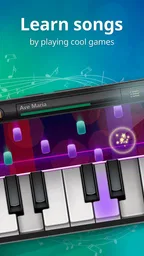
- Tile challenges add a game-like way to practice timing.
- A useful pick for casual music sessions on a phone.
- The touch controls are simple for first-time players.
- Short play sessions fit well into spare moments.
What could be better
- Small screens can make precise tapping difficult.
- Touch controls cannot fully reproduce piano key response.
- Tile gameplay may feel repetitive after extended play.
- Phone speakers may limit the quality of the sound.
- Frequent taps can be tiring during longer sessions.







