



Easy Go: Arrow Puzzle Games review
 Analysis by Appsdrops
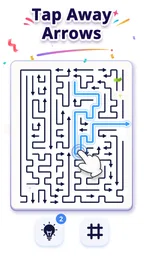
I like a puzzle that gives me a clear problem to think about without asking for a long session, and Easy Go: Arrow Puzzle Games is built around just that kind of moment. Its central idea is to tap arrows and work out how to clear them from the board. That sounds simple, but the satisfying part is deciding what to move first rather than tapping at random. For a first-time player, the best approach is to take a breath, look at how the arrows sit together, and treat each move as a small decision.
This is a casual puzzle game from Wood Puzzle Sudoku Games. It is free to download, rated for Everyone, and has an average rating of 4.8 from around 1.8K ratings, with over 100K installs. Those figures suggest it has found an audience, though they are not a guarantee that its style will suit everyone. I would describe it as a compact brain teaser, not a sprawling strategy game: it is most appealing when you want a focused puzzle and a quick sense of progress.
What the arrow puzzles ask of you
The aim is easy to grasp: tap arrows and clear them away. The challenge comes from deciding which arrow is safe to act on and how the arrangement affects the next choice. That makes the game more about observation and order than speed. I find that distinction useful for setting expectations: if you enjoy scanning a board for a workable sequence, the premise has immediate appeal; if you want action, a story, or a complex set of rules to master, this is probably not where you should spend your time.
In the first moments, I would avoid treating every visible arrow as an invitation to tap. Instead, trace the directions with your eyes and notice which moves seem to have room to resolve cleanly. Then make one deliberate move and inspect the board again. This simple pause helps turn the basic interaction into a puzzle-solving habit. It is also a good way to avoid the common beginner mistake of tapping quickly just because the controls look straightforward.
The game’s short, direct premise makes it suitable for small gaps in the day: waiting for a drink, taking a brief break between tasks, or settling in for a few quiet minutes before bed. The useful thing is that the puzzle asks for attention without demanding that you remember a long story or manage a collection of systems. I would choose it when I want a little mental engagement, not when I need a game to occupy a whole evening.
Start calmly and learn the board
Getting started should be reassuringly simple. The game is listed as version 0.0.10 and supports Android 7.0 or later. Once it is installed, I would begin by looking over the board before making the first tap. You do not need to invent a complicated strategy at the outset: identify the visible directions, choose a move that looks unobstructed, and use the result to understand how the puzzle responds.
That first successful action matters because it turns an abstract arrangement into feedback you can use. After an arrow clears, pause and reassess rather than continuing on autopilot. A move that seems obvious may open up a new choice, while another may make the remaining pattern harder to read. The practical lesson is to work in small cycles: observe, tap once, observe again. That rhythm is more reliable than trying to plan the entire board in one glance.
If you are playing on a phone while distracted, give the board a moment of undivided attention before tapping. A puzzle built around direction and placement is easy to misread when you are also checking messages or walking between rooms. I would save it for a stationary break, even if that break is brief. The game’s simple premise makes it approachable, but a little focus is what makes a successful move feel earned.
Where first-time players can get stuck
The most likely source of confusion is assuming that “tap an arrow” means “tap any arrow.” The point is to solve the arrangement, so a move should be considered in relation to the other arrows rather than as an isolated button press. When the board feels unclear, stop and follow the direction of each arrow visually. Look for the move that appears to have a clear path, make that one, and then reassess the changed layout. This is a more useful response to uncertainty than tapping several times in quick succession.
Another potential stumbling point is expecting a tutorial or a long explanation to do the thinking for you. The appeal here is the compact puzzle premise, and part of the learning happens as you test a considered move and see what changes. That can feel pleasantly immediate if you like figuring things out for yourself. If you prefer games that spell out every rule before presenting a challenge, this may feel too spare at first. I would give it a few careful attempts before deciding whether that simplicity is refreshing or not enough.
It is also worth being realistic about the kind of variety you are looking for. The central loop is arrow-focused, so anyone hoping for several unrelated puzzle modes, a narrative campaign, or elaborate progression should choose a broader game instead. Easy Go is best judged on whether this one small mechanic keeps your attention. Its strength is a clear premise; the corresponding trade-off is that the experience does not promise a wide menu of different activities.
How it fits beside other casual puzzles
Compared with familiar number puzzles such as Sudoku, this game asks you to read directions and relationships on a board rather than fill a grid according to number rules. Compared with match-style casual games, the satisfaction is less about making a colorful combination and more about finding a sensible order for clearing pieces. That makes it a good alternative when you want something puzzle-like but do not feel like counting candidates or chasing fast reactions.
On the other hand, Sudoku may be a better fit if you want a deeper logic challenge with a well-established set of constraints, while a word puzzle is a better choice if language is what you enjoy exercising. Easy Go sits in a narrower lane: it is for people who like a visual arrangement they can inspect and act on. I would not recommend it as a substitute for every kind of brain game. I would recommend trying it when the specific appeal is “show me a pattern, and let me work out the order.”
A useful way to make a session more satisfying is to focus on decision quality instead of speed. Before a tap, ask yourself what you expect that move to accomplish. After it, check whether the board confirms your guess. This turns even a brief play into a small exercise in reasoning, and it helps you notice whether the game’s core loop suits you. If you find yourself enjoying that process, the minimal setup is a benefit. If you want escalating layers of rules, the same minimalism may become a limitation.
Who should try it, and who may prefer something else
I would suggest Easy Go to casual players who enjoy visual logic, want a game that is easy to approach, and prefer short sessions that can fit around ordinary routines. It may also work well for someone who has tried number puzzles but wants a different kind of board-reading challenge. The Everyone content rating makes its intended audience broad, although the real question is whether you enjoy thinking through a sequence of taps.
I would steer away from it if your main priority is a substantial story, competitive play, fast reflexes, or a large variety of modes. It is also not the best pick if you dislike learning a puzzle by testing moves and observing the result. In those cases, a game with explicit tutorials, richer progression, or a different central mechanic will likely feel more rewarding. There is no need to force yourself to like a very focused puzzle just because its controls are simple.
The game is free, with in-app purchases listed at $9.99 per item. I would go in expecting to try the core experience without paying upfront, while keeping in mind that optional purchases may be present. If you are sensitive to spending inside games, it is sensible to check purchase prompts carefully and make sure they fit your preferences before confirming anything. That is a practical habit for any free-to-play title, not a reason to assume you need to buy something to enjoy the basic idea.
My next-step recommendation
For a first session, I would keep the goal modest: learn how an arrow responds, make one move you have thought through, and see whether the next decision becomes clearer. If it does, continue with the same observe-and-reassess rhythm. If the board feels more confusing after a move, slow down and trace the directions again rather than tapping faster. That small adjustment is the most useful first-time tip I can offer, because it puts the focus where this game’s premise puts it: on reading the arrangement.
Easy Go: Arrow Puzzle Games is a focused casual game from Wood Puzzle Sudoku Games, and its 4.8 average gives a new player a reason to take a look without making the choice automatic. I would try it for a quiet, visual brain teaser and judge it by whether solving one arrow arrangement makes me want to tackle another. The game is at its best when you want a clear, contained puzzle and are happy to think one move at a time. If you want a low-pressure way to practise careful observation, this is the kind of small game I would recommend trying.
What we like
- Simple controls make it easy to start playing.
- Short levels suit quick gaming sessions.
- Arrow mechanics offer a fresh twist on sliding puzzles.
- Visual cues help clarify the movement rules.
- The puzzle format rewards careful planning.
What could be better
- Later puzzles may feel repetitive.
- Some levels can be difficult without trial and error.
- The game may rely on ads for free access.
- Small arrows can be hard to distinguish on phones.
- Progress may feel slow for players seeking variety.







